- JMP will suspend normal business operations for our Winter Holiday beginning on Wednesday, Dec. 24, 2025, at 5:00 p.m. ET (2:00 p.m. ET for JMP Accounts Receivable).
Regular business hours will resume at 9:00 a.m. EST on Friday, Jan. 2, 2026. - We’re retiring the File Exchange at the end of this year. The JMP Marketplace is now your destination for add-ins and extensions.
- Subscribe to RSS Feed
- Mark Topic as New
- Mark Topic as Read
- Float this Topic for Current User
- Bookmark
- Subscribe
- Mute
- Printer Friendly Page
Discussions
Solve problems, and share tips and tricks with other JMP users.- JMP User Community
- :
- Discussions
- :
- hide empty groups in Tables / summary

- Mark as New
- Bookmark
- Subscribe
- Mute
- Subscribe to RSS Feed
- Get Direct Link
- Report Inappropriate Content
hide empty groups in Tables / summary
The new possibility to use a Data Filter in Tables/Summary is very useful. Thank for adding it :)
One of the simplest application cases: calculate the summary for some groups, e.g. mean height just for some selected ages.
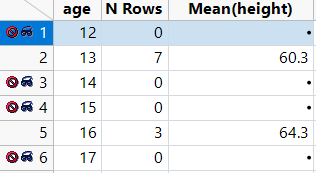
What hurts a bit: the excluded groups are still listed in the summary table, with 0 rows - and "missing" aggregated values.
I understand that the Data Filter in Tables/Summary is much more versatile than the simple application of: use exactly the column in the data filter which is also used as Group - to restrict the groups to some specific ones.
But this is a very nice application :)
Is there an option to hide/remove the filtered -> empty groups already when generating the summary.
easy workarounds:
- restrict the dataset by creating a subset (then one doesn't need the cool new Data Filter in tables/summary)
- select rows with N Rows = 0 and remove them
- select excluded rows and remove them


- Mark as New
- Bookmark
- Subscribe
- Mute
- Subscribe to RSS Feed
- Get Direct Link
- Report Inappropriate Content
Re: Tables / summary
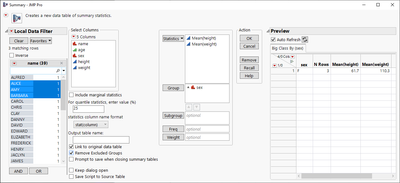
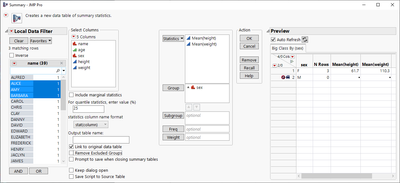
Maybe enabling "Remove Excluded Groups" in summary would work?
vs
- Mark as New
- Bookmark
- Subscribe
- Mute
- Subscribe to RSS Feed
- Get Direct Link
- Report Inappropriate Content
Re: Tables / summary
good idea ...:)
- Mark as New
- Bookmark
- Subscribe
- Mute
- Subscribe to RSS Feed
- Get Direct Link
- Report Inappropriate Content
Re: Tables / summary
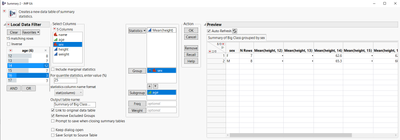
Unfortunately, the "Groups" in 
- Mark as New
- Bookmark
- Subscribe
- Mute
- Subscribe to RSS Feed
- Get Direct Link
- Report Inappropriate Content
Re: Tables / summary
submitted by @shampton82 as a subtopic of this wish:
https://community.jmp.com/t5/JMP-Wish-List/Handling-Hidden-Excluded-rows-columns-in-Table-handling/i...
Recommended Articles
- © 2026 JMP Statistical Discovery LLC. All Rights Reserved.
- Terms of Use
- Privacy Statement
- Contact Us