- Don’t miss your chance to experience Discovery Summit Europe at our best available rate! Early bird registration through 31 Oct.
- Graph Builder Toolbar streamlines interactive graphing. Creates shortcuts on Report and GraphBuilder Helpers toolbars. Download and install the extension.
- Subscribe to RSS Feed
- Mark Topic as New
- Mark Topic as Read
- Float this Topic for Current User
- Bookmark
- Subscribe
- Mute
- Printer Friendly Page
Discussions
Solve problems, and share tips and tricks with other JMP users.- User Community
- :
- Discussions
- :
- Re: dupliquer les cellules

- Mark as New
- Bookmark
- Subscribe
- Mute
- Subscribe to RSS Feed
- Get Direct Link
- Report Inappropriate Content
dupliquer les cellules
Bonjour à tous,
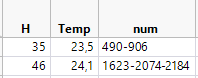
A la fin :
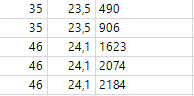
Accepted Solutions


- Mark as New
- Bookmark
- Subscribe
- Mute
- Subscribe to RSS Feed
- Get Direct Link
- Report Inappropriate Content
Re: dupliquer les cellules
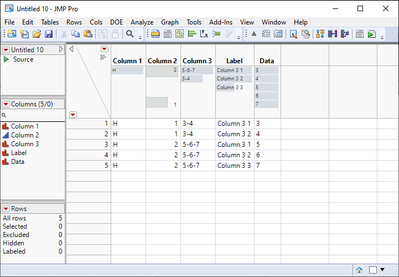
This should work, but I'm not 100% sure in all the cases
Starting table
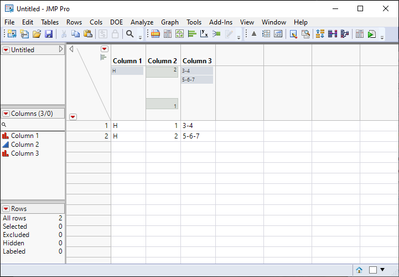
1. Select the column that has values you want to separate
2. With the column selected go to Cols/Utilities/Text to Columns...
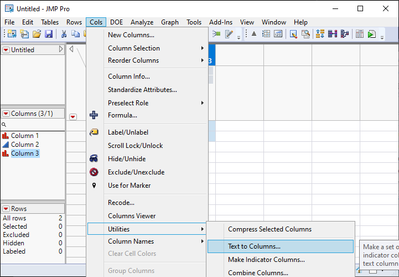
3. And use - as delimiter. Press OK
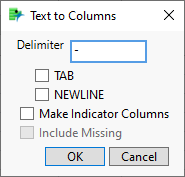
4. Go to Tables/Stack
5. Add your new columns to Stack Columns
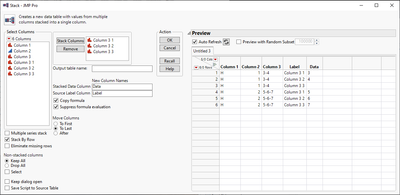
6. Try which settings fit best for your case and press OK
7. From your new table, select one empty value (if there are any) from your newly created data columns and choose Select Matching Cells
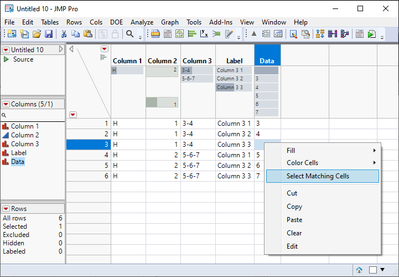
8. Right click on row selector and delete rows
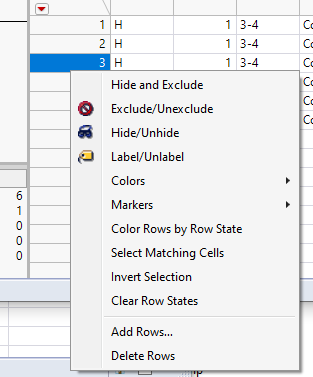
9. Delete and rename columns from your table
- Mark as New
- Bookmark
- Subscribe
- Mute
- Subscribe to RSS Feed
- Get Direct Link
- Report Inappropriate Content
Re: dupliquer les cellules
This should work, but I'm not 100% sure in all the cases
Starting table
1. Select the column that has values you want to separate
2. With the column selected go to Cols/Utilities/Text to Columns...
3. And use - as delimiter. Press OK
4. Go to Tables/Stack
5. Add your new columns to Stack Columns
6. Try which settings fit best for your case and press OK
7. From your new table, select one empty value (if there are any) from your newly created data columns and choose Select Matching Cells
8. Right click on row selector and delete rows
9. Delete and rename columns from your table
Recommended Articles
- © 2026 JMP Statistical Discovery LLC. All Rights Reserved.
- Terms of Use
- Privacy Statement
- Contact Us