- Don’t miss your chance to experience Discovery Summit Europe at our best available rate! Early bird registration through 31 Oct.
- Graph Builder Toolbar streamlines interactive graphing. Creates shortcuts on Report and GraphBuilder Helpers toolbars. Download and install the extension.
- JMP will suspend normal business operations for our Rest and Recharge Day on Friday, October 2, 2026.
Regular business hours will resume on Monday, October 5, 2026.
- Subscribe to RSS Feed
- Mark Topic as New
- Mark Topic as Read
- Float this Topic for Current User
- Bookmark
- Subscribe
- Mute
- Printer Friendly Page
Discussions
Solve problems, and share tips and tricks with other JMP users.- User Community
- :
- Discussions
- :
- How to delete hidden and excluded rows by JSL

- Mark as New
- Bookmark
- Subscribe
- Mute
- Subscribe to RSS Feed
- Get Direct Link
- Report Inappropriate Content
How to delete hidden and excluded rows by JSL
Hello
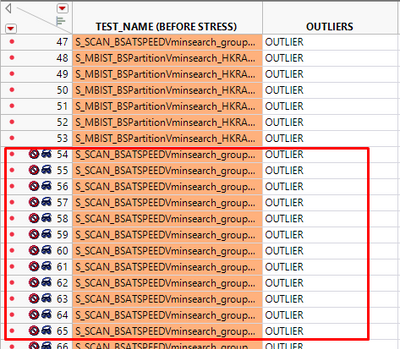
I have a table, and some of the rows are hidden and excluded
I would like to delete them by JSL script
I tried this script, but nothing happened,
dt << Select Where (:Excluded == 1 | :Hidden == 1);
dt << Delete Rows ( );
Can you provide me a solution, please?
Accepted Solutions


- Mark as New
- Bookmark
- Subscribe
- Mute
- Subscribe to RSS Feed
- Get Direct Link
- Report Inappropriate Content
Re: How to delete hidden and excluded rows by JSL
Excluded and Hidden aren't columns so you cannot refer to them with :Hidden and :Excluded. You can use functions though
Names Default To Here(1);

dt = Current Data Table();
dt << Select Where(Hidden() | Excluded()) << Delete Rows;
Edit:
One thing to note here is that this is checking for either hidden OR excluded not for both. If you want to check for both, you should use and operator (&).
dt << Select Where(Hidden() & Excluded()) << Delete Rows;- Mark as New
- Bookmark
- Subscribe
- Mute
- Subscribe to RSS Feed
- Get Direct Link
- Report Inappropriate Content
Re: How to delete hidden and excluded rows by JSL
Excluded and Hidden aren't columns so you cannot refer to them with :Hidden and :Excluded. You can use functions though
Names Default To Here(1);

dt = Current Data Table();
dt << Select Where(Hidden() | Excluded()) << Delete Rows;
Edit:
One thing to note here is that this is checking for either hidden OR excluded not for both. If you want to check for both, you should use and operator (&).
dt << Select Where(Hidden() & Excluded()) << Delete Rows;Recommended Articles
- © 2026 JMP Statistical Discovery LLC. All Rights Reserved.
- Terms of Use
- Privacy Statement
- Contact Us