cancel
Showing results for 
Show  only  | Search instead for 
Did you mean: 
  • JMP will suspend normal business operations for our Winter Holiday beginning on Wednesday, Dec. 24, 2025, at 5:00 p.m. ET (2:00 p.m. ET for JMP Accounts Receivable).
    Regular business hours will resume at 9:00 a.m. EST on Friday, Jan. 2, 2026.
  • We’re retiring the File Exchange at the end of this year. The JMP Marketplace is now your destination for add-ins and extensions.

Discussions

Solve problems, and share tips and tricks with other JMP users.
%3CLINGO-SUB%20id%3D%22lingo-sub-372366%22%20slang%3D%22en-US%22%20mode%3D%22NONE%22%3Emostrar%20ejes%20x%20en%20gr%C3%A1ficos%20de%20varios%20paneles%3C%2FLINGO-SUB%3E%3CLINGO-BODY%20id%3D%22lingo-body-372366%22%20slang%3D%22en-US%22%20mode%3D%22NONE%22%3E%3CP%3ECre%C3%A9%20un%20gr%C3%A1fico%20multipanel%20de%20dos%20variables%20(SNA%20versus%20temperatura%20del%20suelo)%20donde%20divid%C3%AD%20los%20datos%20en%204%20clases%20en%20funci%C3%B3n%20de%20otra%20variable%20(humedad%20del%20suelo).%20La%20columna%20de%20datos%20de%20humedad%20del%20suelo%20se%20arrastr%C3%B3%20al%20%C3%A1rea%20%22Envolver%22%20en%20Graph%20Builder.%20Al%20editor%20de%20la%20revista%20que%20soy%20le%20gustar%C3%ADa%20ver%20ejes%20x%20en%20los%202%20paneles%20superiores.%20%C2%BFHay%20alguna%20forma%20de%20mostrar%20los%20ejes%20completos%20(marcas%20de%20graduaci%C3%B3n%20y%20n%C3%BAmeros)%20o%20solo%20las%20marcas%20de%20graduaci%C3%B3n%20en%20el%20interior%20del%20%C3%A1rea%20del%20gr%C3%A1fico%3F%20Puedo%20manipular%20la%20pantalla%20en%20la%20parte%20inferior%20de%20los%20gr%C3%A1ficos%2C%20pero%20no%20en%20los%20paneles%20superiores.%20%26nbsp%3B%3C%2FP%3E%3CP%3E%26nbsp%3B%3C%2FP%3E%3CP%3E%3CSPAN%20class%3D%22lia-inline-image-display-wrapper%20lia-image-align-inline%22%20image-alt%3D%22JohnMarkham_0-1617037754032.png%22%20style%3D%22width%3A%20400px%3B%22%3E%3Cspan%20class%3D%22lia-inline-image-display-wrapper%22%20image-alt%3D%22JohnMarkham_0-1617037754032.png%22%20style%3D%22width%3A%20400px%3B%22%3E%3Cimg%20src%3D%22https%3A%2F%2Fcommunity.jmp.com%2Ft5%2Fimage%2Fserverpage%2Fimage-id%2F31629iD6116BBF107DAC22%2Fimage-size%2Fmedium%3Fv%3Dv2%26amp%3Bpx%3D400%22%20role%3D%22button%22%20title%3D%22JohnMarkham_0-1617037754032.png%22%20alt%3D%22JohnMarkham_0-1617037754032.png%22%20%2F%3E%3C%2Fspan%3E%3C%2FSPAN%3E%3C%2FP%3E%3CP%3E%26nbsp%3B%3C%2FP%3E%3C%2FLINGO-BODY%3E%3CLINGO-LABS%20id%3D%22lingo-labs-372366%22%20slang%3D%22en-US%22%20mode%3D%22NONE%22%3E%3CLINGO-LABEL%3EGr%C3%A1ficos%3C%2FLINGO-LABEL%3E%3C%2FLINGO-LABS%3E%3CLINGO-SUB%20id%3D%22lingo-sub-373075%22%20slang%3D%22en-US%22%20mode%3D%22NONE%22%3ERe%3A%20mostrar%20ejes%20x%20en%20gr%C3%A1ficos%20de%20paneles%20m%C3%BAltiples%3C%2FLINGO-SUB%3E%3CLINGO-BODY%20id%3D%22lingo-body-373075%22%20slang%3D%22en-US%22%20mode%3D%22NONE%22%3E%3CP%3E%C2%BFLe%20funcionar%C3%ADa%20usar%20l%C3%ADneas%20de%20cuadr%C3%ADcula%3F%20Puede%20hacer%20doble%20clic%20en%20uno%20o%20en%20ambos%20ejes%20para%20editar%20y%20mostrar%20%2F%20ocultar%20las%20l%C3%ADneas%20de%20cuadr%C3%ADcula%20mayores%20y%20menores.%3C%2FP%3E%0A%3CP%3E%26nbsp%3B%3C%2FP%3E%0A%3CP%3E%3CSPAN%20class%3D%22lia-inline-image-display-wrapper%20lia-image-align-inline%22%20image-alt%3D%22brady_brady_0-1617210894909.png%22%20style%3D%22width%3A%20400px%3B%22%3E%3Cspan%20class%3D%22lia-inline-image-display-wrapper%22%20image-alt%3D%22brady_brady_0-1617210894909.png%22%20style%3D%22width%3A%20400px%3B%22%3E%3Cimg%20src%3D%22https%3A%2F%2Fcommunity.jmp.com%2Ft5%2Fimage%2Fserverpage%2Fimage-id%2F31764i09451BC881244A3B%2Fimage-size%2Fmedium%3Fv%3Dv2%26amp%3Bpx%3D400%22%20role%3D%22button%22%20title%3D%22brady_brady_0-1617210894909.png%22%20alt%3D%22brady_brady_0-1617210894909.png%22%20%2F%3E%3C%2Fspan%3E%3C%2FSPAN%3E%3C%2FP%3E%0A%3CP%3E%26nbsp%3B%3C%2FP%3E%3C%2FLINGO-BODY%3E
Choose Language Hide Translation Bar
JohnMarkham
Level II

displaying x axes in multi panel graphs

I've created a multipanel graph of two variables (SNA versus soil temperature) where I've divided the data in 4 classes based on another variable (soil moisture). The soil moisture data column was dragged into the "Wrap" area in Graph Builder. The journal editor I am would like to see x axes on the upper 2 panels.  Is there a way to display the full axes (tick marks and numbers) or just the tick marks to the inside of the graph area?  I can manipulate the display on the bottom of the graphs but not the top panels.  
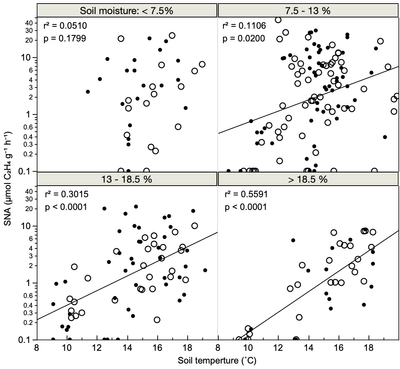
 

JohnMarkham_0-1617037754032.png


2 REPLIES 2

Re: displaying x axes in multi panel graphs

Would it work for you to use grid lines? You can double-click on either or both of the axes to edit and show/ hide major and minor grid lines.


brady_brady_0-1617210894909.png


JohnMarkham
Level II

Re: displaying x axes in multi panel graphs

Hadn't thought of that. Thanks. 

Recommended Articles