- JMP will suspend normal business operations for our Winter Holiday beginning on Wednesday, Dec. 24, 2025, at 5:00 p.m. ET (2:00 p.m. ET for JMP Accounts Receivable).
Regular business hours will resume at 9:00 a.m. EST on Friday, Jan. 2, 2026. - We’re retiring the File Exchange at the end of this year. The JMP Marketplace is now your destination for add-ins and extensions.
- Subscribe to RSS Feed
- Mark Topic as New
- Mark Topic as Read
- Float this Topic for Current User
- Bookmark
- Subscribe
- Mute
- Printer Friendly Page
Discussions
Solve problems, and share tips and tricks with other JMP users.- JMP User Community
- :
- Discussions
- :
- copy value to multiple dropdown boxes

- Mark as New
- Bookmark
- Subscribe
- Mute
- Subscribe to RSS Feed
- Get Direct Link
- Report Inappropriate Content
copy value to multiple dropdown boxes
Hi,
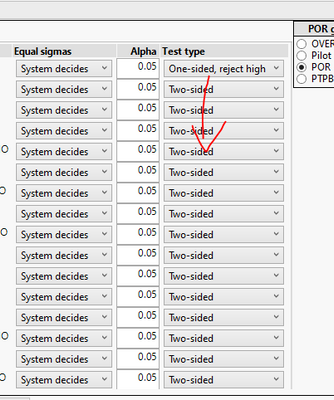
i am performing this action too many times to not know how to copy selection from first row to the rest, can you advice?
Accepted Solutions


- Mark as New
- Bookmark
- Subscribe
- Mute
- Subscribe to RSS Feed
- Get Direct Link
- Report Inappropriate Content
Re: copy value to multiple dropdown boxes
Ah... you want to have same selection in all of the combo boxes as in first one? No idea if you can do it without scripting (if this is a JMP platform it might have button to change values, if custom script someone would have to script it somehow).
- Mark as New
- Bookmark
- Subscribe
- Mute
- Subscribe to RSS Feed
- Get Direct Link
- Report Inappropriate Content
Re: copy value to multiple dropdown boxes
I guess you have Table Box() with Col Box filled with Combo Boxes. Below are some ideas you could try:
Names Default To Here(1);

nw = New Window("",
	tb = Table Box(
		cb = Col Box("select",
			Combo Box({"a", "b", "c"}),
			Combo Box({"a", "b", "c"}),
			Combo Box({"a", "b", "c"}),
			Combo Box({"a", "b", "c"}),
			Combo Box({"a", "b", "c"})
		)
	)
);

cb << Get; //won't work as it returns list with empty values
cb << Get Text; // could use this and parse result
cb[1] << get selected; // this should work, so you could loop over elements or get references to a list
(cb << XPath("//ComboBox")) << get selected; // my preferred method use XPath to get references and then << get selected for values- Mark as New
- Bookmark
- Subscribe
- Mute
- Subscribe to RSS Feed
- Get Direct Link
- Report Inappropriate Content
Re: copy value to multiple dropdown boxes
Hi, thanks, any solution for non-developers? :)
(not working with code unless i will have to :) )
- Mark as New
- Bookmark
- Subscribe
- Mute
- Subscribe to RSS Feed
- Get Direct Link
- Report Inappropriate Content
Re: copy value to multiple dropdown boxes
Ah... you want to have same selection in all of the combo boxes as in first one? No idea if you can do it without scripting (if this is a JMP platform it might have button to change values, if custom script someone would have to script it somehow).
Recommended Articles
- © 2025 JMP Statistical Discovery LLC. All Rights Reserved.
- Terms of Use
- Privacy Statement
- Contact Us