- Don’t miss your chance to experience Discovery Summit Europe at our best available rate! Early bird registration through 31 Oct.
- Graph Builder Toolbar streamlines interactive graphing. Creates shortcuts on Report and GraphBuilder Helpers toolbars. Download and install the extension.
- Subscribe to RSS Feed
- Mark Topic as New
- Mark Topic as Read
- Float this Topic for Current User
- Bookmark
- Subscribe
- Mute
- Printer Friendly Page
Discussions
Solve problems, and share tips and tricks with other JMP users.- User Community
- :
- Discussions
- :
- change size axis increments based on time

- Mark as New
- Bookmark
- Subscribe
- Mute
- Subscribe to RSS Feed
- Get Direct Link
- Report Inappropriate Content
change size axis increments based on time
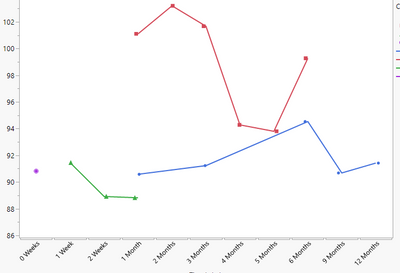
I am plotting data over time using an uneven spread of intervals (1 week, 2 weeks, 1 month, 6 months, etc). I would like to make it so the increments on the x axis are sized proportionally to the amount of time; 0-1 weeks, 1-2 weeks being the smallest and 6-9 months, 9-12 months being the largest.
Accepted Solutions


- Mark as New
- Bookmark
- Subscribe
- Mute
- Subscribe to RSS Feed
- Get Direct Link
- Report Inappropriate Content
Re: change size axis increments based on time
Hi,
That's odd.
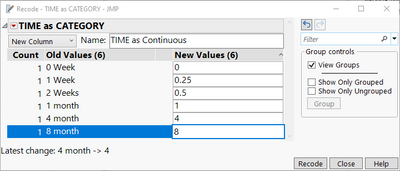
Here are a couple of screen captures to show you the steps:
How the recode dialog should look like before any changes:
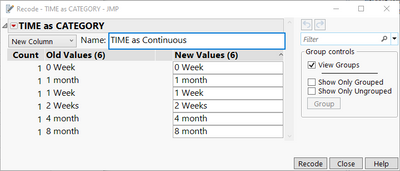
Recode dialog with new values updated
Finally, in the Column Info window, how the Data type and Modeling type should look like:
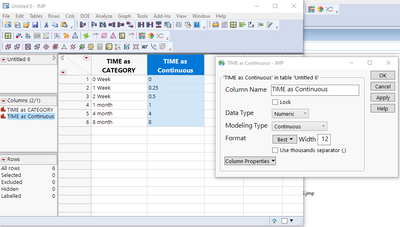
Let me know if that does not work either.
Best
TS
- Mark as New
- Bookmark
- Subscribe
- Mute
- Subscribe to RSS Feed
- Get Direct Link
- Report Inappropriate Content
Re: change size axis increments based on time
Hi, One the simplest method is to create a new X column with the duration as continuous values on a scale of weeks or months whichever is more appropriate to your application.
I would recommend using the Recode function based on your original X values, then change the data type to Numerical and modelling as Continuous.
Best,
TS
- Mark as New
- Bookmark
- Subscribe
- Mute
- Subscribe to RSS Feed
- Get Direct Link
- Report Inappropriate Content
Re: change size axis increments based on time
Hi Thierry,
As a new JMP user I don't have the full knowledge about the recode feature. I have attempted recoding the column to something such where 1 week=0.25 months, 2=0.5 months and then months as whole numbers. Then once i change the modeling type to continuous and try graphing, the 2 fractional x values appear after 12 months so it reads 1-12, 0.25, 0.5. Maybe this isn't what you suggested, but could you give me a little more direction on the recode?
Thanks
- Mark as New
- Bookmark
- Subscribe
- Mute
- Subscribe to RSS Feed
- Get Direct Link
- Report Inappropriate Content
Re: change size axis increments based on time
Hi,
That's odd.
Here are a couple of screen captures to show you the steps:
How the recode dialog should look like before any changes:
Recode dialog with new values updated
Finally, in the Column Info window, how the Data type and Modeling type should look like:
Let me know if that does not work either.
Best
TS
- Mark as New
- Bookmark
- Subscribe
- Mute
- Subscribe to RSS Feed
- Get Direct Link
- Report Inappropriate Content
Re: change size axis increments based on time
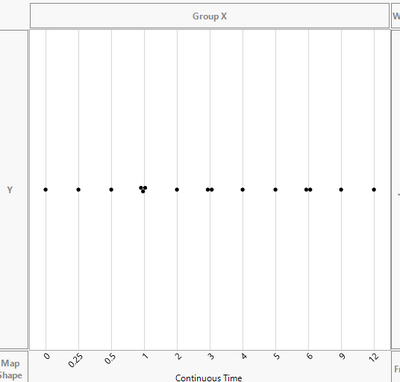
Thank you that did fix the issue with the axis order. Was there a way to distort the axis values themselves so that the time is misinterpreted? Such as the gap between 5 and 6 is the same as 6 and 9 although the time between the two is significantly different. I have included grid lines here, but I mean to pinch the 0 and 0.25 values closer together along the x axis and stretch the 9 and 12 to more accurately show the time spread. Maybe this isnt possible in JMP?
- Mark as New
- Bookmark
- Subscribe
- Mute
- Subscribe to RSS Feed
- Get Direct Link
- Report Inappropriate Content
Re: change size axis increments based on time
Hi,
I'm not sure what you are doing but it seems that the Modeling Type of your X column (i.e., Continuous Time) is still incorrect: from the image you shared it still looks like it is Ordinal or Categorical, it should be Continuous.
Best,
TS
- Mark as New
- Bookmark
- Subscribe
- Mute
- Subscribe to RSS Feed
- Get Direct Link
- Report Inappropriate Content
Re: change size axis increments based on time
I have solved the issue after going back through it again. Thank you for your help!
Recommended Articles
- © 2026 JMP Statistical Discovery LLC. All Rights Reserved.
- Terms of Use
- Privacy Statement
- Contact Us