- JMP will suspend normal business operations for our Winter Holiday beginning on Wednesday, Dec. 24, 2025, at 5:00 p.m. ET (2:00 p.m. ET for JMP Accounts Receivable).
Regular business hours will resume at 9:00 a.m. EST on Friday, Jan. 2, 2026. - We’re retiring the File Exchange at the end of this year. The JMP Marketplace is now your destination for add-ins and extensions.
- Subscribe to RSS Feed
- Mark Topic as New
- Mark Topic as Read
- Float this Topic for Current User
- Bookmark
- Subscribe
- Mute
- Printer Friendly Page
Discussions
Solve problems, and share tips and tricks with other JMP users.- JMP User Community
- :
- Discussions
- :
- box plot basics

- Mark as New
- Bookmark
- Subscribe
- Mute
- Subscribe to RSS Feed
- Get Direct Link
- Report Inappropriate Content
box plot basics
Hello,
My data table has several columns of the same data type (but different test runs). The reason for not having the same data always in the same column is that I would like to be able to create new columns (e.g. "change from run1 to run2" = run2 - run1) and also plot those in graph builder. The number of columns of similar data type is dynamic (because the user can select how many runs to compare).
I would like to have the option to create a box plot based on the data coming from several columns. Is this possible? If so, how?
If I add another variable to the y-axis, an additional box lot is created and the data is not merged.
Any suggestion for workaround in my workflow is also highly appreciated.
Thank you!
Cheers,
Alex


- Mark as New
- Bookmark
- Subscribe
- Mute
- Subscribe to RSS Feed
- Get Direct Link
- Report Inappropriate Content
Re: box plot basics
What you need to do is to simply create a new data table where the columns you want to combine are stacked into a new column. To do this, use
Tables==>Stack
- Mark as New
- Bookmark
- Subscribe
- Mute
- Subscribe to RSS Feed
- Get Direct Link
- Report Inappropriate Content
Re: box plot basics
I think I have done a poor job trying to explain what I would like to achieve.
I would like to build a graph that has the lines for the different columns and within the same graph builder instance another below that contains the box plot (derived out of the combined data of the columns).
With your approach (nice solution by the way, I was not familiar with the stack command), I can do either or but not both at the same time because either I have the data separated (-> line plots ok, no box plot) or combined (box plot ok, no line plots).
Any other idea?
Thank you for your help!
- Mark as New
- Bookmark
- Subscribe
- Mute
- Subscribe to RSS Feed
- Get Direct Link
- Report Inappropriate Content
Re: box plot basics
I do not see a way to do what you want within one Graph Builder instance. However, if I had the requirement to do what you want, JMP, using a script, could produce the 2 graphs you want, and then take the parts from the graphs and bring then together into a final display.
maybe another user has a better insight on how to use a single Graph Builder to do what you want?


- Mark as New
- Bookmark
- Subscribe
- Mute
- Subscribe to RSS Feed
- Get Direct Link
- Report Inappropriate Content
Re: box plot basics
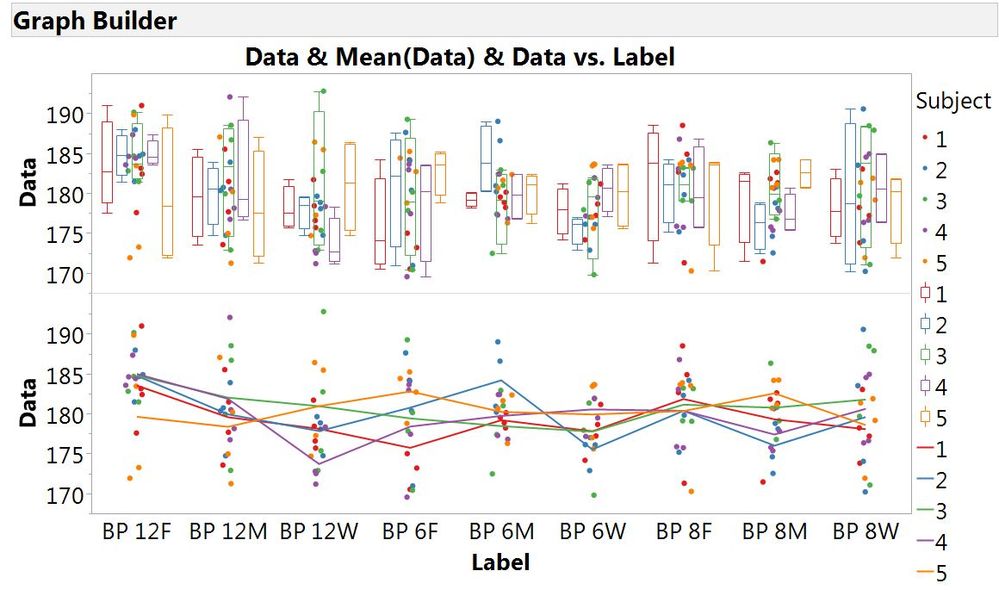
Is the image below close to what you are trying to achieve?
- Mark as New
- Bookmark
- Subscribe
- Mute
- Subscribe to RSS Feed
- Get Direct Link
- Report Inappropriate Content
Re: box plot basics
Per label I have only a single data item per subject, you seem to have multiple (but I guess this is not a problem).
What could be a problem is the following:
My assumption is that the box plots in the upper part of your plot only consider data from a single label and a single subject.
I would like to have a single box plot for a label that merges the data of all subjects.
Recommended Articles
- © 2025 JMP Statistical Discovery LLC. All Rights Reserved.
- Terms of Use
- Privacy Statement
- Contact Us