- JMP will suspend normal business operations for our Winter Holiday beginning on Wednesday, Dec. 24, 2025, at 5:00 p.m. ET (2:00 p.m. ET for JMP Accounts Receivable).
Regular business hours will resume at 9:00 a.m. EST on Friday, Jan. 2, 2026. - We’re retiring the File Exchange at the end of this year. The JMP Marketplace is now your destination for add-ins and extensions.
- Subscribe to RSS Feed
- Mark Topic as New
- Mark Topic as Read
- Float this Topic for Current User
- Bookmark
- Subscribe
- Mute
- Printer Friendly Page
Discussions
Solve problems, and share tips and tricks with other JMP users.- JMP User Community
- :
- Discussions
- :
- add button dynamically in the same row

- Mark as New
- Bookmark
- Subscribe
- Mute
- Subscribe to RSS Feed
- Get Direct Link
- Report Inappropriate Content
add button dynamically in the same row
Hello,
basically I have a data table that I create a report with it and then I'm trying to add buttons to it dynamically in the same row, but the buttons go under the table
this is what i get

what i would like is "button #1" to be after "number 2" in the end of the table
myPlatform = New Window( "name",
	H List Box(
		V List Box( bb = Col Box( "buttons" ), );
		V List Box( myDispObj = dtSum << getAsReport );
	)
);

rowList = myDispObj[Number Col Box( 1 )] << Get As Matrix;
rowList = As List( rowList );

bblist = {};
For( i = 1, i <= N Items( rowList ), i++,
	bb_expr = Eval Insert( "\[bblist[i] = buttonbox("Button #" || char(i), doSomething(^i^))]\" );
	Eval( Parse( bb_expr ) );
	myPlatform << append( bblist[i] );
);Accepted Solutions

- Mark as New
- Bookmark
- Subscribe
- Mute
- Subscribe to RSS Feed
- Get Direct Link
- Report Inappropriate Content
Re: add button dynamically in the same row
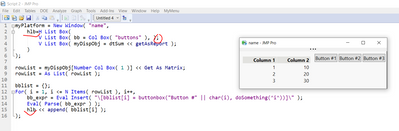
You need to append the buttons to the H List Box,
and btw the elements of the H List Box need to be separated by colons ",".
BR


- Mark as New
- Bookmark
- Subscribe
- Mute
- Subscribe to RSS Feed
- Get Direct Link
- Report Inappropriate Content
Re: add button dynamically in the same row
This example shows another approach that gives you more control.
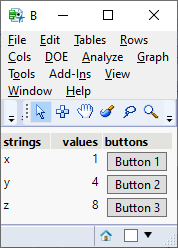
Adapted from example given in the Scripting Index entry for Display Boxes > Col Box:
Names Default To Here( 1 );

New Window( "Button in Row",
	exx = 1;
	exy = 4;
	exz = 8;
	Table Box(
		String Col Box( "strings", {"x", "y", "z"} ),
		Number Col Box( "values", {exx, exy, exz} ),
		Col Box(
			"buttons",
			Button Box( "Button 1" ),
			Button Box( "Button 2" ),
			Button Box( "Button 3" )
		)
	);
);
- Mark as New
- Bookmark
- Subscribe
- Mute
- Subscribe to RSS Feed
- Get Direct Link
- Report Inappropriate Content
Re: add button dynamically in the same row
You need to append the buttons to the H List Box,
and btw the elements of the H List Box need to be separated by colons ",".
BR
- Mark as New
- Bookmark
- Subscribe
- Mute
- Subscribe to RSS Feed
- Get Direct Link
- Report Inappropriate Content
Re: add button dynamically in the same row
This example shows another approach that gives you more control.
Adapted from example given in the Scripting Index entry for Display Boxes > Col Box:
Names Default To Here( 1 );

New Window( "Button in Row",
	exx = 1;
	exy = 4;
	exz = 8;
	Table Box(
		String Col Box( "strings", {"x", "y", "z"} ),
		Number Col Box( "values", {exx, exy, exz} ),
		Col Box(
			"buttons",
			Button Box( "Button 1" ),
			Button Box( "Button 2" ),
			Button Box( "Button 3" )
		)
	);
);
Recommended Articles
- © 2025 JMP Statistical Discovery LLC. All Rights Reserved.
- Terms of Use
- Privacy Statement
- Contact Us