- JMP will suspend normal business operations for our Winter Holiday beginning on Wednesday, Dec. 24, 2025, at 5:00 p.m. ET (2:00 p.m. ET for JMP Accounts Receivable).
Regular business hours will resume at 9:00 a.m. EST on Friday, Jan. 2, 2026. - We’re retiring the File Exchange at the end of this year. The JMP Marketplace is now your destination for add-ins and extensions.
- Subscribe to RSS Feed
- Mark Topic as New
- Mark Topic as Read
- Float this Topic for Current User
- Bookmark
- Subscribe
- Mute
- Printer Friendly Page
Discussions
Solve problems, and share tips and tricks with other JMP users.- JMP User Community
- :
- Discussions
- :
- Why does JMP Not calculate STDEV correct

- Mark as New
- Bookmark
- Subscribe
- Mute
- Subscribe to RSS Feed
- Get Direct Link
- Report Inappropriate Content
Why does JMP Not calculate STDEV correct
JMP is over estimating the STDEV. In R/Excel this number is less than the mean. Why is JMP calculating these over estimations?



- Mark as New
- Bookmark
- Subscribe
- Mute
- Subscribe to RSS Feed
- Get Direct Link
- Report Inappropriate Content
Re: Why does JMP Not calculate STDEV correct
I think you will need to provide more details. JMP does indeed correctly calculate a standard deviation. So, a few questions:
* What version of JMP are you using?
* Can you share some of your data, even if it is anonymized? You may have your data formatted in an unusual way.
* How much data do you have for each of these categories?
* Have you verified these exact same calculations with this exact same data in R or Excel?
Remember that there is no requirement that a standard deviation be less than a mean. For skewed distributions, the standard deviation could certainly be larger than the mean.
- Mark as New
- Bookmark
- Subscribe
- Mute
- Subscribe to RSS Feed
- Get Direct Link
- Report Inappropriate Content
Re: Why does JMP Not calculate STDEV correct
Using JMP 16 Pro.
I've attached some data where you can calculate the standard deviation per the 3 factors above (Gender, Age, Ethnicity) for each Congener. You'll notice that this calculation will indeed deviate if you run it with R. Even when analyzing these distributions or doing a normalization technique (log normalization), you'll note that the standard deviations are still completely off.
Attached is the data and a summary table I generated in R. JMP cannot replicate these calculations.


- Mark as New
- Bookmark
- Subscribe
- Mute
- Subscribe to RSS Feed
- Get Direct Link
- Report Inappropriate Content
Re: Why does JMP Not calculate STDEV correct
Are you using a script like this?
Data Table( "NHANES 2003-2004" ) << Summary(
    Group( :Gender, :Age, :Ethnicity, :Congener ),
    Mean( :Lipid Weight ),
    Std Dev( :Lipid Weight ),
    Freq( "None" ),
    Weight( "None" )
)
The largest difference seems to agree to the resolution of the CSV numbers.

- Mark as New
- Bookmark
- Subscribe
- Mute
- Subscribe to RSS Feed
- Get Direct Link
- Report Inappropriate Content
Re: Why does JMP Not calculate STDEV correct
Dear @MikeDereviankin ,
I cannot reproduce the problem.
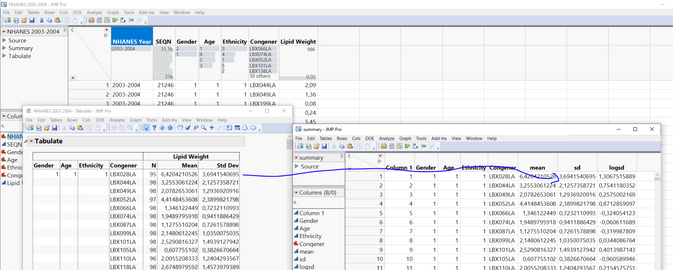
When importing your data into JMP (JMP Pro 16.1, Win10), I get exactly the same numbers (see Tabulate left) than you posted in your Summary (Summary Table right).
Perhaps there is an issue with importing the data?
- Mark as New
- Bookmark
- Subscribe
- Mute
- Subscribe to RSS Feed
- Get Direct Link
- Report Inappropriate Content
Re: Why does JMP Not calculate STDEV correct
The CSV data is helpful, but the issue could be how you have your JMP table formatted. Could you attach your JMP file??


- Mark as New
- Bookmark
- Subscribe
- Mute
- Subscribe to RSS Feed
- Get Direct Link
- Report Inappropriate Content
Re: Why does JMP Not calculate STDEV correct
Change Gender Age and Ethnicity to Nominal (not continuous)
I ran tabulate just like you did in your first post, and made a data table from it.
Then I used tables>compare on my table and your summary.csv
The tables are identical
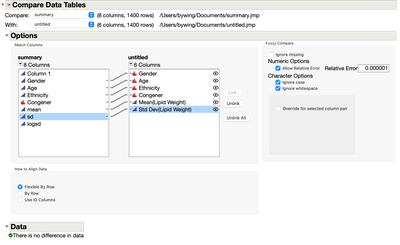
coding data correctly is very important
Recommended Articles
- © 2025 JMP Statistical Discovery LLC. All Rights Reserved.
- Terms of Use
- Privacy Statement
- Contact Us