- JMP will suspend normal business operations for our Winter Holiday beginning on Wednesday, Dec. 24, 2025, at 5:00 p.m. ET (2:00 p.m. ET for JMP Accounts Receivable).
Regular business hours will resume at 9:00 a.m. EST on Friday, Jan. 2, 2026. - We’re retiring the File Exchange at the end of this year. The JMP Marketplace is now your destination for add-ins and extensions.
- Subscribe to RSS Feed
- Mark Topic as New
- Mark Topic as Read
- Float this Topic for Current User
- Bookmark
- Subscribe
- Mute
- Printer Friendly Page
Discussions
Solve problems, and share tips and tricks with other JMP users.- JMP User Community
- :
- Discussions
- :
- Vertical alignment in Lineup Box

- Mark as New
- Bookmark
- Subscribe
- Mute
- Subscribe to RSS Feed
- Get Direct Link
- Report Inappropriate Content
Vertical alignment in Lineup Box
Hi,
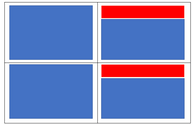
If I add some display boxes (blue color in the attached image) to a lineup box with two cols,
and the right display box is lower than the left, I get this empty gaps (red color in the attached image).
What is the way to align the children of the lineup to Top?
Thanks
.
Accepted Solutions

- Mark as New
- Bookmark
- Subscribe
- Mute
- Subscribe to RSS Feed
- Get Direct Link
- Report Inappropriate Content
Re: Vertical alignment in Lineup Box
Does this give the behaviour you would like?
Names Default To Here( 1 );
Open( "$SAMPLE_DATA/Big Class.jmp" );

New Window( "Spacing",
	Lineup Box( N Col( 2 ), Spacing(0),
		v = Variability Chart( Y( :height ), X( :age, :sex ), Std Dev Chart( 0 ) ),
		d = Distribution(
				Continuous Distribution(
					Column( :height ),Quantiles( 0 ),Summary Statistics( 0 ),
					Horizontal Layout( 1 ),Vertical( 0 ),Outlier Box Plot( 0 )
				)
			)
	);
);
Wait(2);
Report(v) << verticalAlignment(Top);
Report(d) << verticalAlignment(Top);

- Mark as New
- Bookmark
- Subscribe
- Mute
- Subscribe to RSS Feed
- Get Direct Link
- Report Inappropriate Content
Re: Vertical alignment in Lineup Box
The right side could by another V List Box() that includes the actual display box you want to show followed by a spacer box.
Names Default to Here( 1 );

New Window( "Spacing",
	Line Up Box( N Col( 2 ),
		Outline Box( "one",
			Table Box(
				String Col Box( "Stuff 1", { "1", "2", "3" } )
			)
		),
		V List Box(
			Outline Box( "two",
				Table Box(
					String Col Box( "Stuff 1", { "1", "2" } )
				)
			),
			Spacer Box()
		)
	)
);

- Mark as New
- Bookmark
- Subscribe
- Mute
- Subscribe to RSS Feed
- Get Direct Link
- Report Inappropriate Content
Re: Vertical alignment in Lineup Box
- Mark as New
- Bookmark
- Subscribe
- Mute
- Subscribe to RSS Feed
- Get Direct Link
- Report Inappropriate Content
Re: Vertical alignment in Lineup Box
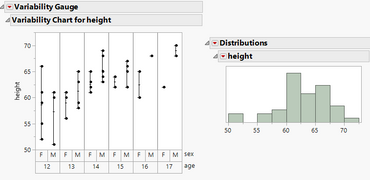
Thank you to you both.
Unfortunatly, doesnt work for me.
Attached image and script.
I am using JMP Pro 15.1
Names Default To Here( 1 );
Open( "$SAMPLE_DATA/Big Class.jmp" );

New Window( "Spacing",
	Lineup Box( N Col( 2 ), Spacing(0),
		Variability Chart( Y( :height ), X( :age, :sex ), Std Dev Chart( 0 ) ),
		V List Box(
			Distribution(
				Continuous Distribution(
					Column( :height ),Quantiles( 0 ),Summary Statistics( 0 ),
					Horizontal Layout( 1 ),Vertical( 0 ),Outlier Box Plot( 0 )
				),
				Spacer Box()
			)
		)
	);
);
- Mark as New
- Bookmark
- Subscribe
- Mute
- Subscribe to RSS Feed
- Get Direct Link
- Report Inappropriate Content
Re: Vertical alignment in Lineup Box
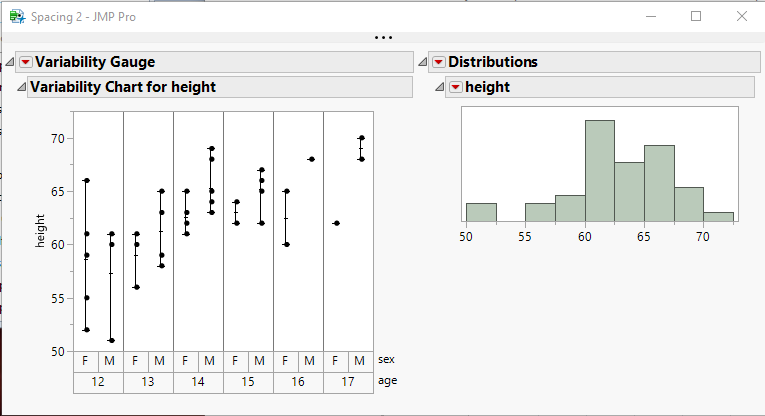
Your placement of the Spacer Box and the size of the Spacer Box is all that needed to be changed to get your code to work
Names Default To Here( 1 );
Open( "$SAMPLE_DATA/Big Class.jmp" );

New Window( "Spacing",
	Lineup Box( N Col( 2 ), Spacing( 0 ),
		Variability Chart( Y( :height ), X( :age, :sex ), Std Dev Chart( 0 ) ),
		V List Box(
			Distribution(
				Continuous Distribution(
					Column( :height ),
					Quantiles( 0 ),
					Summary Statistics( 0 ),
					Horizontal Layout( 1 ),
					Vertical( 0 ),
					Outlier Box Plot( 0 )
				)
			),
			Spacer Box( size( 1, 150 ) )
		)
	)
);- Mark as New
- Bookmark
- Subscribe
- Mute
- Subscribe to RSS Feed
- Get Direct Link
- Report Inappropriate Content
Re: Vertical alignment in Lineup Box
Thank you Jim.
When I define exact size of the spacer box, and then the user (I'm developing a dashboard) enlarges the Variability chart, the empty space comes back.
I guess there is no "normal" solution...
- Mark as New
- Bookmark
- Subscribe
- Mute
- Subscribe to RSS Feed
- Get Direct Link
- Report Inappropriate Content
Re: Vertical alignment in Lineup Box
Does this give the behaviour you would like?
Names Default To Here( 1 );
Open( "$SAMPLE_DATA/Big Class.jmp" );

New Window( "Spacing",
	Lineup Box( N Col( 2 ), Spacing(0),
		v = Variability Chart( Y( :height ), X( :age, :sex ), Std Dev Chart( 0 ) ),
		d = Distribution(
				Continuous Distribution(
					Column( :height ),Quantiles( 0 ),Summary Statistics( 0 ),
					Horizontal Layout( 1 ),Vertical( 0 ),Outlier Box Plot( 0 )
				)
			)
	);
);
Wait(2);
Report(v) << verticalAlignment(Top);
Report(d) << verticalAlignment(Top);- Mark as New
- Bookmark
- Subscribe
- Mute
- Subscribe to RSS Feed
- Get Direct Link
- Report Inappropriate Content
Re: Vertical alignment in Lineup Box
- Mark as New
- Bookmark
- Subscribe
- Mute
- Subscribe to RSS Feed
- Get Direct Link
- Report Inappropriate Content
Re: Vertical alignment in Lineup Box
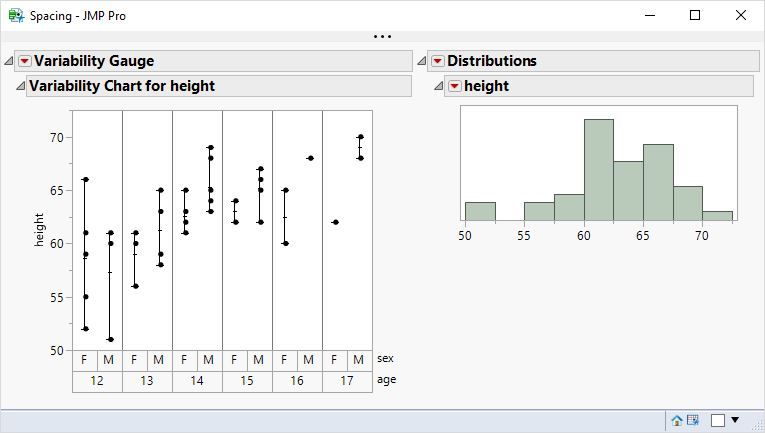
Why not simply use a horizontal list box?
Names Default To Here( 1 );
dt = Open( "$SAMPLE_DATA/Big Class.jmp" );

New Window( "Spacing",
	H List Box(
		dt << Variability Chart( Y( :height ), X( :age, :sex ), Std Dev Chart( 0 ) ),
		dt << Distribution(
			Continuous Distribution(
				Column( :height ),Quantiles( 0 ),Summary Statistics( 0 ),
				Horizontal Layout( 1 ),Vertical( 0 ),Outlier Box Plot( 0 )
			)
		)
	)
);- Mark as New
- Bookmark
- Subscribe
- Mute
- Subscribe to RSS Feed
- Get Direct Link
- Report Inappropriate Content
Re: Vertical alignment in Lineup Box
In the real dashboard there wiil be many charts of several kinds and NCols number of the lineup will not be constant.
Report(v) << verticalAlignment(Top);
is perfect
Recommended Articles
- © 2025 JMP Statistical Discovery LLC. All Rights Reserved.
- Terms of Use
- Privacy Statement
- Contact Us