- Don’t miss your chance to experience Discovery Summit Europe at our best available rate! Early bird registration through 31 Oct.
- Graph Builder Toolbar streamlines interactive graphing. Creates shortcuts on Report and GraphBuilder Helpers toolbars. Download and install the extension.
- Subscribe to RSS Feed
- Mark Topic as New
- Mark Topic as Read
- Float this Topic for Current User
- Bookmark
- Subscribe
- Mute
- Printer Friendly Page
Discussions
Solve problems, and share tips and tricks with other JMP users.- User Community
- :
- Discussions
- :
- Variability Plot Grouping

- Mark as New
- Bookmark
- Subscribe
- Mute
- Subscribe to RSS Feed
- Get Direct Link
- Report Inappropriate Content
Variability Plot Grouping
Hi,
I have a bunch of variability plots to show on a single window with same columns grouping. How will I just define the x_grouping at the very top, so that I can change the grouping in only one place. For example, I want to define grouping by :xA, :xB, and ;xC outside the function "variability chart ( )", so that I can change grouping columns in one place only. Thanks.
Names Default To Here( 1 );

dt = Current Data Table( );

/*

A general grouping variable for X grouping.

*/


New Window(
	"Variability",
	V List Box(
		Variability Chart(
			Y( :Y1 ),
			X( :xA, :xB, :xC ),
		),
		Variability Chart(
			Y( :Y1 ),
			X( :xA, :xB, :xC ),
			Connect Cell Means( 1 )
		)
	)
);
Accepted Solutions


- Mark as New
- Bookmark
- Subscribe
- Mute
- Subscribe to RSS Feed
- Get Direct Link
- Report Inappropriate Content
Re: Variability Plot Grouping
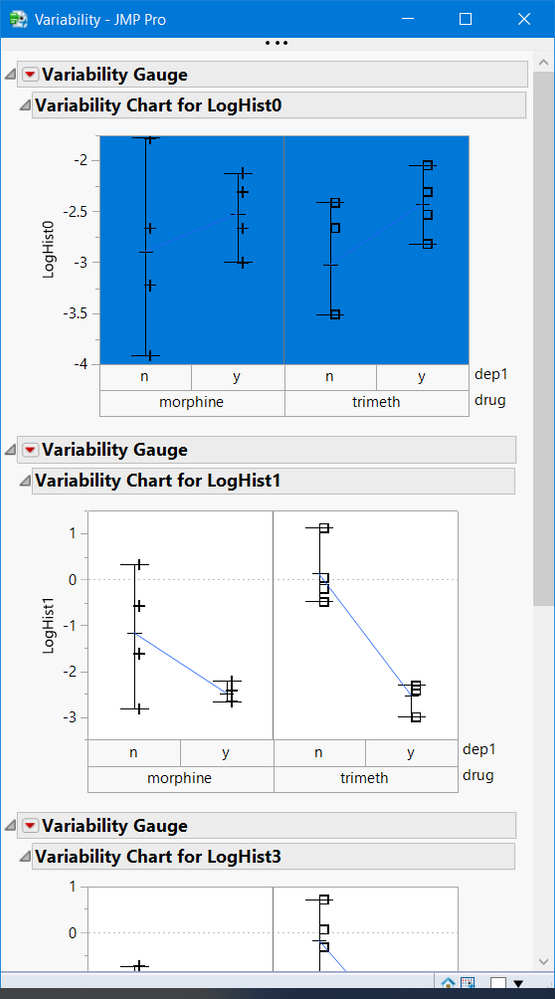
You can create multiple variability plots with one Variability Plot() platform statement
Names Default To Here( 1 );
dt = Open( "$SAMPLE_DATA/Dogs.jmp" );


New Window(
	"Variability",
	V List Box(
		vc = dt << Variability Chart(
		Y( :LogHist0, :LogHist1, :LogHist3, :LogHist5 ),
		X( :drug, :dep1 ),
		Connect Cell Means( 1 ),
		Std Dev Chart( 0 )
	)
  ) //end VListBox
);

show(vc);
//vc = {Variability Chart[], Variability Chart[], Variability Chart[], Variability Chart[]};

//you can reference and change the the plots, see below

report(vc[1])[FrameBox(1)] << select;
- Mark as New
- Bookmark
- Subscribe
- Mute
- Subscribe to RSS Feed
- Get Direct Link
- Report Inappropriate Content
Re: Variability Plot Grouping
You can create multiple variability plots with one Variability Plot() platform statement
Names Default To Here( 1 );
dt = Open( "$SAMPLE_DATA/Dogs.jmp" );


New Window(
	"Variability",
	V List Box(
		vc = dt << Variability Chart(
		Y( :LogHist0, :LogHist1, :LogHist3, :LogHist5 ),
		X( :drug, :dep1 ),
		Connect Cell Means( 1 ),
		Std Dev Chart( 0 )
	)
  ) //end VListBox
);

show(vc);
//vc = {Variability Chart[], Variability Chart[], Variability Chart[], Variability Chart[]};

//you can reference and change the the plots, see below

report(vc[1])[FrameBox(1)] << select;
- Mark as New
- Bookmark
- Subscribe
- Mute
- Subscribe to RSS Feed
- Get Direct Link
- Report Inappropriate Content
Re: Variability Plot Grouping
@gzmorgan0
Can you explain the purpose of these two statements a bit more?
Show( vc );
//vc = {Variability Chart[], Variability Chart[], Variability Chart[], Variability Chart[]};
Report( vc[1] )[FrameBox( 1 )] << select;- Mark as New
- Bookmark
- Subscribe
- Mute
- Subscribe to RSS Feed
- Get Direct Link
- Report Inappropriate Content
Re: Variability Plot Grouping
@RA ,
When scripting, it is useful to create variable references to the objects, in your case the 4 variability charts. I do not know your JSL experience, so those statements are showing you how to create a variable reference to the varaibility charts.
- vc = dt << Variability Chart() sets up a reference to a list of the varaibiity charts created by this statement
- you can referencs them in a for loop For( i=1, i<=nitems(vc), i++, vc[i] << ... or report( vc[i] ) << ...
- some options you can change all vc << Std Dev(1)
//change var chart
report(vc[1])[FrameBox(1)] << {Background Color( 32)} ;

//change all var charts
vc << Connect Cell Means(0);
wait(2);
vc << Connect Cell Means(1);
My goal was inform you of this capability just in case you were not aware, that is, I was anticipating a next question. Sorry if it was unclear.
- Mark as New
- Bookmark
- Subscribe
- Mute
- Subscribe to RSS Feed
- Get Direct Link
- Report Inappropriate Content
Re: Variability Plot Grouping

- Mark as New
- Bookmark
- Subscribe
- Mute
- Subscribe to RSS Feed
- Get Direct Link
- Report Inappropriate Content
Re: Variability Plot Grouping
Is there to way to define the limits and axis range independently for each variability plot by this method?
For example if I wanted to add a horizontal line at -1 on one plot and 0 on the next one, can we do that ?
Recommended Articles
- © 2026 JMP Statistical Discovery LLC. All Rights Reserved.
- Terms of Use
- Privacy Statement
- Contact Us