- Don’t miss your chance to experience Discovery Summit Europe at our best available rate! Early bird registration through 31 Oct.
- Graph Builder Toolbar streamlines interactive graphing. Creates shortcuts on Report and GraphBuilder Helpers toolbars. Download and install the extension.
- Subscribe to RSS Feed
- Mark Topic as New
- Mark Topic as Read
- Float this Topic for Current User
- Bookmark
- Subscribe
- Mute
- Printer Friendly Page
Discussions
Solve problems, and share tips and tricks with other JMP users.- User Community
- :
- Discussions
- :
- Re: Using variables in column formulas

- Mark as New
- Bookmark
- Subscribe
- Mute
- Subscribe to RSS Feed
- Get Direct Link
- Report Inappropriate Content
Using variables in column formulas
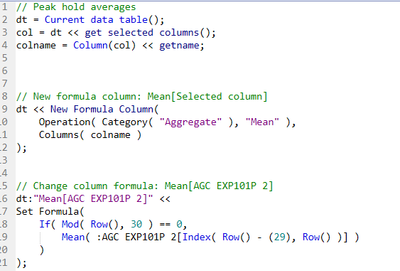
I want to change all references to "AGC EXP101P 2" to the variable 'colname' so that when I run the script this code applies to the selected column in the data table and not just the column "AGC EXP101P 2". However, when I try to change it, JMP always reads the variable name as a string in the column formula and doesn't evaluate properly. How do I fix this so that the column formula recognises the variable?
Thanks :)
Accepted Solutions


- Mark as New
- Bookmark
- Subscribe
- Mute
- Subscribe to RSS Feed
- Get Direct Link
- Report Inappropriate Content
Re: Using variables in column formulas
Insert one expression into another using Eval Insert, Eval Expr, Parse, and Substitute is good post regarding this. << Get Selected Columns() does return a list of columns, so you might have to take that into account somehow (not sure why Column(cols) works, but I would suggest changing it to Column(cols[1])).
Edit:
Here is one example what you could do. If you have any questions, please ask!
Names Default To Here(1);

dt = Open("$SAMPLE_DATA/Big Class.jmp");

dt << Select Columns({"height", "weight"});

sel_cols = dt << get selected columns("String");


Eval(EvalExpr(
	dt << New Column("Mean " ||sel_cols[1], Numeric, Continuous, Formula(
		Mean(Expr(NameExpr(AsColumn(dt, sel_cols[1])))[1::20])
	));
));
- Mark as New
- Bookmark
- Subscribe
- Mute
- Subscribe to RSS Feed
- Get Direct Link
- Report Inappropriate Content
Re: Using variables in column formulas
Insert one expression into another using Eval Insert, Eval Expr, Parse, and Substitute is good post regarding this. << Get Selected Columns() does return a list of columns, so you might have to take that into account somehow (not sure why Column(cols) works, but I would suggest changing it to Column(cols[1])).
Edit:
Here is one example what you could do. If you have any questions, please ask!
Names Default To Here(1);

dt = Open("$SAMPLE_DATA/Big Class.jmp");

dt << Select Columns({"height", "weight"});

sel_cols = dt << get selected columns("String");


Eval(EvalExpr(
	dt << New Column("Mean " ||sel_cols[1], Numeric, Continuous, Formula(
		Mean(Expr(NameExpr(AsColumn(dt, sel_cols[1])))[1::20])
	));
));
Recommended Articles
- © 2026 JMP Statistical Discovery LLC. All Rights Reserved.
- Terms of Use
- Privacy Statement
- Contact Us