Turn on suggestions
Auto-suggest helps you quickly narrow down your search results by suggesting possible matches as you type.
- Don’t miss your chance to experience Discovery Summit Europe at our best available rate! Early bird registration through 31 Oct.
- Graph Builder Toolbar streamlines interactive graphing. Creates shortcuts on Report and GraphBuilder Helpers toolbars. Download and install the extension.
Options
- Subscribe to RSS Feed
- Mark Topic as New
- Mark Topic as Read
- Float this Topic for Current User
- Bookmark
- Subscribe
- Mute
- Printer Friendly Page
Discussions
Solve problems, and share tips and tricks with other JMP users.- User Community
- :
- Discussions
- :
- Using The Color Overlay Box To Sort Additional variable, but limits to 60/128

Level I
- Mark as New
- Bookmark
- Subscribe
- Mute
- Subscribe to RSS Feed
- Get Direct Link
- Report Inappropriate Content
Using The Color Overlay Box To Sort Additional variable, but limits to 60/128
Jul 11, 2023 08:45 PM
(2101 views)
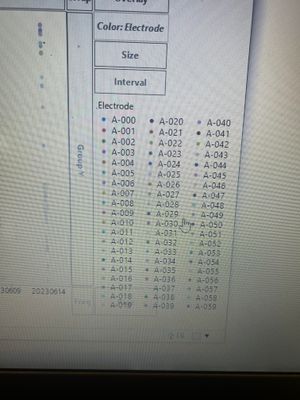
I have a variable with 128 samples, called Elect, and I am in graph builder and I drag that variable in the color box. However it only shows 60/128 of the varibales. Anyone hve any idea how to go on so all variables are seen. I basically have an X and Y variable already on and wanting to see a scatter plot of everything at once with the Elect variable added in the color section/box.
2 REPLIES 2


Super User
- Mark as New
- Bookmark
- Subscribe
- Mute
- Subscribe to RSS Feed
- Get Direct Link
- Report Inappropriate Content
Re: Using The Color Overlay Box To Sort Additional variable, but limits to 60/128
Double click on the legend and change max items

You can also get to the same menu from Graph Builder red triangle and Legend Settings

-Jarmo
Level I
- Mark as New
- Bookmark
- Subscribe
- Mute
- Subscribe to RSS Feed
- Get Direct Link
- Report Inappropriate Content
Re: Using The Color Overlay Box To Sort Additional variable, but limits to 60/128
Hi thank you, I'm not seeing Max Items as an option, have any idea why that could be?
Recommended Articles
- © 2026 JMP Statistical Discovery LLC. All Rights Reserved.
- Terms of Use
- Privacy Statement
- Contact Us