Turn on suggestions
Auto-suggest helps you quickly narrow down your search results by suggesting possible matches as you type.
- JMP will suspend normal business operations for our Winter Holiday beginning on Wednesday, Dec. 24, 2025, at 5:00 p.m. ET (2:00 p.m. ET for JMP Accounts Receivable).
Regular business hours will resume at 9:00 a.m. EST on Friday, Jan. 2, 2026. - We’re retiring the File Exchange at the end of this year. The JMP Marketplace is now your destination for add-ins and extensions.
Options
- Subscribe to RSS Feed
- Mark Topic as New
- Mark Topic as Read
- Float this Topic for Current User
- Bookmark
- Subscribe
- Mute
- Printer Friendly Page
Discussions
Solve problems, and share tips and tricks with other JMP users.- JMP User Community
- :
- Discussions
- :
- Use ComboBox on TableBox

Level I
- Mark as New
- Bookmark
- Subscribe
- Mute
- Subscribe to RSS Feed
- Get Direct Link
- Report Inappropriate Content
Use ComboBox on TableBox
Jun 11, 2018 03:20 AM
(4653 views)
Hi
I want to make a tablebox that one of it column eatch cell can have a value of "Yes" or "No"
thought of using a combobox for it
try using the following code with no success
new window("Bla Bla",
tb = Table Box(
c1 = String Col Box( "Bla Bla", {cb = combo box({"Yes","No"}) << get selected})
)
)
any idea
4 REPLIES 4


Super User
- Mark as New
- Bookmark
- Subscribe
- Mute
- Subscribe to RSS Feed
- Get Direct Link
- Report Inappropriate Content
Re: Use ComboBox on TableBox
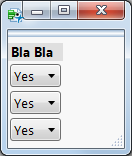
Col boxes will do what you need:
new window("Combo Boxes in Tablebox",
	tb = Table Box(
		c1 = Col Box( "Bla Bla",
			cb1 = combo box({"Yes","No"}),
			cb2 = combo box({"Yes","No"}),
			cb3 = combo box({"Yes","No"}),
		)
	)
);
Level I
- Mark as New
- Bookmark
- Subscribe
- Mute
- Subscribe to RSS Feed
- Get Direct Link
- Report Inappropriate Content
Re: Use ComboBox on TableBox
Level I
- Mark as New
- Bookmark
- Subscribe
- Mute
- Subscribe to RSS Feed
- Get Direct Link
- Report Inappropriate Content
Re: Use ComboBox on TableBox
Thanks pmroz
Exactly what I needed

Super User
- Mark as New
- Bookmark
- Subscribe
- Mute
- Subscribe to RSS Feed
- Get Direct Link
- Report Inappropriate Content
Re: Use ComboBox on TableBox
Created:
Jun 11, 2018 08:00 AM
| Last Modified: Jun 11, 2018 5:01 AM
(4636 views)
| Posted in reply to message from cerdmh 06-11-2018
I am not aware of being able to use a Combo Box() in a Table Box(), however, you can use a Check Box() to accomplish the same type of functionallity, as your Yes/No, but just by Check Box() selections
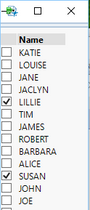
Names Default To Here( 1 );
dt = Open( "$SAMPLE_DATA/big class.jmp" );

// Create a list of blank labels for the checkboxes
labelList = {};
For( i = 1, i <= N Rows( dt ), i++,
	Insert Into( labelList, "" )
);

// Create a display with a table box()
New Window( "Select Names",
	tb = Table Box(
		// Add the list boxes to the data table
		cb = Check Box(
			labelList,
			For( i = 1, i <= N Rows( dt ), i++,
				If( cb << get( i ) == 1,
					Print( dt:Name[i] )
				)
			)
		),
		// Add the names from the data table
		scb = String Col Box( "Name", dt:Name << get values )
	)
);
Jim
Recommended Articles
- © 2025 JMP Statistical Discovery LLC. All Rights Reserved.
- Terms of Use
- Privacy Statement
- Contact Us