- JMP Statement Regarding Critical PHP Remote Code Execution Vulnerabilities (CVE-2026-109618, CVE-2026-109619)
- Don’t miss your chance to experience Discovery Summit Europe at our best available rate! Early bird registration through 31 Oct.
- Graph Builder Toolbar streamlines interactive graphing. Creates shortcuts on Report and GraphBuilder Helpers toolbars. Download and install the extension.
- Subscribe to RSS Feed
- Mark Topic as New
- Mark Topic as Read
- Float this Topic for Current User
- Bookmark
- Subscribe
- Mute
- Printer Friendly Page
Discussions
Solve problems, and share tips and tricks with other JMP users.- User Community
- :
- Discussions
- :
- Re: Uninstall JMP PRO 16 silently

- Mark as New
- Bookmark
- Subscribe
- Mute
- Subscribe to RSS Feed
- Get Direct Link
- Report Inappropriate Content
Uninstall JMP PRO 16 silently
Hi,
I want to uninstall JMP PRO 16 silently, i have tried with the below command but it is not working, looks like this stuck because of below pop up message
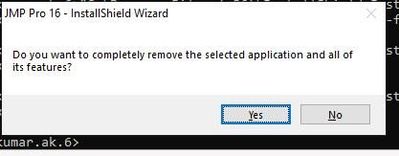
"C:\Program Files (x86)\InstallShield Installation Information\{61DF41B1-9877-4906-80C4-09941A05BD77}\setup.exe" -runfromtemp -l0x0409 -removeonly /s


- Mark as New
- Bookmark
- Subscribe
- Mute
- Subscribe to RSS Feed
- Get Direct Link
- Report Inappropriate Content
Re: Uninstall JMP PRO 16 silently
There needs to be a reference to the silent uninstall script file in your command. When you uninstall from a command line with a -r at the end of the command line, the uninstall script will be recorded with an .iss file extension. The, update your command to reference the .iss file. Note that there is no space after the "-f1"
"C:\Program Files (x86)\InstallShield Installation Information\{61DF41B1-9877-4906-80C4-09941A05BD77}\setup.exe" -f1C:\full_path_to_uninstall.iss -runfromtemp -l0x0409 -removeonly /s
- Mark as New
- Bookmark
- Subscribe
- Mute
- Subscribe to RSS Feed
- Get Direct Link
- Report Inappropriate Content
Re: Uninstall JMP PRO 16 silently
Copy the JMP folder to another path first.Then uninstall the original installation.In this way, the newly copied JMP will still work well in the future.
Recommended Articles
- © 2026 JMP Statistical Discovery LLC. All Rights Reserved.
- Terms of Use
- Privacy Statement
- Contact Us