- Don’t miss your chance to experience Discovery Summit Europe at our best available rate! Early bird registration through 31 Oct.
- Graph Builder Toolbar streamlines interactive graphing. Creates shortcuts on Report and GraphBuilder Helpers toolbars. Download and install the extension.
- Subscribe to RSS Feed
- Mark Topic as New
- Mark Topic as Read
- Float this Topic for Current User
- Bookmark
- Subscribe
- Mute
- Printer Friendly Page
Discussions
Solve problems, and share tips and tricks with other JMP users.- User Community
- :
- Discussions
- :
- The use of Throw( in scripting

- Mark as New
- Bookmark
- Subscribe
- Mute
- Subscribe to RSS Feed
- Get Direct Link
- Report Inappropriate Content
The use of Throw( in scripting
I use Throw() in my programs to stop the execution for that particular part of the program. This still works in JMP 13 but I sometimes get a new window with a JMP Alert. I can't seem to simulate the problem - It happens in a User Window - the program sees a problem, the program sends a Caption and executes a Throw(). In earlier version I only got the Caption now I sometimes get an Alert window as well. I thought Throw() just stops execution. I can use text in the Throw("Hello") and it will in this case get a JMP Alert with the text - if executed on its own I get only the text in the log. I'm not sure what to expect when. Can anybody help.
Accepted Solutions


- Mark as New
- Bookmark
- Subscribe
- Mute
- Subscribe to RSS Feed
- Get Direct Link
- Report Inappropriate Content
Re: The use of Throw( in scripting
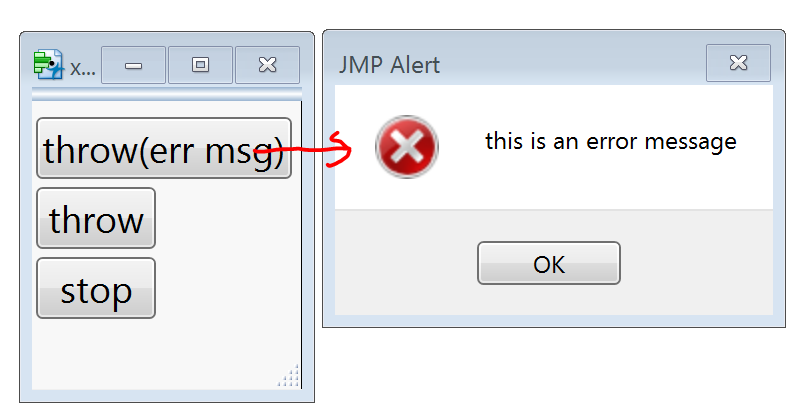
When JSL runs from a button script it is running in interactive mode and produces alert dialogs when JMP thinks you should know what happened. If you run a script by submitting it, JSL runs in batch mode and just sends alerts to the log. I think in your case you probably want to use stop() rather than throw("msg").
When you submit this script, it runs in batch mode and brings up a window. When you click a button in the window, the button script runs interactively.
newwindow("x",
buttonbox("throw(err msg)",setscript(print(1);throw("this is an error message");print(2))),
buttonbox("throw",setscript(print(3);throw();print(4))),
buttonbox("stop",setscript(print(5);stop();print(6))),
)
For each of the buttons, only the first number is printed in the log because the script stops.
- Mark as New
- Bookmark
- Subscribe
- Mute
- Subscribe to RSS Feed
- Get Direct Link
- Report Inappropriate Content
Re: The use of Throw( in scripting
Thanks Craige - exactly what I need - the Stop() function. I can't get it the Sctipt Manual though.
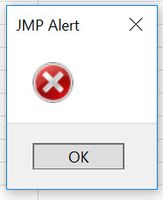
I would expect that the 'throw' button in your example would display an empty Alert like below. This is what I get in my own program - as you said it is in an interactive environment
- Mark as New
- Bookmark
- Subscribe
- Mute
- Subscribe to RSS Feed
- Get Direct Link
- Report Inappropriate Content
Re: The use of Throw( in scripting
When JSL runs from a button script it is running in interactive mode and produces alert dialogs when JMP thinks you should know what happened. If you run a script by submitting it, JSL runs in batch mode and just sends alerts to the log. I think in your case you probably want to use stop() rather than throw("msg").
When you submit this script, it runs in batch mode and brings up a window. When you click a button in the window, the button script runs interactively.
newwindow("x",
buttonbox("throw(err msg)",setscript(print(1);throw("this is an error message");print(2))),
buttonbox("throw",setscript(print(3);throw();print(4))),
buttonbox("stop",setscript(print(5);stop();print(6))),
)
For each of the buttons, only the first number is printed in the log because the script stops.
- Mark as New
- Bookmark
- Subscribe
- Mute
- Subscribe to RSS Feed
- Get Direct Link
- Report Inappropriate Content
Re: The use of Throw( in scripting
Thanks Craige - exactly what I need - the Stop() function. I can't get it the Sctipt Manual though.
I would expect that the 'throw' button in your example would display an empty Alert like below. This is what I get in my own program - as you said it is in an interactive environment


- Mark as New
- Bookmark
- Subscribe
- Mute
- Subscribe to RSS Feed
- Get Direct Link
- Report Inappropriate Content
Re: The use of Throw( in scripting
Another thing about stop(). It seems to only stop the script in the displaybox that holds it.
dt = open("$SAMPLE_DATA\Big Class.jmp");
newwindow("x", <<modal,
	lb = collistbox(dt, all),
	textbox("don't select anything"),
	buttonbox("OK",
		n = nitems(lb << Get Selected);
		if(n==0, stop());
		print("Button Stopped");
	)
);

print("Main Script not stopped");
- Mark as New
- Bookmark
- Subscribe
- Mute
- Subscribe to RSS Feed
- Get Direct Link
- Report Inappropriate Content
Re: The use of Throw( in scripting
The same is true for Throw(
Recommended Articles
- © 2026 JMP Statistical Discovery LLC. All Rights Reserved.
- Terms of Use
- Privacy Statement
- Contact Us