Turn on suggestions
Auto-suggest helps you quickly narrow down your search results by suggesting possible matches as you type.
- JMP will suspend normal business operations for our Winter Holiday beginning on Wednesday, Dec. 24, 2025, at 5:00 p.m. ET (2:00 p.m. ET for JMP Accounts Receivable).
Regular business hours will resume at 9:00 a.m. EST on Friday, Jan. 2, 2026. - We’re retiring the File Exchange at the end of this year. The JMP Marketplace is now your destination for add-ins and extensions.
Options
- Subscribe to RSS Feed
- Mark Topic as New
- Mark Topic as Read
- Float this Topic for Current User
- Bookmark
- Subscribe
- Mute
- Printer Friendly Page
Discussions
Solve problems, and share tips and tricks with other JMP users.- JMP User Community
- :
- Discussions
- :
- Table Update: How to update only selected columns?

Level III
- Mark as New
- Bookmark
- Subscribe
- Mute
- Subscribe to RSS Feed
- Get Direct Link
- Report Inappropriate Content
Table Update: How to update only selected columns?
Created:
Feb 27, 2023 06:14 AM
| Last Modified: Jun 8, 2023 9:32 AM
(2344 views)
This should be a quick one:
Table update: How to update only selected columns?
Data Table( dt1 ) << Update(
	With( Data Table( dt10 ) ),
	Match Columns( :SAMPLE = :SamID ),
	Add Columns from Update Table( None ),
    ### Update Selected Columns (:Type, :Method) ###
)
It's simple when done manually, but in the script? There's nothing in the scripting guide (only how to avoid adding columns). My various guesses and trials (eg. see inside ### in above script) do not work.
1 ACCEPTED SOLUTION
Accepted Solutions


Super User
Solution
- Mark as New
- Bookmark
- Subscribe
- Mute
- Subscribe to RSS Feed
- Get Direct Link
- Report Inappropriate Content
Re: Table Update: How to update only selected columns?
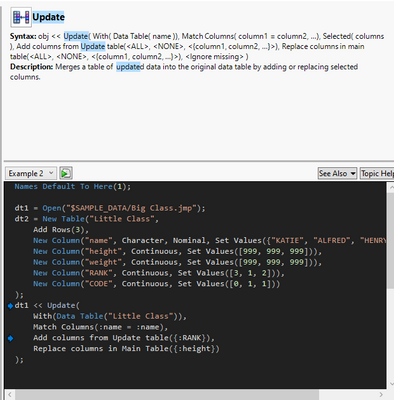
If you have JMP16 you can perform the action once manually and then get the script from enhanced log, most likely what you are looking for is Replace Columns in Main Table()
Data Table("Big Class") << Update(
	With(Data Table("Subset of Big Class")),
	Match Columns(:name = :name),
	Replace Columns in Main Table(:age)
);
-Jarmo
2 REPLIES 2
Super User
Solution
- Mark as New
- Bookmark
- Subscribe
- Mute
- Subscribe to RSS Feed
- Get Direct Link
- Report Inappropriate Content
Re: Table Update: How to update only selected columns?
If you have JMP16 you can perform the action once manually and then get the script from enhanced log, most likely what you are looking for is Replace Columns in Main Table()
Data Table("Big Class") << Update(
	With(Data Table("Subset of Big Class")),
	Match Columns(:name = :name),
	Replace Columns in Main Table(:age)
);
-Jarmo

Level IV
- Mark as New
- Bookmark
- Subscribe
- Mute
- Subscribe to RSS Feed
- Get Direct Link
- Report Inappropriate Content
Re: Table Update: How to update only selected columns?
Created:
Feb 27, 2023 08:58 AM
| Last Modified: Feb 27, 2023 6:00 AM
(2329 views)
| Posted in reply to message from jthi 02-27-2023
HI, this will probably do what you are looking for
Names Default To Here( 1 );

// opens Table
dt1 = Open( "$SAMPLE_DATA/Big Class.jmp" );

//generate update Table
dt2 = dt1 << Clear Select << Select Rows( Index( 1, 8 ) ) << Subset( Selected Rows( 1 ), Selected columns only( 0 ) );

// delete contend
for(k=4,k<=ncols(dt1),k++,column(dt1,k)[(1 :: 8)]=.);

//select columns
dt1 << Clear select;
wait(0.1);
dt1 << Select Rows ( (3::5) );
wait(0.1);


// ### scrpit only with selected rows

// get selected rows
s_rows = dt1 << Get Selected Rows();

// create a new column with selected rows as 1
n_c1 = dt1 << new column();
n_c1[s_rows]=1;

// create a new column on the update table
n_c2 = dt2 <<  New Column("temp",Numeric,"Continuous",<<Set Initial Data( 1 ));

// update only where the 1 is present (selected rows only)
dt1 << Update(
	With( dt2 ),
	Match Columns( :name = :name, n_c1 = n_c2 ),
);

// delete the columns
dt1 << Delete Columns(n_c1);
dt2 << Delete Columns(n_c2);
"I thought about our dilemma, and I came up with a solution that I honestly think works out best for one of both of us"
- GLaDOS
- GLaDOS
Recommended Articles
- © 2026 JMP Statistical Discovery LLC. All Rights Reserved.
- Terms of Use
- Privacy Statement
- Contact Us