cancel
Showing results for 
Show  only  | Search instead for 
Did you mean: 
  • JMP will suspend normal business operations for our Winter Holiday beginning on Wednesday, Dec. 24, 2025, at 5:00 p.m. ET (2:00 p.m. ET for JMP Accounts Receivable).
    Regular business hours will resume at 9:00 a.m. ET on Friday, Jan. 2, 2026.
  • We’re retiring the File Exchange at the end of this year. The JMP Marketplace is now your destination for add-ins and extensions.

Discussions

Solve problems, and share tips and tricks with other JMP users.
Choose Language Hide Translation Bar
FN
FN
Level VI

Statistics for time aggregated results in JMP

I have a table with a column that is my time index.


This column is in minutes and I want to calculate statistics aggregating the results but per hour, for example.


How to do that?


1 REPLY 1
FN
FN
Level VI

Re: Statistics for time aggregated results in JMP

One way to do this I found:


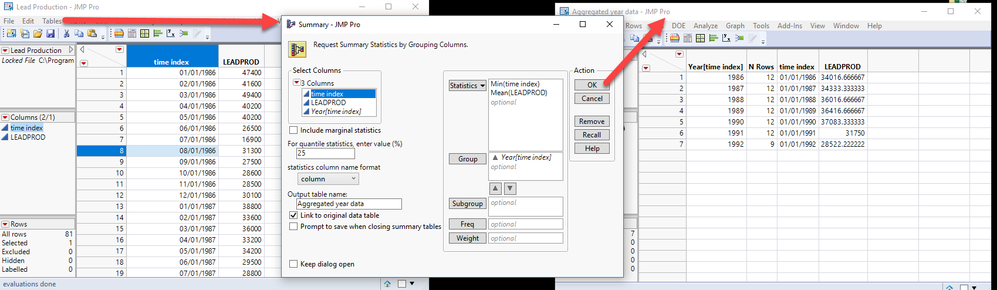
Tables>Summary and Grouping by Date and Hour (in this order).


To have a column with the complete date, and not splitted by two: include in the Statistics min(Date), being median or max are also possible.


Here is a simpler example aggregating the Lead Production Data table by year.
jmp_aggregation.png


Recommended Articles