Turn on suggestions
Auto-suggest helps you quickly narrow down your search results by suggesting possible matches as you type.
- Don’t miss your chance to experience Discovery Summit Europe at our best available rate! Early bird registration through 31 Oct.
- Graph Builder Toolbar streamlines interactive graphing. Creates shortcuts on Report and GraphBuilder Helpers toolbars. Download and install the extension.
Options
- Subscribe to RSS Feed
- Mark Topic as New
- Mark Topic as Read
- Float this Topic for Current User
- Bookmark
- Subscribe
- Mute
- Printer Friendly Page
Discussions
Solve problems, and share tips and tricks with other JMP users.- User Community
- :
- Discussions
- :
- Re: Sorting the level after analysis

Level II
- Mark as New
- Bookmark
- Subscribe
- Mute
- Subscribe to RSS Feed
- Get Direct Link
- Report Inappropriate Content
Sorting the level after analysis
Jun 14, 2023 03:42 AM
(4293 views)
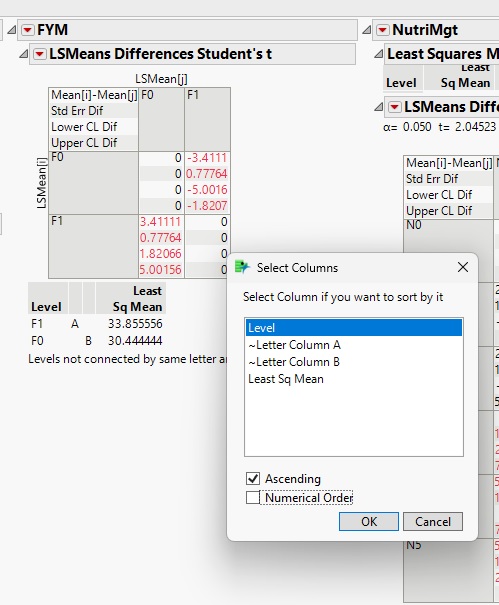
I analyzed the data in a split-plot design and in the post-hoc test (LSMeans Differences Student's t) the levels by default were arranged according to the least Sq mean. I tried to sort them based on levels and for individual tables; I got success. But I want to know how we can change these settings (sort by levels) by default for all analyses.
3 REPLIES 3


Super User
- Mark as New
- Bookmark
- Subscribe
- Mute
- Subscribe to RSS Feed
- Get Direct Link
- Report Inappropriate Content
Re: Sorting the level after analysis
Here is an example of how to do the sorting using JSL
Names Default To Here( 1 );
dt = Open( "$SAMPLE_DATA/Drug.jmp" );
obj = Fit Model(
	Y( :y ),
	Effects( :Drug, :x ),
	Personality( Standard Least Squares ),
	Emphasis( Effect Leverage )
);
myobj = obj << Run(
	:Drug << {LSMeans Student's t( .05, Connecting Letters Report( 1 ) )}
);
objr = obj << report;
Report(myobj)["Response y","Drug","LSMeans Differences Student's t",TableBox(1)] << sort by column( "Level", ascending = 1);


Jim
Level II
- Mark as New
- Bookmark
- Subscribe
- Mute
- Subscribe to RSS Feed
- Get Direct Link
- Report Inappropriate Content
Re: Sorting the level after analysis
Can we do this without JSL?, If possible than please let me know
Super User
- Mark as New
- Bookmark
- Subscribe
- Mute
- Subscribe to RSS Feed
- Get Direct Link
- Report Inappropriate Content
Re: Sorting the level after analysis
I am not aware of a preferences setting to have the table sorted by level automatically. I suggest that you add this request to the JMP Wish List.
Jim
Recommended Articles
- © 2026 JMP Statistical Discovery LLC. All Rights Reserved.
- Terms of Use
- Privacy Statement
- Contact Us