Turn on suggestions
Auto-suggest helps you quickly narrow down your search results by suggesting possible matches as you type.
- JMP will suspend normal business operations for our Winter Holiday beginning on Wednesday, Dec. 24, 2025, at 5:00 p.m. ET (2:00 p.m. ET for JMP Accounts Receivable).
Regular business hours will resume at 9:00 a.m. EST on Friday, Jan. 2, 2026. - We’re retiring the File Exchange at the end of this year. The JMP Marketplace is now your destination for add-ins and extensions.
Options
- Subscribe to RSS Feed
- Mark Topic as New
- Mark Topic as Read
- Float this Topic for Current User
- Bookmark
- Subscribe
- Mute
- Printer Friendly Page
Discussions
Solve problems, and share tips and tricks with other JMP users.- JMP User Community
- :
- Discussions
- :
- Sorting the level after analysis

Level I
- Mark as New
- Bookmark
- Subscribe
- Mute
- Subscribe to RSS Feed
- Get Direct Link
- Report Inappropriate Content
Sorting the level after analysis
Jun 14, 2023 03:42 AM
(2763 views)
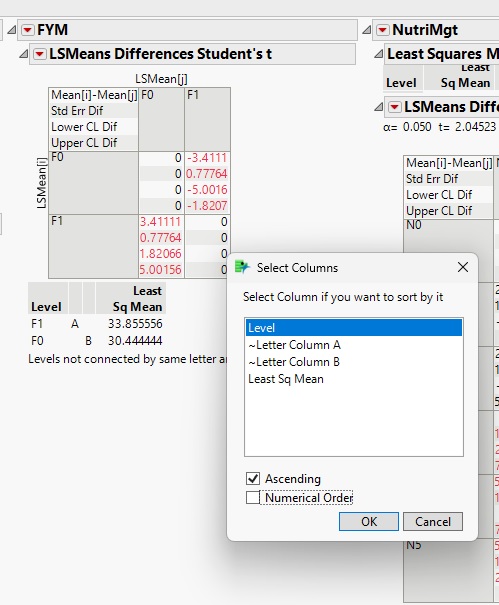
I analyzed the data in a split-plot design and in the post-hoc test (LSMeans Differences Student's t) the levels by default were arranged according to the least Sq mean. I tried to sort them based on levels and for individual tables; I got success. But I want to know how we can change these settings (sort by levels) by default for all analyses.
3 REPLIES 3


Super User
- Mark as New
- Bookmark
- Subscribe
- Mute
- Subscribe to RSS Feed
- Get Direct Link
- Report Inappropriate Content
Re: Sorting the level after analysis
Here is an example of how to do the sorting using JSL
Names Default To Here( 1 );
dt = Open( "$SAMPLE_DATA/Drug.jmp" );
obj = Fit Model(
	Y( :y ),
	Effects( :Drug, :x ),
	Personality( Standard Least Squares ),
	Emphasis( Effect Leverage )
);
myobj = obj << Run(
	:Drug << {LSMeans Student's t( .05, Connecting Letters Report( 1 ) )}
);
objr = obj << report;
Report(myobj)["Response y","Drug","LSMeans Differences Student's t",TableBox(1)] << sort by column( "Level", ascending = 1);


Jim
Level I
- Mark as New
- Bookmark
- Subscribe
- Mute
- Subscribe to RSS Feed
- Get Direct Link
- Report Inappropriate Content
Re: Sorting the level after analysis
Can we do this without JSL?, If possible than please let me know
Super User
- Mark as New
- Bookmark
- Subscribe
- Mute
- Subscribe to RSS Feed
- Get Direct Link
- Report Inappropriate Content
Re: Sorting the level after analysis
I am not aware of a preferences setting to have the table sorted by level automatically. I suggest that you add this request to the JMP Wish List.
Jim
Recommended Articles
- © 2025 JMP Statistical Discovery LLC. All Rights Reserved.
- Terms of Use
- Privacy Statement
- Contact Us