- Don’t miss your chance to experience Discovery Summit Europe at our best available rate! Early bird registration through 31 Oct.
- Graph Builder Toolbar streamlines interactive graphing. Creates shortcuts on Report and GraphBuilder Helpers toolbars. Download and install the extension.
- Subscribe to RSS Feed
- Mark Topic as New
- Mark Topic as Read
- Float this Topic for Current User
- Bookmark
- Subscribe
- Mute
- Printer Friendly Page
Discussions
Solve problems, and share tips and tricks with other JMP users.- User Community
- :
- Discussions
- :
- Simple Question: How to find out a column number

- Mark as New
- Bookmark
- Subscribe
- Mute
- Subscribe to RSS Feed
- Get Direct Link
- Report Inappropriate Content
Simple Question: How to find out a column number
Hello Community,
i just want to learn how to find out a column number in JMP.
I tried using Column Info, but this information is not there. I can type a column number in Cols > Column Selection > Go to.. , but I don't want to try to guess.
Because I want to use the Column Number in my Script to loop over it (for example from column 120 to 130). But for this I needed to find out, that my starter Column (in my case "I_nA_3_m30_NS") was located on the column 120..
Thanks for any help.
Accepted Solutions

- Mark as New
- Bookmark
- Subscribe
- Mute
- Subscribe to RSS Feed
- Get Direct Link
- Report Inappropriate Content
Re: Simple Question: How to find out a column number
If you want to allow for partial matches across multiple columns, you could let 'FilterColSelector()' do some of the work:
Names Default To Here( 1 );

dt = Open( "$SAMPLE_DATA/big class.jmp" );
allCols = dt << getColumnNames("String");

fcs = Filter Col Selector( << nameContains("eight"));
matchingCols = fcs << getItems;
fcs << delete;

matchingColNumbers = [];
for(c=1, c<=NItems(matchingCols), c++, matchingColNumbers = matchingColNumbers||Loc(allCols, matchingCols[c]));
Print(matchingColNumbers);

- Mark as New
- Bookmark
- Subscribe
- Mute
- Subscribe to RSS Feed
- Get Direct Link
- Report Inappropriate Content
Re: Simple Question: How to find out a column number
Hi,
Here is one method to return the relative position of the first column matching a text pattern (in my care "VISIT"):
Names default to here (1);

dt = current data table ();

cols = dt << get column names (string);

text = "VISIT";

tcol = contains (cols, text);

show (tcol);
Let us know if that works for you.
Best,
TS
- Mark as New
- Bookmark
- Subscribe
- Mute
- Subscribe to RSS Feed
- Get Direct Link
- Report Inappropriate Content
Re: Simple Question: How to find out a column number
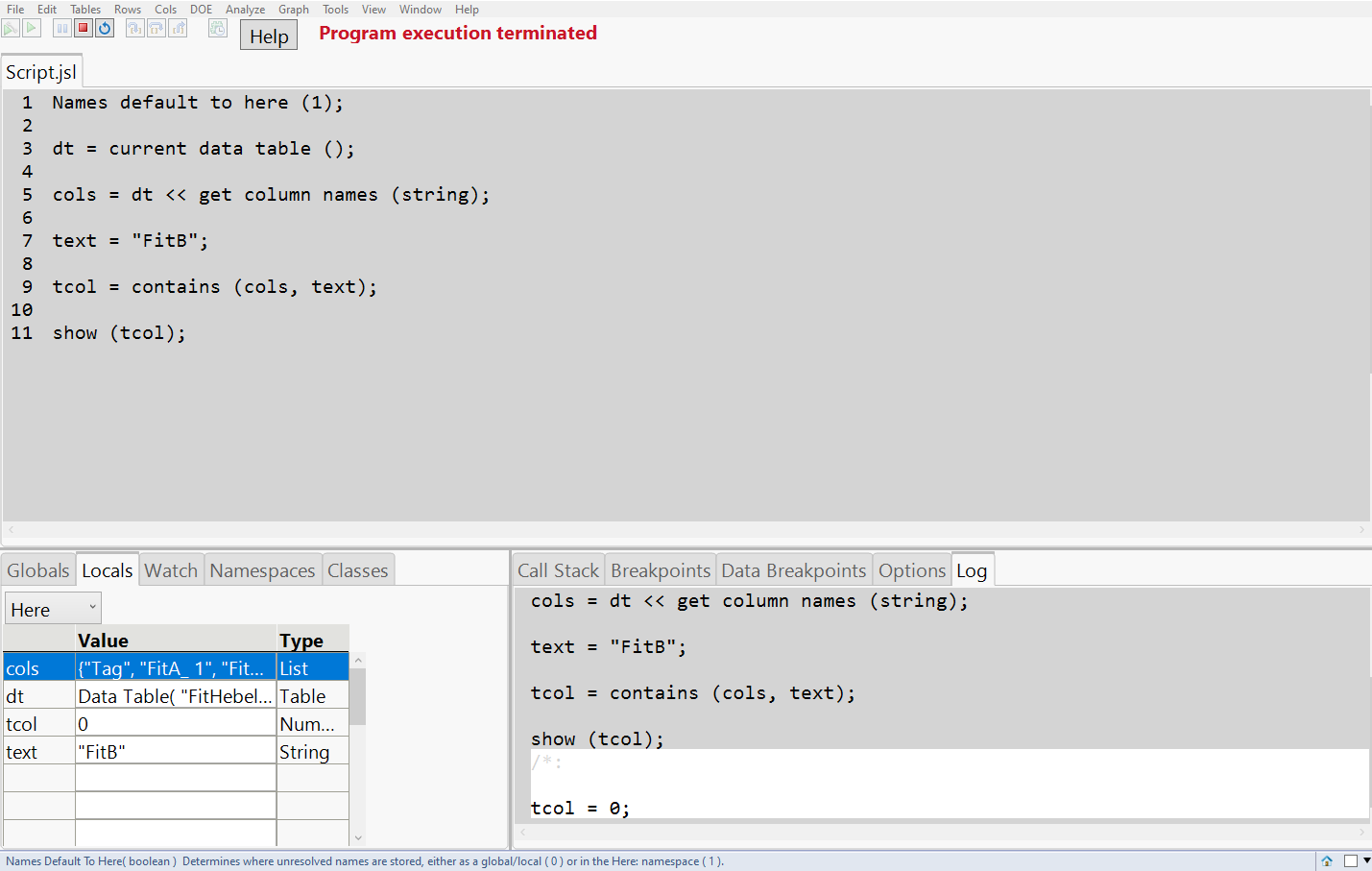
Thank you for your reply, is a good idea, but it didn't work for me, my tcol was 0.
Here is the cols variable (another table than the original question):
{"Tag", "FitA_ 1", "FitA_ 2", "FitA_ 3", "FitA_ 4", "FitA_ 5", "FitA_ 6", "FitA_ 7", "FitA_ 8", "FitA_ 9", "FitA_10", "FitA_11", "FitA_12", "FitB_ 1", "FitB_ 2", "FitB_ 3", "FitB_ 4", "FitB_ 5", "FitB_ 6", "FitB_ 7", "FitB_ 8", "FitB_ 9", "FitB_10", "FitB_11", "FitB_12", "F", "H_ 1", "H_ 2", "H_ 3", "H_ 4", "H_ 5", "H_ 6", "H_ 7", "H_ 8", "H_ 9", "H_10", "H_11", "H_12", "V2_ 1", "V2_ 2", "V2_ 3", "V2_ 4", "V2_ 5", "V2_ 6", "V2_ 7", "V2_ 8", "V2_ 9", "V2_10", "V2_11", "V2_12", "V3_ 1", "V3_ 2", "V3_ 3", "V3_ 4", "V3_ 5", "V3_ 6", "V3_ 7", "V3_ 8", "V3_ 9", "V3_10", "V3_11", "V3_12", "NAT"}
and I tried with text = "FitB"
but tcol was 0

- Mark as New
- Bookmark
- Subscribe
- Mute
- Subscribe to RSS Feed
- Get Direct Link
- Report Inappropriate Content
Re: Simple Question: How to find out a column number
The Contains() function when used to compare across a JMP List, returns only exact matches. If you need to look internally for each element in the list, you will need to do something like:
Names Default To Here( 1 );
dt = Open( "$SAMPLE_DATA/big class.jmp" );

cols = dt << get column names( string );

text = "wei";

For( i = 1, i <= N Items( cols ), i++,

	tcol = Contains( cols[i], text );
	If( tcol > 0,
		tcol = i;
		Break();
	);
);
Show( tcol );
- Mark as New
- Bookmark
- Subscribe
- Mute
- Subscribe to RSS Feed
- Get Direct Link
- Report Inappropriate Content
Re: Simple Question: How to find out a column number
Hi,
Good catch: the method I suggested assumes that you look for the entire name of the target column which is not valid in your case where you look for a substring.
Let me think about it.
Best,
TS
- Mark as New
- Bookmark
- Subscribe
- Mute
- Subscribe to RSS Feed
- Get Direct Link
- Report Inappropriate Content
Re: Simple Question: How to find out a column number
If you want to allow for partial matches across multiple columns, you could let 'FilterColSelector()' do some of the work:
Names Default To Here( 1 );

dt = Open( "$SAMPLE_DATA/big class.jmp" );
allCols = dt << getColumnNames("String");

fcs = Filter Col Selector( << nameContains("eight"));
matchingCols = fcs << getItems;
fcs << delete;

matchingColNumbers = [];
for(c=1, c<=NItems(matchingCols), c++, matchingColNumbers = matchingColNumbers||Loc(allCols, matchingCols[c]));
Print(matchingColNumbers);- Mark as New
- Bookmark
- Subscribe
- Mute
- Subscribe to RSS Feed
- Get Direct Link
- Report Inappropriate Content
Re: Simple Question: How to find out a column number
One way to approach this is:
Names Default To Here( 1 );
dt = Open( "$SAMPLE_DATA/big class.jmp" );

colNumber = Contains( dt << get column names( string ), "height" );
Show( colNumber );Recommended Articles
- © 2026 JMP Statistical Discovery LLC. All Rights Reserved.
- Terms of Use
- Privacy Statement
- Contact Us