JMP Security Notice: CVE-2026-109618 and CVE-2026-109619
JMP promptly initiated a review of its products, services, and relevant infrastructure for exposure to CVE-2026-109618 and CVE-2026-109619.
Our assessment of JMP products has not identified exposure to these vulnerabilities. Where remediation was required within supporting environments, appropriate security updates and controls have been applied and validated.
We have identified no evidence of successful exploitation or unauthorized access to JMP systems or customer information associated with these vulnerabilities.
JMP continues to monitor the issue and relevant vendor guidance. No action is required by JMP customers at this time.
- Don’t miss your chance to experience Discovery Summit Europe at our best available rate! Early bird registration through 31 Oct.
- Graph Builder Toolbar streamlines interactive graphing. Creates shortcuts on Report and GraphBuilder Helpers toolbars. Download and install the extension.
- Subscribe to RSS Feed
- Mark Topic as New
- Mark Topic as Read
- Float this Topic for Current User
- Bookmark
- Subscribe
- Mute
- Printer Friendly Page
Discussions
Solve problems, and share tips and tricks with other JMP users.- User Community
- :
- Discussions
- :
- Set column as Marker for a graphic.

- Mark as New
- Bookmark
- Subscribe
- Mute
- Subscribe to RSS Feed
- Get Direct Link
- Report Inappropriate Content
Set column as Marker for a graphic.
Hello everyone,
I'm triying to put a column which contains pictures as marker for a graphic.
This is what i want :
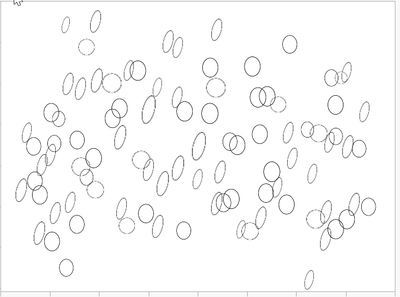
When I make this graphic get the script and copy it in my script then play it I got this :
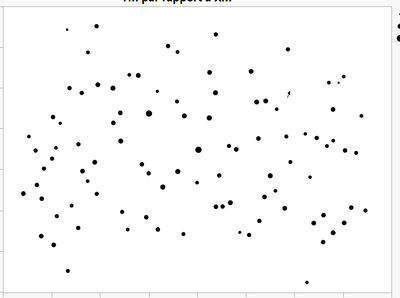
In fact I have to select this :
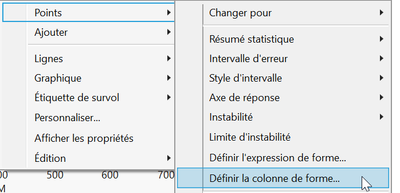
which "is define a column as shape" and it works. ( yes i'm french ).
But i would like to have a script which make it.
This script should be good :
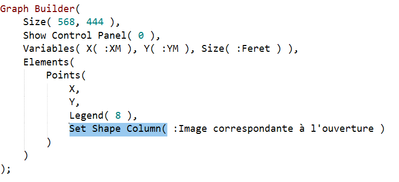
but it doesn't work.
And a second question is about marker size, i would like to decide how many size i want because JMP selection is too big when i use continuous variable as size.
Have a nice day,
Dorian Grousset
- Tags:
- Mass Customization
Accepted Solutions


- Mark as New
- Bookmark
- Subscribe
- Mute
- Subscribe to RSS Feed
- Get Direct Link
- Report Inappropriate Content
Re: Set column as Marker for a graphic.
Hi @CheeseProgram ,
Your JSL that you save should work, at least in looking it over, I would think it should work. One possibility why it doesn't might be the reference to the column. When you call the Set Shape Column() command, you might need to change the column reference within it to something like :"Column name"n with the parentheses and 'n' at the end. JMP has replaced the former :Name("Column name") with the :"name here"n format. It's possible that could be causing problems in the script.
I tried it out using the Big Class Families.jmp file in the sample directory. I got something like the following, which is basically what you want:
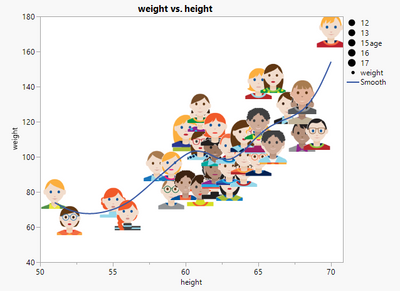
This is the JSL code saved from the Graph Builder platform I used to generate the above graph.
Graph Builder(
	Size( 534, 456 ),
	Show Control Panel( 0 ),
	Variables( X( :height ), Y( :weight ), Size( :age ) ),
	Elements(
		Points( X, Y, Legend( 3 ), Set Shape Column( :picture ) ),
		Smoother( X, Y, Legend( 4 ) )
	),
	SendToReport(
		Dispatch(
			{},
			"400",
			ScaleBox,
			{Legend Model(
				3,
				Properties(
					0,
					{Marker Scale( {N Labels( 5 )} )},
					Item ID( "age", 1 )
				)
			)}
		)
	)
);
I think you have to first manually set the image column as well as the number of levels (I'm using age as an ORDINAL size variable). You might need to change your :Feret size column to ordinal instead of continuous as this might allow for more flexibility when defining the number of levels.
If you right click on the size options and select size settings...
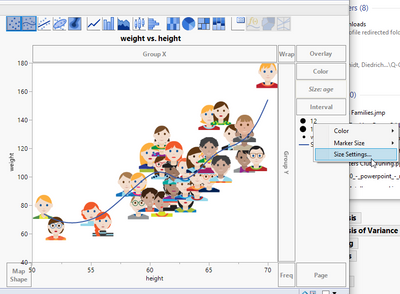
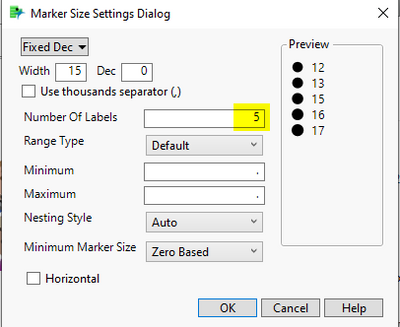
You can define the number of levels (or labels) to show on the legend.
When I save and run the above JSL script, it works as expected and reproduces the graph that I had manually created in order to generate the script to begin with.
I hope this helps.
Good luck!,
DS
- Mark as New
- Bookmark
- Subscribe
- Mute
- Subscribe to RSS Feed
- Get Direct Link
- Report Inappropriate Content
Re: Set column as Marker for a graphic.
Hi @CheeseProgram ,
Your JSL that you save should work, at least in looking it over, I would think it should work. One possibility why it doesn't might be the reference to the column. When you call the Set Shape Column() command, you might need to change the column reference within it to something like :"Column name"n with the parentheses and 'n' at the end. JMP has replaced the former :Name("Column name") with the :"name here"n format. It's possible that could be causing problems in the script.
I tried it out using the Big Class Families.jmp file in the sample directory. I got something like the following, which is basically what you want:
This is the JSL code saved from the Graph Builder platform I used to generate the above graph.
Graph Builder(
	Size( 534, 456 ),
	Show Control Panel( 0 ),
	Variables( X( :height ), Y( :weight ), Size( :age ) ),
	Elements(
		Points( X, Y, Legend( 3 ), Set Shape Column( :picture ) ),
		Smoother( X, Y, Legend( 4 ) )
	),
	SendToReport(
		Dispatch(
			{},
			"400",
			ScaleBox,
			{Legend Model(
				3,
				Properties(
					0,
					{Marker Scale( {N Labels( 5 )} )},
					Item ID( "age", 1 )
				)
			)}
		)
	)
);
I think you have to first manually set the image column as well as the number of levels (I'm using age as an ORDINAL size variable). You might need to change your :Feret size column to ordinal instead of continuous as this might allow for more flexibility when defining the number of levels.
If you right click on the size options and select size settings...
You can define the number of levels (or labels) to show on the legend.
When I save and run the above JSL script, it works as expected and reproduces the graph that I had manually created in order to generate the script to begin with.
I hope this helps.
Good luck!,
DS
- Mark as New
- Bookmark
- Subscribe
- Mute
- Subscribe to RSS Feed
- Get Direct Link
- Report Inappropriate Content
Re: Set column as Marker for a graphic.
Hello,
that's good, I just put the definition of my variable before my graphic construction, in fact i was confused by too much graph. For this part this is good.
For the second part is there any option to use continuous variable as size ? For exemple JMP use my continuous variable as coefficient to set the size. In my example my pictures has to be represented with their size so if I put groups of size it doesn't look good.
Thanks a lot and have nice day !
Recommended Articles
- © 2026 JMP Statistical Discovery LLC. All Rights Reserved.
- Terms of Use
- Privacy Statement
- Contact Us