- JMP will suspend normal business operations for our Winter Holiday beginning on Wednesday, Dec. 24, 2025, at 5:00 p.m. ET (2:00 p.m. ET for JMP Accounts Receivable).
Regular business hours will resume at 9:00 a.m. EST on Friday, Jan. 2, 2026. - We’re retiring the File Exchange at the end of this year. The JMP Marketplace is now your destination for add-ins and extensions.
- Subscribe to RSS Feed
- Mark Topic as New
- Mark Topic as Read
- Float this Topic for Current User
- Bookmark
- Subscribe
- Mute
- Printer Friendly Page
Discussions
Solve problems, and share tips and tricks with other JMP users.- JMP User Community
- :
- Discussions
- :
- Set Current Directory

- Mark as New
- Bookmark
- Subscribe
- Mute
- Subscribe to RSS Feed
- Get Direct Link
- Report Inappropriate Content
Set Current Directory
Hi.
I have written some sentences to set the current directory where to find the files of interest but it dones not work. Any help? Thanks
Set Current Directory( "/Users/manel/Desktop/Municipales_Spain" );

my_file = Pick File( {"All files|*"} );

dt = Open( my_file );

dt << Select Where(
	Código de Provincia == 44
);

SubDt = dt << Subset( output table name( "Matarranya1" ) );

Close( "Matarranya1", Save( "/Users/manel/Desktop/Municipales Spain/04_1995Terol.jmp" ) );

Close All( Data Tables, No Save );
Accepted Solutions


- Mark as New
- Bookmark
- Subscribe
- Mute
- Subscribe to RSS Feed
- Get Direct Link
- Report Inappropriate Content
Re: Set Current Directory
Would this do what you need?
path = "/Users/manel/Desktop/Municipales_Spain";

my_file = Pick File( "", path, {"All files|*"} );

dt = Open( my_file );

dt << Select Where(
	Código de Provincia == 44
);

SubDt = dt << Subset( output table name( "Matarranya1" ) );

Close( "Matarranya1", Save( path||"/04_1995Terol.jmp" ) );

Close All( Data Tables, No Save );
- Mark as New
- Bookmark
- Subscribe
- Mute
- Subscribe to RSS Feed
- Get Direct Link
- Report Inappropriate Content
Re: Set Current Directory
The scripting index (Help>>Scripting Index) doesn't say there's anything called set current directory(). Are you looking for
Set File Search Path(
	{Convert File Path( "$SAMPLE_DATA/" ), Convert File Path( "$SAMPLE_DATA/Time Series/" )}
)- Mark as New
- Bookmark
- Subscribe
- Mute
- Subscribe to RSS Feed
- Get Direct Link
- Report Inappropriate Content
Re: Set Current Directory
Hi Vince, I try your proposal but I can't change the directory.
Set File Search Path( {Convert File Path( "/Users/manel/Desktop/ELECCIONS/JMP coses/Scipts/" ), Convert File Path( "/Users/manel/Desktop/Municipales_Spain/" )} );
When I ask about the Default Directory();
I get:
"/Users/manel/Desktop/ELECCIONS/JMP coses/Scipts/"
- Mark as New
- Bookmark
- Subscribe
- Mute
- Subscribe to RSS Feed
- Get Direct Link
- Report Inappropriate Content
Re: Set Current Directory
Would this do what you need?
path = "/Users/manel/Desktop/Municipales_Spain";

my_file = Pick File( "", path, {"All files|*"} );

dt = Open( my_file );

dt << Select Where(
	Código de Provincia == 44
);

SubDt = dt << Subset( output table name( "Matarranya1" ) );

Close( "Matarranya1", Save( path||"/04_1995Terol.jmp" ) );

Close All( Data Tables, No Save );- Mark as New
- Bookmark
- Subscribe
- Mute
- Subscribe to RSS Feed
- Get Direct Link
- Report Inappropriate Content
Re: Set Current Directory
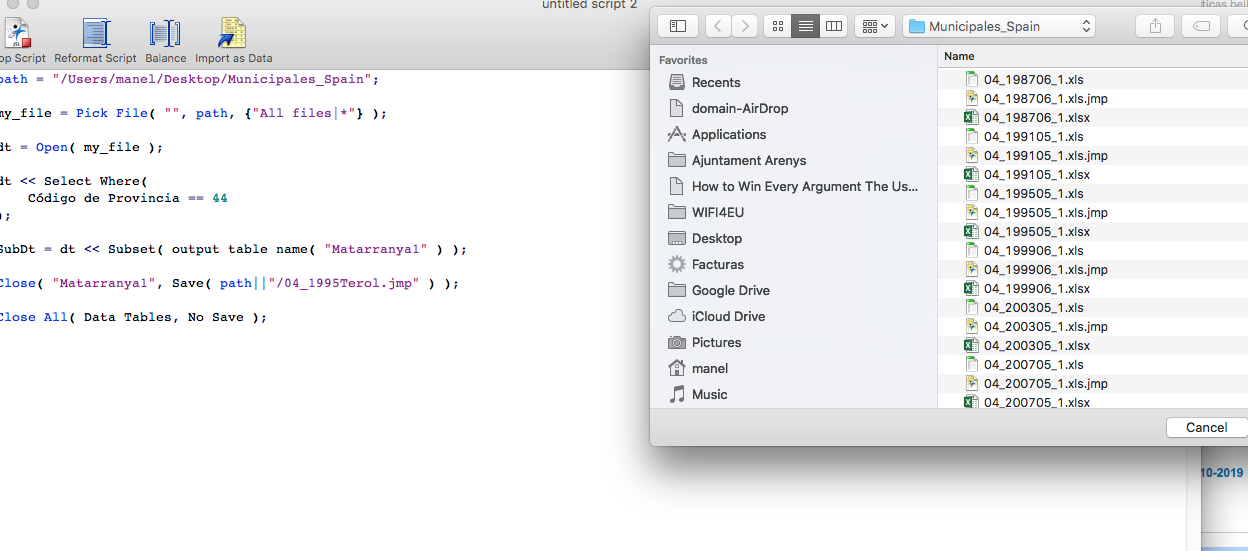
Eureka!
Thanks a lot!


- Mark as New
- Bookmark
- Subscribe
- Mute
- Subscribe to RSS Feed
- Get Direct Link
- Report Inappropriate Content
Re: Set Current Directory
Just to add to the other responses, you should not use the Set Current Directory() function. It has been deprecated because of bad behavior. The correct function to use is Set Default Directory().
Names Default To Here( 1 );
Set Default Directory( "$SAMPLE_DATA" );
Open( "Big Class.jmp" );Recommended Articles
- © 2025 JMP Statistical Discovery LLC. All Rights Reserved.
- Terms of Use
- Privacy Statement
- Contact Us