- JMP will suspend normal business operations for our Winter Holiday beginning on Wednesday, Dec. 24, 2025, at 5:00 p.m. ET (2:00 p.m. ET for JMP Accounts Receivable).
Regular business hours will resume at 9:00 a.m. EST on Friday, Jan. 2, 2026. - We’re retiring the File Exchange at the end of this year. The JMP Marketplace is now your destination for add-ins and extensions.
- Subscribe to RSS Feed
- Mark Topic as New
- Mark Topic as Read
- Float this Topic for Current User
- Bookmark
- Subscribe
- Mute
- Printer Friendly Page
Discussions
Solve problems, and share tips and tricks with other JMP users.- JMP User Community
- :
- Discussions
- :
- Script for table processing JMP14

- Mark as New
- Bookmark
- Subscribe
- Mute
- Subscribe to RSS Feed
- Get Direct Link
- Report Inappropriate Content
Script for table processing JMP14
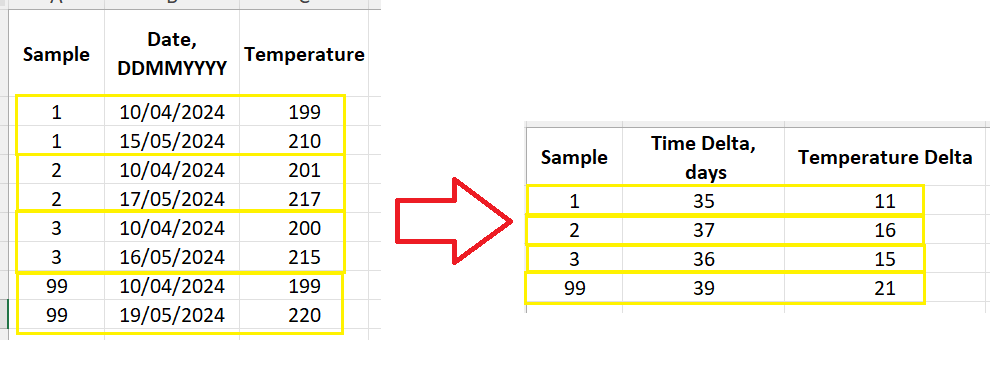
Hi. Could you please help me to write a script that takes the original table and make a new table out of it? Original table has two lines per each sample temperature measurement. In the output table we use only one row per each sample and calculate number of the days between the two measurements and the temperature delta.
- Tags:
- windows


- Mark as New
- Bookmark
- Subscribe
- Mute
- Subscribe to RSS Feed
- Get Direct Link
- Report Inappropriate Content
Re: Script for table processing JMP14
Could you provide the example data as JMP table so we don't have to create it from the image (formats can have big impact on the script)
- Mark as New
- Bookmark
- Subscribe
- Mute
- Subscribe to RSS Feed
- Get Direct Link
- Report Inappropriate Content
Re: Script for table processing JMP14
Hi Jarmo. Thanks for your support. Please find attached.
- Mark as New
- Bookmark
- Subscribe
- Mute
- Subscribe to RSS Feed
- Get Direct Link
- Report Inappropriate Content
Re: Script for table processing JMP14
You can use following formulas
:Temperature - (Col Moving Average(:Temperature, 1, 1, 0, :Sample) * 2 - :Temperature)and
(:Date - (Col Moving Average(:Date, 1, 1, 0, :Sample) * 2 - :Date)) / In Days(1)to calculate the deltas.

Then either create new table without the 0 rows (don't include formulas in that table) or remove formulas and delete those 0 rows.

I think this script should work for JMP14 (I cannot test it as I don't have access to that)
Names Default To Here(1);

dt = Open("$DOWNLOADS/source table.jmp");

dt << New Column("Time Delta", Numeric, "Continuous", Formula(
	:Temperature - (Col Moving Average(:Temperature, 1, 1, 0, :Sample) * 2
	- :Temperature)
));

dt << New Column("Temperature Delta", Numeric, "Continuous", Formula(
	(:Date - (Col Moving Average(:Date, 1, 1, 0, :Sample) * 2 - :Date)) /
	In Days(1)
));

dt << Select Where(:Temperature Delta == 0) << Invert Row Selection;

dt_subset = dt << Subset(
	Copy formula(0),
	Selected Rows(1),
	Columns({"Sample", "Time Delta", "Temperature Delta"}),
	Output Table("Deltas")
);

dt << Clear Select;- Mark as New
- Bookmark
- Subscribe
- Mute
- Subscribe to RSS Feed
- Get Direct Link
- Report Inappropriate Content
Re: Script for table processing JMP14
Kiitos Jarmo. Let me try it.
- Mark as New
- Bookmark
- Subscribe
- Mute
- Subscribe to RSS Feed
- Get Direct Link
- Report Inappropriate Content
Re: Script for table processing JMP14
Jarmo, thanks a lot for your solution. It is working.
But I have two more questions:
1. Could you please explain what does the formula with Moving Average calculation does? I just want to understand the logic of your approach...
2. I just noticed that if the first line goes with later date, it gives the negative Time delta... The Time Delta should always be positive. Will it work if I sort the source table in the very beginning so your script works correctly?
- Mark as New
- Bookmark
- Subscribe
- Mute
- Subscribe to RSS Feed
- Get Direct Link
- Report Inappropriate Content
Re: Script for table processing JMP14
Sorting should work, but you could consider also other formulas if that is the case (if the order is always later - earlier). I use Col Moving Average, so I can access to value from earlier row for the group.

- Mark as New
- Bookmark
- Subscribe
- Mute
- Subscribe to RSS Feed
- Get Direct Link
- Report Inappropriate Content
Re: Script for table processing JMP14
You could add two formula columns that calculate the maximum - minimum for each sample (temperature and date):

Or run below script to get your example table with formula columns.
New Table( "Example",
	Add Rows( 8 ),
	New Column( "Sample",
		Numeric,
		"Continuous",
		Format( "Best", 12 ),
		Set Values( [1, 1, 2, 2, 3, 3, 99, 99] )
	),
	New Column( "Temperature",
		Numeric,
		"Continuous",
		Format( "Best", 12 ),
		Set Values( [199, 210, 201, 217, 200, 215, 199, 220] )
	),
	New Column( "Temp Diff",
		Numeric,
		"Continuous",
		Format( "Best", 12 ),
		Formula(
			Col Maximum( :Temperature, :Sample )
			-Col Minimum( :Temperature, :Sample )
		)
	),
	New Column( "Date (ISO 9601 format)",
		Numeric,
		"Continuous",
		Format( "yyyy-mm-dd", 10 ),
		Input Format( "yyyy-mm-dd" ),
		Set Values(
			[3795552000, 3798576000, 3795552000, 3798748800, 3795552000, 3798662400,
			3795552000, 3798921600]
		)
	),
	New Column( "Date Diff",
		Numeric,
		"Continuous",
		Format( "Best", 12 ),
		Formula(
			Date Difference(
				Col Minimum( :"Date (ISO 9601 format)"n, :Sample ),
				Col Maximum( :"Date (ISO 9601 format)"n, :Sample ),
				"Day"
			)
		)
	)
)
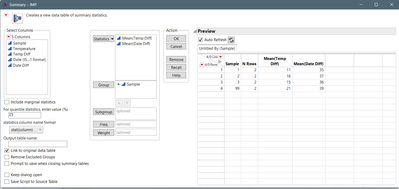
And then a quick summary will give you the table you were after:
- Mark as New
- Bookmark
- Subscribe
- Mute
- Subscribe to RSS Feed
- Get Direct Link
- Report Inappropriate Content
Re: Script for table processing JMP14
Hi Paul. Thanks for your idea. Will this approach work if the temperature delta sometimes is negative, and it is critical for me?
- Mark as New
- Bookmark
- Subscribe
- Mute
- Subscribe to RSS Feed
- Get Direct Link
- Report Inappropriate Content
Re: Script for table processing JMP14
Okay. I checked, it is not working. Can we use some other formula to pick the temperature measurement from the later date and from the earlier date?
Recommended Articles
- © 2026 JMP Statistical Discovery LLC. All Rights Reserved.
- Terms of Use
- Privacy Statement
- Contact Us