Turn on suggestions
Auto-suggest helps you quickly narrow down your search results by suggesting possible matches as you type.
- Don’t miss your chance to experience Discovery Summit Europe at our best available rate! Early bird registration through 31 Oct.
- Graph Builder Toolbar streamlines interactive graphing. Creates shortcuts on Report and GraphBuilder Helpers toolbars. Download and install the extension.
Options
- Subscribe to RSS Feed
- Mark Topic as New
- Mark Topic as Read
- Float this Topic for Current User
- Bookmark
- Subscribe
- Mute
- Printer Friendly Page
Discussions
Solve problems, and share tips and tricks with other JMP users.- User Community
- :
- Discussions
- :
- Re: Save the following as txt with JMP?

Level IX
- Mark as New
- Bookmark
- Subscribe
- Mute
- Subscribe to RSS Feed
- Get Direct Link
- Report Inappropriate Content
Save the following as txt with JMP?
Feb 27, 2024 07:35 AM
(1876 views)
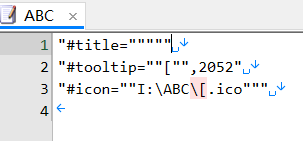
How can save txt files without excess "
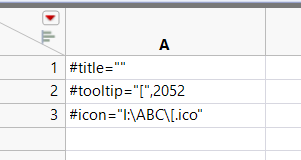
#title=""
#tooltip="[",2052
#icon="I:\ABC\[.ico"
Thanks!
1 ACCEPTED SOLUTION
Accepted Solutions


Super User
Solution
- Mark as New
- Bookmark
- Subscribe
- Mute
- Subscribe to RSS Feed
- Get Direct Link
- Report Inappropriate Content
Re: Save the following as txt with JMP?
You could get the values into a list, convert it to a string and then save that
Names Default To Here(1);

dt = New Table("Untitled",
	Add Rows(3),
	Compress File When Saved(1),
	New Column("Col",
		Character,
		"Nominal",
		Set Values({"#title=\!"\!"", "#tooltip=\!"[\!",2052", "#icon=\!"I:\ABC\!\[.ico\!""})
	)
);

vals = dt[0, 1];
str = Concat Items(vals, "\!N");
Save Text File("$TEMP/test.txt", str);

wait(0);
Web("$TEMP/test.txt");
-Jarmo
2 REPLIES 2
Level IX
- Mark as New
- Bookmark
- Subscribe
- Mute
- Subscribe to RSS Feed
- Get Direct Link
- Report Inappropriate Content
回复: Save the following as txt with JMP?
This result is incorrect.
Super User
Solution
- Mark as New
- Bookmark
- Subscribe
- Mute
- Subscribe to RSS Feed
- Get Direct Link
- Report Inappropriate Content
Re: Save the following as txt with JMP?
You could get the values into a list, convert it to a string and then save that
Names Default To Here(1);

dt = New Table("Untitled",
	Add Rows(3),
	Compress File When Saved(1),
	New Column("Col",
		Character,
		"Nominal",
		Set Values({"#title=\!"\!"", "#tooltip=\!"[\!",2052", "#icon=\!"I:\ABC\!\[.ico\!""})
	)
);

vals = dt[0, 1];
str = Concat Items(vals, "\!N");
Save Text File("$TEMP/test.txt", str);

wait(0);
Web("$TEMP/test.txt");
-Jarmo
Recommended Articles
- © 2026 JMP Statistical Discovery LLC. All Rights Reserved.
- Terms of Use
- Privacy Statement
- Contact Us