- Don’t miss your chance to experience Discovery Summit Europe at our best available rate! Early bird registration through 31 Oct.
- Graph Builder Toolbar streamlines interactive graphing. Creates shortcuts on Report and GraphBuilder Helpers toolbars. Download and install the extension.
- Subscribe to RSS Feed
- Mark Topic as New
- Mark Topic as Read
- Float this Topic for Current User
- Bookmark
- Subscribe
- Mute
- Printer Friendly Page
Discussions
Solve problems, and share tips and tricks with other JMP users.- User Community
- :
- Discussions
- :
- Row States markers & colors disappear when selected in 'data filter source box()...

- Mark as New
- Bookmark
- Subscribe
- Mute
- Subscribe to RSS Feed
- Get Direct Link
- Report Inappropriate Content
Row States markers & colors disappear when selected in 'data filter source box()'
I'm trying to use a graph as a filter for another graph using 'data filter source box()' (see script below).
Names Default To Here( 1 );
dt = Open( "$SAMPLE_DATA/Big Class.jmp" );
New Window( "Selection Filter",
	Data Filter Context Box(
		H List Box(
			DFSB = Data Filter Source Box(
				Graph Builder(
					Size( 208, 207 ),
					Show Control Panel( 0 ),
					Show Legend( 0 ),
					Variables( X( :age ) ),
					Elements( Points( X, Legend( 3 ) ) ),
					SendToReport( Dispatch( {}, "Graph Builder", OutlineBox, {Set Title( "Filter" )} ) )
				)
			),
			Platform( Current Data Table(), Bubble Plot( X( :weight ), Y( :height ), Sizes( :age ), Title Position( 0, 0 ) ) )
		)
	)
);
dt << clear row states;

wait(1);
rs = dt << get row states();
selected_rows = [35,36,37];
rs[selected_rows] = 945;
DFSB << set row states (dt,rs);
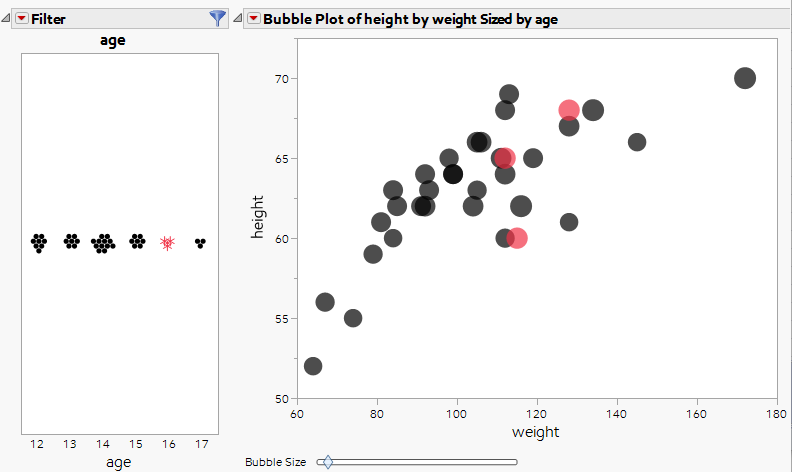
Let's say I've marked row 35,35,37 with red stars. For some reason, when I select these 3 points in the filter graph, those three points automatically returned to default black points (see attached picture comparison of before & after selection). Is there a way for these points to remain as red stars even when selected ?
Accepted Solutions



- Mark as New
- Bookmark
- Subscribe
- Mute
- Subscribe to RSS Feed
- Get Direct Link
- Report Inappropriate Content
Re: Row States markers & colors disappear when selected in 'data filter source box()'
Thanks for this report - I agree that this is a bug, and we are working on a fix for a future release. It looks like single-selection of points does not clear the row states, but brushing of points does clear the row states.

- Mark as New
- Bookmark
- Subscribe
- Mute
- Subscribe to RSS Feed
- Get Direct Link
- Report Inappropriate Content
Re: Row States markers & colors disappear when selected in 'data filter source box()'
I can replicate the behavior (on JMP15, 16 and 17), seems like a bug to me. You should contact tech support.
- Mark as New
- Bookmark
- Subscribe
- Mute
- Subscribe to RSS Feed
- Get Direct Link
- Report Inappropriate Content
Re: Row States markers & colors disappear when selected in 'data filter source box()'
Thanks for this report - I agree that this is a bug, and we are working on a fix for a future release. It looks like single-selection of points does not clear the row states, but brushing of points does clear the row states.
Recommended Articles
- © 2026 JMP Statistical Discovery LLC. All Rights Reserved.
- Terms of Use
- Privacy Statement
- Contact Us