- Discovery Summit 2026: Early User Edition - September 23-24.Register. It's free.
- Graph Builder Toolbar streamlines interactive graphing. Creates shortcuts on Report and GraphBuilder Helpers toolbars. Download and install the extension.
- Subscribe to RSS Feed
- Mark Topic as New
- Mark Topic as Read
- Float this Topic for Current User
- Bookmark
- Subscribe
- Mute
- Printer Friendly Page
Discussions
Solve problems, and share tips and tricks with other JMP users.- User Community
- :
- Discussions
- :
- Re: Return "True" or "False" if multiple columns contain string

- Mark as New
- Bookmark
- Subscribe
- Mute
- Subscribe to RSS Feed
- Get Direct Link
- Report Inappropriate Content
Return "True" or "False" if multiple columns contain string
Hi,
I would like to return "False" if any column data contains "hello" else return a "True"

I am only able to process 1 column with if, any ideas?
Accepted Solutions


- Mark as New
- Bookmark
- Subscribe
- Mute
- Subscribe to RSS Feed
- Get Direct Link
- Report Inappropriate Content
Re: Return "True" or "False" if multiple columns contain string
Here is my approach, which adds in the ability to set the range.
If( Row() == 1,
	dt = Current Data Table();
	rangelow = 2;
	rangehigh = 14;
);
If( Contains( dt[Row(), Index( rangelow, rangehigh )], "hello" ),
	"False",
	"True"
);
I have attached a sample data table with the formula already embedded in the column. I have also included @jthi response in a new column called Scan_RESULT


- Mark as New
- Bookmark
- Subscribe
- Mute
- Subscribe to RSS Feed
- Get Direct Link
- Report Inappropriate Content
Re: Return "True" or "False" if multiple columns contain string
Many ways of doing this. Do you need formula, is setting values enough, JSL or not, interactive solution?
Here is one possible formula, but I would remove it after it has been calculated once, as it won't re-evaluate in similar manner as formulas usually do (this might not be a problem in this case thou).
If(N Items(Loc(Current Data Table()[Row(), 1::N Cols()], "hello")) > 0,
	"FALSE"
,
	"TRUE"
);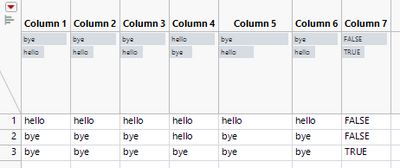
This script should give a little extra explanation, it won't create new column for you though. Open log and run this, you can also change Row() = 1 to Row() = 2 and so on, to see how it behaves on different rows
Names Default To Here(1);

dt = New Table("Untitled 9",
	Add Rows(3),
	New Column("Column 1", Character, "Nominal", Set Values({"hello", "bye", "bye"})),
	New Column("Column 2", Character, "Nominal", Set Values({"hello", "bye", "bye"})),
	New Column("Column 3", Character, "Nominal", Set Values({"hello", "bye", "bye"})),
	New Column("Column 4", Character, "Nominal", Set Values({"hello", "hello", "bye"})),
	New Column("Column 5", Character, "Nominal", Set Values({"hello", "bye", "bye"}), Set Display Width(75)),
	New Column("Column 6", Character, "Nominal", Set Values({"hello", "bye", "bye"}))
);

Row() = 1;
Show(Current Data Table()[Row(), 1::N Cols()]);
Show(Loc(Current Data Table()[Row(), 1::N Cols()], "hello"));
Show(N Items(Loc(Current Data Table()[Row(), 1::N Cols()], "hello")));
Show(N Items(Loc(Current Data Table()[Row(), 1::N Cols()], "hello")) > 0);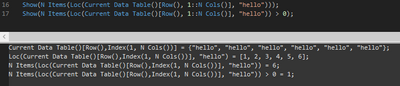
Edit:
Removed extra "," from the formula
- Mark as New
- Bookmark
- Subscribe
- Mute
- Subscribe to RSS Feed
- Get Direct Link
- Report Inappropriate Content
Re: Return "True" or "False" if multiple columns contain string
Hi,
I have a set of data with few thousand rows but would need to post process the data with a jmp script. So far my script has filtered out all the noise. Just need to know how to implement the solution you provided
- Mark as New
- Bookmark
- Subscribe
- Mute
- Subscribe to RSS Feed
- Get Direct Link
- Report Inappropriate Content
Re: Return "True" or "False" if multiple columns contain string
In terms of excel, this is my formula:
=IF(COUNTIF(R21602:AC21602,"HELLO")>0,"FALSE","TRUE")
- Mark as New
- Bookmark
- Subscribe
- Mute
- Subscribe to RSS Feed
- Get Direct Link
- Report Inappropriate Content
Re: Return "True" or "False" if multiple columns contain string
You would create new formula character column Create Formulas in JMP (jmp.com) as last column in the data table and copy paste the formula I provided. After that you could re-open the column properties by double clicking the column header and remove formula if you want to. If you have JMP16 enhanced log should give you script to perform this if it is needed.
I had one extra "," in the earlier post (I will edit it out):
If(N Items(Loc(Current Data Table()[Row(), 1::N Cols()], "hello")) > 0,
	"FALSE"
,
	"TRUE"
);- Mark as New
- Bookmark
- Subscribe
- Mute
- Subscribe to RSS Feed
- Get Direct Link
- Report Inappropriate Content
Re: Return "True" or "False" if multiple columns contain string
Hi,
I tried out the formula, but its only blank. Is there a way to do it as like excel =IF(COUNTIF(R21602:AC21602,"HELLO")>0,"FALSE","TRUE"), where we can only target specific range of columns to check for "Hello"?
Formula:
dt << New Column("Scan_RESULT", Character, Nominal Formula(If(N Items(Loc(dt[Row(), 1::N Cols()], "hello")) > 0)),
"FALSE"
,
"TRUE"
);
- Mark as New
- Bookmark
- Subscribe
- Mute
- Subscribe to RSS Feed
- Get Direct Link
- Report Inappropriate Content
Re: Return "True" or "False" if multiple columns contain string
Here is my approach, which adds in the ability to set the range.
If( Row() == 1,
	dt = Current Data Table();
	rangelow = 2;
	rangehigh = 14;
);
If( Contains( dt[Row(), Index( rangelow, rangehigh )], "hello" ),
	"False",
	"True"
);
I have attached a sample data table with the formula already embedded in the column. I have also included @jthi response in a new column called Scan_RESULT

- Mark as New
- Bookmark
- Subscribe
- Mute
- Subscribe to RSS Feed
- Get Direct Link
- Report Inappropriate Content
Re: Return "True" or "False" if multiple columns contain string
What if I'm interested to get the number of times "hello" apears in this range of col's?
And a another situation - what if the word "hello" is part of the text in the cell in certain col's?
- Mark as New
- Bookmark
- Subscribe
- Mute
- Subscribe to RSS Feed
- Get Direct Link
- Report Inappropriate Content
Re: Return "True" or "False" if multiple columns contain string
1. You can use Loc to check for matches
If(Row() == 1,
	dt = Current Data Table();
	rangelow = 1;
	rangehigh = 6;
);
N Items(Loc(dt[Row(), Index(rangelow, rangehigh)], "hello"));
2. I assume you wish to know how many times 'hello' appears in that range. Loop + Contains or Substitute + Length are options
If(Row() == 1,
	dt = Current Data Table();
	rangelow = 1;
	rangehigh = 6;
);
str = Concat Items(dt[Row(), Index(rangelow, rangehigh)], " ");
new_str = Substitute(str, "hello", "");
(Length(str) - Length(new_str)) / Length("hello")
If(Row() == 1,
	dt = Current Data Table();
	rangelow = 1;
	rangehigh = 6;
);
res = Filter Each({val}, dt[Row(), Index(rangelow, rangehigh)], Contains(val, "hello"));
N Items(res);
Names Default To Here(1);

dt = New Table("Untitled",
	Add Rows(3),
	New Column("Column 1", Character, "Nominal", Set Values({"hello", "bye", "bye"})),
	New Column("Column 2", Character, "Nominal", Set Values({"hello", "bye", "bye"})),
	New Column("Column 3", Character, "Nominal", Set Values({"hello", "hello", "bye"})),
	New Column("Column 4", Character, "Nominal", Set Values({"hello", "a hello a", "bye"})),
	New Column("Column 5", Character, "Nominal", Set Values({"hello", "bye", "bye"}), Set Display Width(75)),
	New Column("Column 6", Character, "Nominal", Set Values({"hello", "bye", "bye"}))
);

dt << new column("hellocount", numeric, continuous, formula(
If( Row() == 1,
	dt = Current Data Table();
	rangelow = 1;
	rangehigh = 6;
);
N Items(Loc(dt[Row(), Index(rangelow, rangehigh)], "hello"));
));

dt << new column("hellocountwithin", numeric, continuous, formula(
	If(Row() == 1,
		dt = Current Data Table();
		rangelow = 1;
		rangehigh = 6;
	);
	str = Concat Items(dt[Row(), Index(rangelow, rangehigh)], " ");
	new_str = Substitute(str, "hello", "");
	(Length(str) - Length(new_str)) / Length("hello");
));

dt << new column("hellocountwithin2", numeric, continuous, formula(
	If(Row() == 1,
		dt = Current Data Table();
		rangelow = 1;
		rangehigh = 6;
	);
	res = Filter Each({val}, dt[Row(), Index(rangelow, rangehigh)], Contains(val, "hello"));
	N Items(res);
));- Mark as New
- Bookmark
- Subscribe
- Mute
- Subscribe to RSS Feed
- Get Direct Link
- Report Inappropriate Content
Re: Return "True" or "False" if multiple columns contain string
Thanks a lot. The formula worked perfectly. However, I realized my data is a bit more complex.
I have two target words, for example "hello" and "Hi". In some cells, "Hi" may appear two or three times, and in others, both "Hello" and "Hi" may be present. I need to count the number of cells that contain either word—each cell should be counted only once regardless of how many times the words appear within it.
Recommended Articles
- © 2026 JMP Statistical Discovery LLC. All Rights Reserved.
- Terms of Use
- Privacy Statement
- Contact Us