- JMP will suspend normal business operations for our Winter Holiday beginning on Wednesday, Dec. 24, 2025, at 5:00 p.m. ET (2:00 p.m. ET for JMP Accounts Receivable).
Regular business hours will resume at 9:00 a.m. EST on Friday, Jan. 2, 2026. - We’re retiring the File Exchange at the end of this year. The JMP Marketplace is now your destination for add-ins and extensions.
- Subscribe to RSS Feed
- Mark Topic as New
- Mark Topic as Read
- Float this Topic for Current User
- Bookmark
- Subscribe
- Mute
- Printer Friendly Page
Discussions
Solve problems, and share tips and tricks with other JMP users.- JMP User Community
- :
- Discussions
- :
- Reference lines in control chart builder

- Mark as New
- Bookmark
- Subscribe
- Mute
- Subscribe to RSS Feed
- Get Direct Link
- Report Inappropriate Content
Reference lines in control chart builder
I am working in Control Chart Builder and attempting to add a reference line in any plot that isn’t the XBar chart, like such
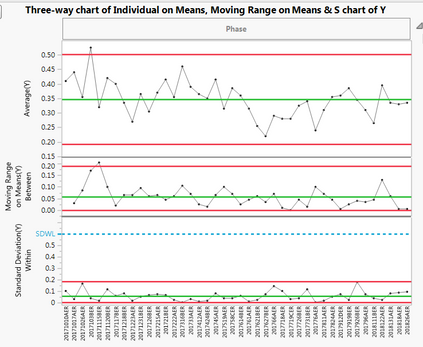
When I save the script to the window, and run said script, the reference line on the S Chart is gone, which is sad. This problem holds for any chart made in Control Chart Builder that is not an XBar chart. Here is the code that is saves to the Table.
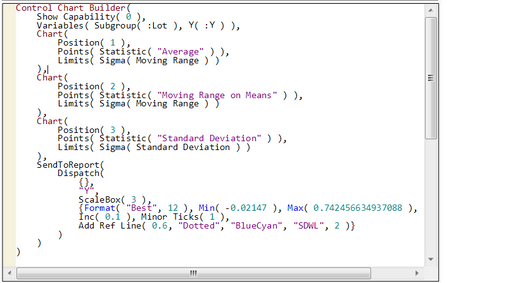
Please help, thank you!
Accepted Solutions


- Mark as New
- Bookmark
- Subscribe
- Mute
- Subscribe to RSS Feed
- Get Direct Link
- Report Inappropriate Content
Re: Reference lines in control chart builder
Hey @JosephMaurer
Welcome to the community! I'm not sure why Dispatch stuff is not working in the script. You want to customize a specific axis box, and for whatever reason, the scale box stuff is not working. I tried replacing the ScaleBox reference with the appropriate axis box reference, but that didn't work.
So, here's a good work around:
1. Get the control chart builder object as a report and save it as a variable.
2. Send a message to the appropriate axis box to update the max value and draw the ref line.
Here's an example with an X-bar and S chart. I found the appropriate axis box by looking in the tree structure.
ccb = Control Chart Builder(
	Size( 522, 446 ),
	Show Control Panel( 0 ),
	Show Capability( 0 ),
	Variables( Subgroup( :Group ), Y( :X ) ),
	Chart( Position( 1 ) ),
	Chart(
		Position( 2 ),
		Points( Statistic( "Standard Deviation" ) ),
		Limits( Sigma( Standard Deviation ) )
	),
	SendToReport(
		Dispatch(
			{},
			"X",
			Axis Box( 3 ),
			{Max( 7.82258064516129 ), Add Ref Line(
				6,
				"Dashed",
				"Medium Dark Blue",
				"",
				2
			)}
		)
	)
) << Report;

ccb[axisbox(3)] << Max(8);
ccb[axisbox(3)] << Add Ref Line(6,"Dashed","Medium Dark Blue","SDWL",2);
You can delete everything in the SendToReport function.
Hope that helps!
- Mark as New
- Bookmark
- Subscribe
- Mute
- Subscribe to RSS Feed
- Get Direct Link
- Report Inappropriate Content
Re: Reference lines in control chart builder
Hey @JosephMaurer
Welcome to the community! I'm not sure why Dispatch stuff is not working in the script. You want to customize a specific axis box, and for whatever reason, the scale box stuff is not working. I tried replacing the ScaleBox reference with the appropriate axis box reference, but that didn't work.
So, here's a good work around:
1. Get the control chart builder object as a report and save it as a variable.
2. Send a message to the appropriate axis box to update the max value and draw the ref line.
Here's an example with an X-bar and S chart. I found the appropriate axis box by looking in the tree structure.
ccb = Control Chart Builder(
	Size( 522, 446 ),
	Show Control Panel( 0 ),
	Show Capability( 0 ),
	Variables( Subgroup( :Group ), Y( :X ) ),
	Chart( Position( 1 ) ),
	Chart(
		Position( 2 ),
		Points( Statistic( "Standard Deviation" ) ),
		Limits( Sigma( Standard Deviation ) )
	),
	SendToReport(
		Dispatch(
			{},
			"X",
			Axis Box( 3 ),
			{Max( 7.82258064516129 ), Add Ref Line(
				6,
				"Dashed",
				"Medium Dark Blue",
				"",
				2
			)}
		)
	)
) << Report;

ccb[axisbox(3)] << Max(8);
ccb[axisbox(3)] << Add Ref Line(6,"Dashed","Medium Dark Blue","SDWL",2);
You can delete everything in the SendToReport function.
Hope that helps!

- Mark as New
- Bookmark
- Subscribe
- Mute
- Subscribe to RSS Feed
- Get Direct Link
- Report Inappropriate Content
Re: Reference lines in control chart builder
I encounter the same issue, all reference lines I added are gone once I embed the chart into the table. Weird thing is it seems work yesterday. I found people always show the solution in a script, but I am not familiar with the JMP script. Is there a quick start script introduction for new JMPer?
Recommended Articles
- © 2025 JMP Statistical Discovery LLC. All Rights Reserved.
- Terms of Use
- Privacy Statement
- Contact Us