- Don’t miss your chance to experience Discovery Summit Europe at our best available rate! Early bird registration through 31 Oct.
- Graph Builder Toolbar streamlines interactive graphing. Creates shortcuts on Report and GraphBuilder Helpers toolbars. Download and install the extension.
- Subscribe to RSS Feed
- Mark Topic as New
- Mark Topic as Read
- Float this Topic for Current User
- Bookmark
- Subscribe
- Mute
- Printer Friendly Page
Discussions
Solve problems, and share tips and tricks with other JMP users.- User Community
- :
- Discussions
- :
- Rearranging Data

- Mark as New
- Bookmark
- Subscribe
- Mute
- Subscribe to RSS Feed
- Get Direct Link
- Report Inappropriate Content
Rearranging Data
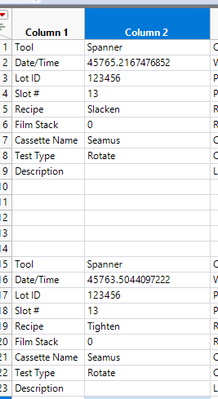
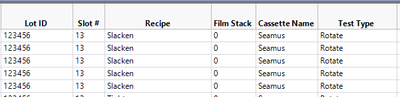
I have a data set that comes in from Excel whereby several key pieces of information are arranged in individual cells. To make this data useful in JMP, I came up with a scheme to populate the data systematically in columns using lag statements. I have some consistency in the layout which allows me to use fixed lag values. I included an example for rearranging the data contained in the cell to the right of "Recipe". I suspect that what I'm doing is more cumbersome than necessary if anyone has a better suggestion?
Before
After
	New Column("Recipe2", Character, "Nominal", Formula(If(!Is Missing(:Column 7), If(:Column 1 == "Recipe", :Column 2, Lag(:Recipe2, 1)))));
	New Column("Recipe", Character, "Nominal", Formula(If(!Is Missing(:Column 7), If(Is Missing(:"Recipe2"n), Lag(:"Recipe2"n, -4), :"Recipe2"n))));
Slán
SpannerHead
Accepted Solutions
- Mark as New
- Bookmark
- Subscribe
- Mute
- Subscribe to RSS Feed
- Get Direct Link
- Report Inappropriate Content
Re: Rearranging Data
I came up with a simplification of the approach I'm already using to eliminate the need for pairs of columns.
New Column("Recipe", Character, "Nominal", Formula(If(!Is Missing(:Column 7), If(Lag(:Column 1, -4) == "Recipe", Lag(:Column 2, -4), Lag(:Recipe, 1)))));Slán
SpannerHead


- Mark as New
- Bookmark
- Subscribe
- Mute
- Subscribe to RSS Feed
- Get Direct Link
- Report Inappropriate Content
Re: Rearranging Data
Split and join/update could potentially be enough but difficult to say without seeing your data. For example from here

You can split your data and get clean single row which you could possibly join/update to your data

With multiple groups? you could add running number to the groups and use that as group in split

- Mark as New
- Bookmark
- Subscribe
- Mute
- Subscribe to RSS Feed
- Get Direct Link
- Report Inappropriate Content
Re: Rearranging Data
My suggestions to reformat the Excel sheets you are importing in the first place. I suggest to my clients who all use excel is to create the data table the way you want in JMP and then export it into excel to be populated.
- Mark as New
- Bookmark
- Subscribe
- Mute
- Subscribe to RSS Feed
- Get Direct Link
- Report Inappropriate Content
Re: Rearranging Data
I came up with a simplification of the approach I'm already using to eliminate the need for pairs of columns.
New Column("Recipe", Character, "Nominal", Formula(If(!Is Missing(:Column 7), If(Lag(:Column 1, -4) == "Recipe", Lag(:Column 2, -4), Lag(:Recipe, 1)))));Slán
SpannerHead
Recommended Articles
- © 2026 JMP Statistical Discovery LLC. All Rights Reserved.
- Terms of Use
- Privacy Statement
- Contact Us