cancel
Showing results for 
Show  only  | Search instead for 
Did you mean: 
  • Sign-in to the JMP Community will be unavailable intermittently Dec. 6-7 due to a system update. Thank you for your understanding!
  • We’re retiring the File Exchange at the end of this year. The JMP Marketplace is now your destination for add-ins and extensions.
  • JMP 19 is here! Learn more about the new features.

Discussions

Solve problems, and share tips and tricks with other JMP users.
Choose Language Hide Translation Bar
MathStatChem
Level VII

Question: how to use Recode to remove carriage returns

One thing I noticed in JMP 16 (that is an improvement over previous versions) is that if you import data from Excel and an individual cell in the Excel worksheet has a carriage return in the cell, JMP now imports that entire cell and does not interpret that as an "end of record" and force a new row ---> Yay!  I've asked for that for a long time and it is great to see that change.


But now I face the issue of getting rid of the carriage return after I import the data.  I would like to use Recode (Cols > Recode) to do this, but I don't see a direct way to do this.  Perhaps using a Regex in in the Replace String approach would work?  Is there a good way to do this?  

1 REPLY 1
txnelson
Super User

Re: Question: how to use Recode to remove carriage returns

\!r is the escape character that parses to a carriage return. Given the embedded carriage return in the below data table
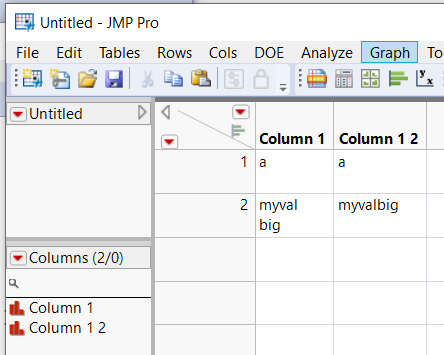
apic.PNG

The following JSL recognizes and removes it

Names Default To Here( 1 );
dt = current data tahle() );
dt << Begin Data Update;
col1 = dt << New Column( dt:Column 1 );
col1 << Set Name( "Column 1 2" );
dt << Move Selected Columns( {col1}, after( dt:Column 1 ) );
dt << Recode Column(
	dt:Column 1,
	{Map Value( _rcOrig, {"myval\!rbig", "myvalbig"}, Unmatched( _rcNow ) )},
	Update Properties( 1 ),
	Target Column( col1 )
);
dt << End Data Update;
Jim

Recommended Articles