- Don’t miss your chance to experience Discovery Summit Europe at our best available rate! Early bird registration through 31 Oct.
- Image to Table JMP extension imports single or batch images as data tables. Useful to extract curves from pictures or convert image data to curve data to use in analyses like Functional Data Explorer. Download and install the extension.
- Subscribe to RSS Feed
- Mark Topic as New
- Mark Topic as Read
- Float this Topic for Current User
- Bookmark
- Subscribe
- Mute
- Printer Friendly Page
Discussions
Solve problems, and share tips and tricks with other JMP users.- User Community
- :
- Discussions
- :
- Pause Script Until After User Manually Works on Data Table

- Mark as New
- Bookmark
- Subscribe
- Mute
- Subscribe to RSS Feed
- Get Direct Link
- Report Inappropriate Content
Pause Script Until After User Manually Works on Data Table
Folks,
I'm trying to pause my script so that a user can manually work on an open data table (manually examine data and add/delete rows or columns) before proceeding. I've tried using a dialog box to accomplish this, but I can't work on the data table until after the dialog box is accepted. Does anyone have any suggestions on how I can accomplish this?
Clear Log();
Names Default to Here ( 1 );
dt.bigclass = Open( "$SAMPLE_DATA/Big Class.JMP" );
New Window( "WAIT!",
<<modal,
Beep(),
V List Box(
Text Box(
"Manually Add/Delete Rows or Columns In Data Table"
),
)
);
// User adds or subtracts rows/columns from open data table before proceeding
// Other instructions
Accepted Solutions


- Mark as New
- Bookmark
- Subscribe
- Mute
- Subscribe to RSS Feed
- Get Direct Link
- Report Inappropriate Content
Re: Pause Script Until After User Manually Works on Data Table
Just don't make the new window modal. Then have all the actions inside of the OK button (or whatever button).
Names Default To Here( 1 );
dt.bigclass = Open( "$SAMPLE_DATA/Big Class.JMP" );
New Window( "WAIT!",
	Beep(),
	V List Box( Text Box( "Manually Add/Delete Rows or Columns In Data Table" ), ),
	Hlistbox(
		Buttonbox("OK",
			<<Set Function(
				Function({self},
					print("do stuff");
					self<<Close Window;
				)
			)

		)
	)
);- Mark as New
- Bookmark
- Subscribe
- Mute
- Subscribe to RSS Feed
- Get Direct Link
- Report Inappropriate Content
Re: Pause Script Until After User Manually Works on Data Table
Just don't make the new window modal. Then have all the actions inside of the OK button (or whatever button).
Names Default To Here( 1 );
dt.bigclass = Open( "$SAMPLE_DATA/Big Class.JMP" );
New Window( "WAIT!",
	Beep(),
	V List Box( Text Box( "Manually Add/Delete Rows or Columns In Data Table" ), ),
	Hlistbox(
		Buttonbox("OK",
			<<Set Function(
				Function({self},
					print("do stuff");
					self<<Close Window;
				)
			)

		)
	)
);- Mark as New
- Bookmark
- Subscribe
- Mute
- Subscribe to RSS Feed
- Get Direct Link
- Report Inappropriate Content
Re: Pause Script Until After User Manually Works on Data Table
Thanks Vince,
That was easy. I guess I need to read about Modal properties.

- Mark as New
- Bookmark
- Subscribe
- Mute
- Subscribe to RSS Feed
- Get Direct Link
- Report Inappropriate Content
Re: Pause Script Until After User Manually Works on Data Table
Vince,
If I understand the user's question, I am trying to do a very similar thing, i.e. allow the user to edit a table before proceeding with the script. Maybe I didn't do something right, but when I use the script above within my script the program just keeps running causing an error because the necessary table edits have not been accomplished.
So, if I use modal, the script stops but doesn't allow a table edit.
If I don't use modal a table edit is allowed before pressing OK but the script keeps running without the necessary edit.
I want the script to stop running and not proceed until the user indicates that the table edits have been made.
Can this be done?
Thanks in advance for your help.
Patrick Carroll


- Mark as New
- Bookmark
- Subscribe
- Mute
- Subscribe to RSS Feed
- Get Direct Link
- Report Inappropriate Content
Re: Pause Script Until After User Manually Works on Data Table
The script and idea provided by Vince should work, you have to place the actions which you want to perform, after button is pressed, inside the buttons function call
Button Box("OK",
	<<Set Function(Function({self},
		Print("do stuff"); // this
		self << Close Window; // and this
	))
The script which will be executed after the "OK" button is pressed is this:
		Print("do stuff");
		self << Close Window;
There are other ways of doing this but this is most likely the easiest option and I would start with it.

- Mark as New
- Bookmark
- Subscribe
- Mute
- Subscribe to RSS Feed
- Get Direct Link
- Report Inappropriate Content
Re: Pause Script Until After User Manually Works on Data Table
For this particular example, if you are wanting the user to perform manual operations on a table, you can create a data view/data box for that table that will show in the same window. For example:
Names Default To Here( 1 );

dt = New Table( "My Table" );
dt << Add Rows( 10 );
dt << New Column( "X1", Set Values( J( 10, 1, Random Normal() ) ) );
dt << New Column( "X2", Set Values( J( 10, 1, Random Uniform() ) ) );

nw = New Window( "Prepare Your Data",
	hb = H List Box(
		V List Box(
			Text Box( "Delete Unneccesary Columns in Table and then click OK" ),
			Button Box( "OK", nw << close window )
		),

		Panel Box( "Data Table View",
			Border Box( Sides( 15 ), dt << new data box(), <<border( 1 ) )
		)
	)
);
Wait( 0 );
nw << bring window to front;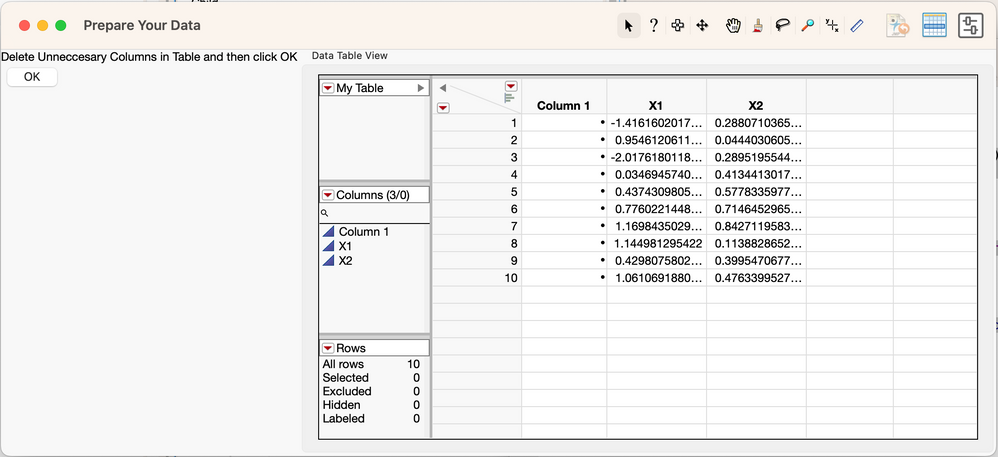
- Mark as New
- Bookmark
- Subscribe
- Mute
- Subscribe to RSS Feed
- Get Direct Link
- Report Inappropriate Content
Re: Pause Script Until After User Manually Works on Data Table
I'm guessing you are doing something like this.
Names Default To Here( 1 );
dt.bigclass = Open( "$SAMPLE_DATA/Big Class.JMP" );
New Window( "WAIT!",
	Beep(),
	V List Box( Text Box( "Manually Add/Delete Rows or Columns In Data Table" ), ),
	Hlistbox(
		Buttonbox("OK",
			<<Set Function(
				Function({self},
					print("do stuff");
					self<<Close Window;
				)
			)

		)
	)
);

print("this shouldn't show until okay");
// other stuff
where you don't want the "this shouldn't show until okay
You need to not do ANYTHING else until okay is pressed though. The normal way I do this is by using functions and calling them from the okay button.
Names Default To Here( 1 );
dt.bigclass = Open( "$SAMPLE_DATA/Big Class.JMP" );

action_okay = function({},
	//{DEFAULT LOCAL}, //uncomment this if you want the variables to be local only (don't exist outside the function)
	// put everything you want to do after okay button in here.
	print("this shouldn't show until okay");
	// other stuff
);
New Window( "WAIT!",
	Beep(),
	V List Box( Text Box( "Manually Add/Delete Rows or Columns In Data Table" ), ),
	Hlistbox(
		Buttonbox("OK",
			<<Set Function(
				Function({self},
					print("do stuff");
					action_okay();
					self<<Close Window;
				)
			)

		)
	)
);
Recommended Articles
- © 2026 JMP Statistical Discovery LLC. All Rights Reserved.
- Terms of Use
- Privacy Statement
- Contact Us