- JMP will suspend normal business operations for our Winter Holiday beginning on Wednesday, Dec. 24, 2025, at 5:00 p.m. ET (2:00 p.m. ET for JMP Accounts Receivable).
Regular business hours will resume at 9:00 a.m. EST on Friday, Jan. 2, 2026. - We’re retiring the File Exchange at the end of this year. The JMP Marketplace is now your destination for add-ins and extensions.
- Subscribe to RSS Feed
- Mark Topic as New
- Mark Topic as Read
- Float this Topic for Current User
- Bookmark
- Subscribe
- Mute
- Printer Friendly Page
Discussions
Solve problems, and share tips and tricks with other JMP users.- JMP User Community
- :
- Discussions
- :
- Paired t-test on long format table

- Mark as New
- Bookmark
- Subscribe
- Mute
- Subscribe to RSS Feed
- Get Direct Link
- Report Inappropriate Content
Paired t-test on long format table
Hi,
I am rather new to JMP so perhaps I am missing something obvious.
I would like to run a paired t-test. I made a toy dataset with 8 cases and 2 columns: one "before" and one "after". Running a paired t-test on this wide format data is no problem: Analyze -> Specialized Modeling -> Matched Pairs and give both columns as "Y" inputs. Easy!
My "wide format" toy data:
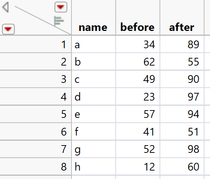
But can I do the same thing with the data in a long format? It's the same data but now there is a "condition" column with "before" and "after" values, and a "name" column (for example) that encodes the pairing of values. The same data in long format looks like this:
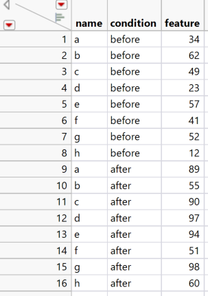
I understand that I could just manually turn this into a broad format table. But this becomes tedious if there are multiple variables (i.e.: imagine if there is not just "feature" but "feature1", "feature2", etc).
Is it possible to run a paired t-test directly on this long format?
- Tags:
- windows
Accepted Solutions


- Mark as New
- Bookmark
- Subscribe
- Mute
- Subscribe to RSS Feed
- Get Direct Link
- Report Inappropriate Content
Re: Paired t-test on long format table
I do not see an option to perform a matched t test in a long format. However, you do not have to manually move the data. You can simply use the Split Platform to do that.
Given your data table
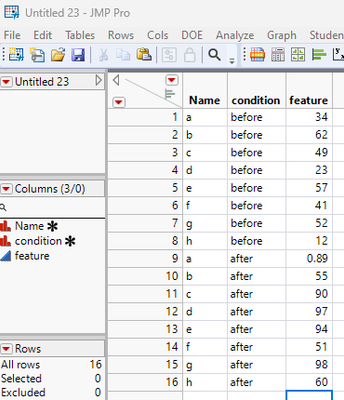
Go the Split Platform Tables=>Split
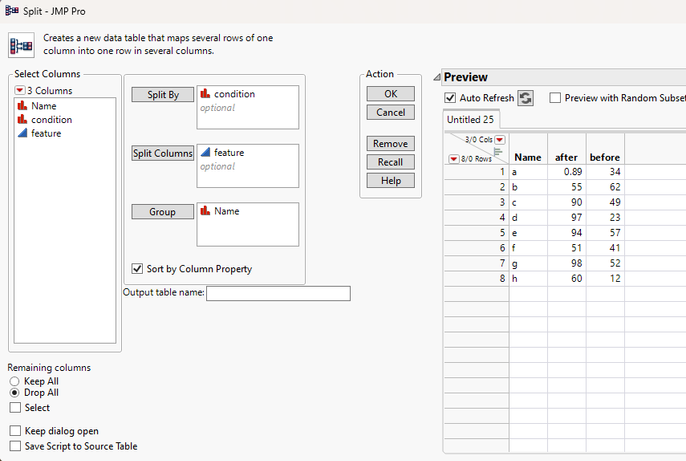
Fill in the Split By, Split Columns and Group boxes, and Click OK and a new transformed data table will be created.
You then can run the Matched Pairs
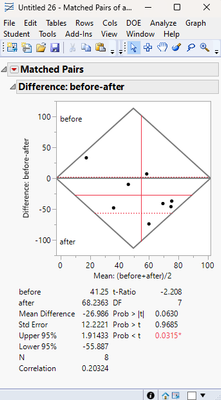
There is an old school method for performing the Matched Pairs analysis by using Anova. If you run Fit Model, and specify both the Condition and Name as factors
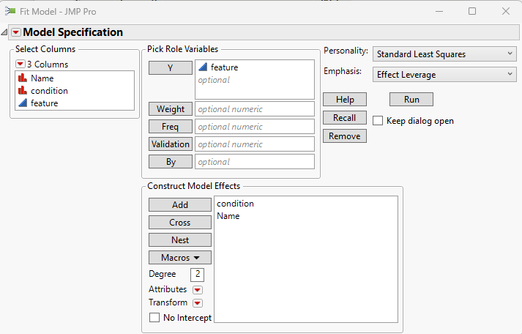
You will get the same result.
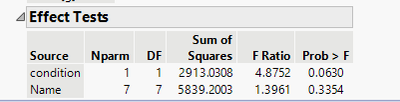
F = t squared
F= 4.8752 = -2.208^2 = t
Of course you don't get the nice graphics of the Matched Pairs t-test Platform
- Mark as New
- Bookmark
- Subscribe
- Mute
- Subscribe to RSS Feed
- Get Direct Link
- Report Inappropriate Content
Re: Paired t-test on long format table
I do not see an option to perform a matched t test in a long format. However, you do not have to manually move the data. You can simply use the Split Platform to do that.
Given your data table
Go the Split Platform Tables=>Split
Fill in the Split By, Split Columns and Group boxes, and Click OK and a new transformed data table will be created.
You then can run the Matched Pairs
There is an old school method for performing the Matched Pairs analysis by using Anova. If you run Fit Model, and specify both the Condition and Name as factors
You will get the same result.
F = t squared
F= 4.8752 = -2.208^2 = t
Of course you don't get the nice graphics of the Matched Pairs t-test Platform
- Mark as New
- Bookmark
- Subscribe
- Mute
- Subscribe to RSS Feed
- Get Direct Link
- Report Inappropriate Content
Re: Paired t-test on long format table
Thanks a lot, Jim!
I confirmed the Split By function. More importantly, I confirmed that even if you have several features (feature1, feature2, etc), the Split By function will split all of them (into for example "feature1 before", "feature1 after", "feature2 before", "feature2 after", etc). Then, you can run the paired t-tests on those columns.
I accepted this as the solution, although - as you also wrote - there is probably no way to directly run the pairwise t-tests on the long format table.


- Mark as New
- Bookmark
- Subscribe
- Mute
- Subscribe to RSS Feed
- Get Direct Link
- Report Inappropriate Content
Re: Paired t-test on long format table
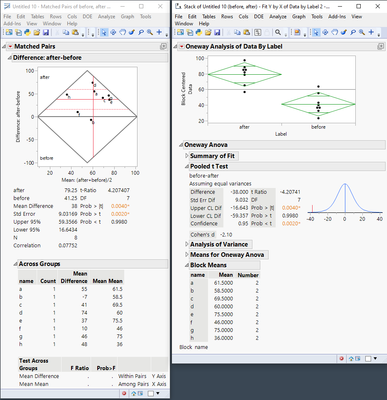
Here is a way to run the analysis on the tall table using Fit Y by X. In this case, use Data as Y, Label as X, and Name as the Block:
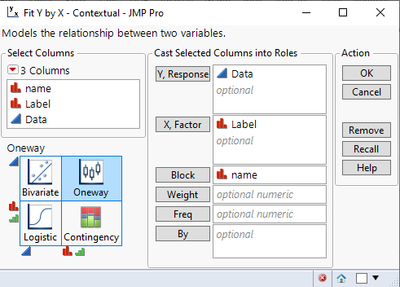
The summary statistics are the same, but the reports are different.

- Mark as New
- Bookmark
- Subscribe
- Mute
- Subscribe to RSS Feed
- Get Direct Link
- Report Inappropriate Content
Re: Paired t-test on long format table
Hi @RankBarracuda15 : And to extend @txnelson 's "old School" method, it can be generalized to include a wider class of of problems: What if you have more than 2 conditions? Old School. Multiple, balanced or unbalanced, reps across condition*name combinations? Old School. And, strictly speaking, the "old school" method should have "name" as a random effect. But in the simpler case such as you have, it doesn't really matter.

- Mark as New
- Bookmark
- Subscribe
- Mute
- Subscribe to RSS Feed
- Get Direct Link
- Report Inappropriate Content
Re: Paired t-test on long format table
Just to add that you can also add a new column that computes the difference (After - Before) and use this result as your response.
- Mark as New
- Bookmark
- Subscribe
- Mute
- Subscribe to RSS Feed
- Get Direct Link
- Report Inappropriate Content
Re: Paired t-test on long format table
Yup @RankBarracuda15 , as @Mark_Bailey said, then just use the distribution platform.
Recommended Articles
- © 2025 JMP Statistical Discovery LLC. All Rights Reserved.
- Terms of Use
- Privacy Statement
- Contact Us