- Don’t miss your chance to experience Discovery Summit Europe at our best available rate! Early bird registration through 31 Oct.
- Image to Table JMP extension imports single or batch images as data tables. Useful to extract curves from pictures or convert image data to curve data to use in analyses like Functional Data Explorer. Download and install the extension.
- Subscribe to RSS Feed
- Mark Topic as New
- Mark Topic as Read
- Float this Topic for Current User
- Bookmark
- Subscribe
- Mute
- Printer Friendly Page
Discussions
Solve problems, and share tips and tricks with other JMP users.- User Community
- :
- Discussions
- :
- Re: Organize a journal via jsl

- Mark as New
- Bookmark
- Subscribe
- Mute
- Subscribe to RSS Feed
- Get Direct Link
- Report Inappropriate Content
Organize a journal via jsl
Hi,
Is there A way i can save my charts to journal using JSL? one chart next to the other (as row), And not just below (as column)
End goal is for journal with
Trend chart1 boxplot1
Trend chart2 boxplot2
Trend chart3 boxplot3
. . .
.
.
Appreciate your help, Adam.
Accepted Solutions


- Mark as New
- Bookmark
- Subscribe
- Mute
- Subscribe to RSS Feed
- Get Direct Link
- Report Inappropriate Content
Re: Organize a journal via jsl
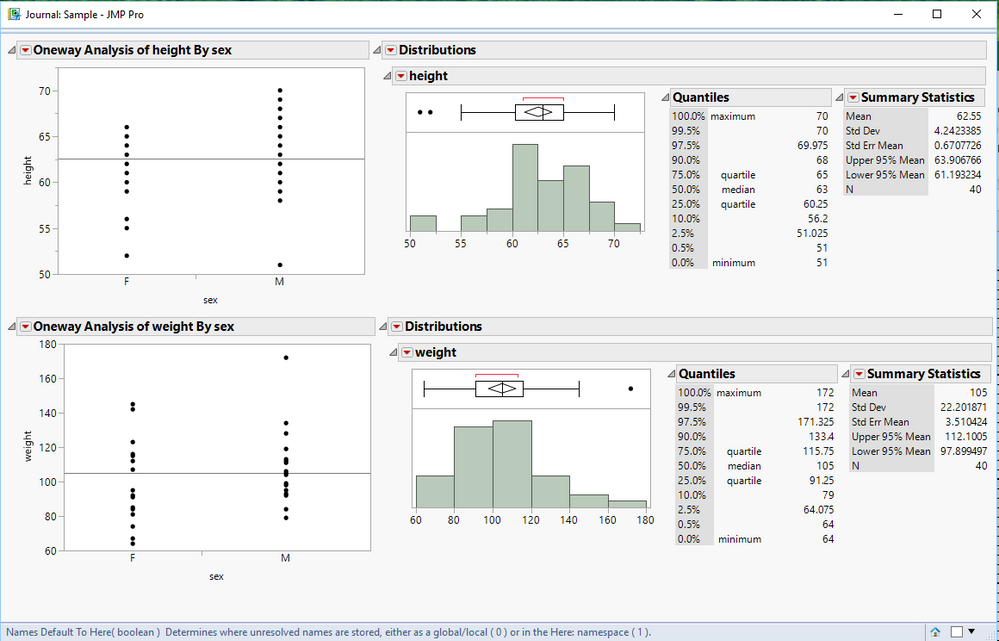
There is a whole subsystem in JMP to do the kinds of things you are asking about. A simple illustration is shown below. This programming environment is detailed in the Scripting Guide
Help==>Books==>Scripting Guide
Names Default To Here( 1 );
dt = Open( "$SAMPLE_DATA/big class.jmp" );
nw = New Window( "Sample",
	<<journal,
	V List Box(
		H List Box(
			Oneway( Y( :height ), X( :sex ) ),
			Distribution(
				Stack( 1 ),
				Continuous Distribution( Column( :height ), Horizontal Layout( 1 ), Vertical( 0 ) )
			)
		),
		H List Box(
			Oneway( Y( :weight ), X( :sex ) ),
			Distribution(
				Stack( 1 ),
				Continuous Distribution( Column( :weight ), Horizontal Layout( 1 ), Vertical( 0 ) )
			)
		)
	)
);
Again, the above JSL is a very basic illustration of this facility in JMP. Many other methods could have been used to accomplish this and far more complex outputs.
- Mark as New
- Bookmark
- Subscribe
- Mute
- Subscribe to RSS Feed
- Get Direct Link
- Report Inappropriate Content
Re: Organize a journal via jsl
There is a whole subsystem in JMP to do the kinds of things you are asking about. A simple illustration is shown below. This programming environment is detailed in the Scripting Guide
Help==>Books==>Scripting Guide
Names Default To Here( 1 );
dt = Open( "$SAMPLE_DATA/big class.jmp" );
nw = New Window( "Sample",
	<<journal,
	V List Box(
		H List Box(
			Oneway( Y( :height ), X( :sex ) ),
			Distribution(
				Stack( 1 ),
				Continuous Distribution( Column( :height ), Horizontal Layout( 1 ), Vertical( 0 ) )
			)
		),
		H List Box(
			Oneway( Y( :weight ), X( :sex ) ),
			Distribution(
				Stack( 1 ),
				Continuous Distribution( Column( :weight ), Horizontal Layout( 1 ), Vertical( 0 ) )
			)
		)
	)
);
Again, the above JSL is a very basic illustration of this facility in JMP. Many other methods could have been used to accomplish this and far more complex outputs.
- Mark as New
- Bookmark
- Subscribe
- Mute
- Subscribe to RSS Feed
- Get Direct Link
- Report Inappropriate Content
Re: Organize a journal via jsl
- Mark as New
- Bookmark
- Subscribe
- Mute
- Subscribe to RSS Feed
- Get Direct Link
- Report Inappropriate Content
Re: Organize a journal via jsl
Recommended Articles
- © 2026 JMP Statistical Discovery LLC. All Rights Reserved.
- Terms of Use
- Privacy Statement
- Contact Us