- Don’t miss your chance to experience Discovery Summit Europe at our best available rate! Early bird registration through 31 Oct.
- Image to Table JMP extension imports single or batch images as data tables. Useful to extract curves from pictures or convert image data to curve data to use in analyses like Functional Data Explorer. Download and install the extension.
- Subscribe to RSS Feed
- Mark Topic as New
- Mark Topic as Read
- Float this Topic for Current User
- Bookmark
- Subscribe
- Mute
- Printer Friendly Page
Discussions
Solve problems, and share tips and tricks with other JMP users.- User Community
- :
- Discussions
- :
- Multiple columns with their own dedicated timestamp - Join/Combine/Concat timest...

- Mark as New
- Bookmark
- Subscribe
- Mute
- Subscribe to RSS Feed
- Get Direct Link
- Report Inappropriate Content
Multiple columns with their own dedicated timestamp - Join/Combine/Concat timestamps
I have many files with the below format, where each measurement has its own recorded timestamp. I'd like a table that has only one time column, so that I can chart multiple variables against the same timeline.
Here's an example of my data:
| datetime_measure1 | value_measure1 | datetime_measure2 | value_measure2 | datetime_measure3 | value_measure3 |
| 1:39:15.000 PM | 1.7138 | 1:39:15.000 PM | 400.0345 | 1:39:15:000 PM | 50.9007 |
| 1:39:23.071 PM | 0.0976 | 1:39:25.730 PM | 399.8793 | 1:39:17.591 PM | 51.7412 |
| 1:39:26.410 PM | 1.7163 | 1:39:35.990 PM | 399.9487 | 1:39:33.590 PM | 51.1936 |
| 1:39:37.150 PM | 0.1245 | 1:39:40.029 PM | 400.0361 | 1:39:50.869 PM | 50.9051 |
Ideally I'd like it to look something like this:
| datetime | value_measure1 | value_mesure2 | value_measure3 |
| 1:39:15.000 PM | 1.7138 | 400.0345 | 50.9007 |
| 1:39:17.591 PM | - | - | 51.7412 |
| 1:39:23.071 PM | 0.0976 | - | - |
| 1:39:25.730 PM | - | 399.8793 | - |
| 1:39:26.410 PM | 1.7163 | - | - |
| 1:39:33.590 PM | - | - | 51.1936 |
| 1:39:35.990 PM | - | 399.9487 | - |
| 1:39:37.150 PM | 0.1245 | - | - |
| 1:39:40.029 PM | - | 400.0361 | - |
| 1:39:50.869 PM | - | - | 50.9051 |
I have been attempting to use the stack, join, and concatenate formulas in JMP to do this. But it has produced undesirable results. Usually I end up with "value" columns that are unsorted correctly. I may need to manipulate the data first to add some kind of sorting column, but haven't been successful yet. Need help as I am not a JMP scripting expert.
Thank you.
Accepted Solutions

- Mark as New
- Bookmark
- Subscribe
- Mute
- Subscribe to RSS Feed
- Get Direct Link
- Report Inappropriate Content
Re: Multiple columns with their own dedicated timestamp - Join/Combine/Concat timestamps
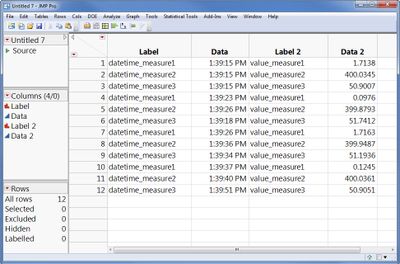
You can do this with two table operations:Stack all the columns (Tables > Stack), and check the box for "Multiple Series Stack". Enter the value 2 for the number or series, and make sure the "contiguous" box is not checked. Click OK. This will create a table that looks like this:
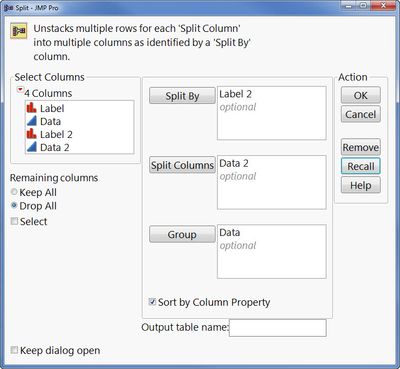
Then, you want to split this table (Tables > Spit). Split by Label 2, split the Data 2 column, and group by Data.
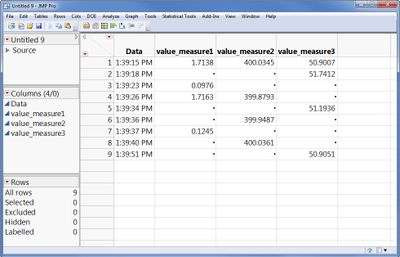
this results in this table:
Note, you will have another problem to deal with, I think. I don't believe JMP supports the datetime format (hh:mm:ss.ddd AM/PM) you are using, if you want to treat those values like numbers. If you treat them like character values you will be alright, though, and the steps above will still work.
- Mark as New
- Bookmark
- Subscribe
- Mute
- Subscribe to RSS Feed
- Get Direct Link
- Report Inappropriate Content
Re: Multiple columns with their own dedicated timestamp - Join/Combine/Concat timestamps
You can do this with two table operations:Stack all the columns (Tables > Stack), and check the box for "Multiple Series Stack". Enter the value 2 for the number or series, and make sure the "contiguous" box is not checked. Click OK. This will create a table that looks like this:
Then, you want to split this table (Tables > Spit). Split by Label 2, split the Data 2 column, and group by Data.
this results in this table:
Note, you will have another problem to deal with, I think. I don't believe JMP supports the datetime format (hh:mm:ss.ddd AM/PM) you are using, if you want to treat those values like numbers. If you treat them like character values you will be alright, though, and the steps above will still work.
- Mark as New
- Bookmark
- Subscribe
- Mute
- Subscribe to RSS Feed
- Get Direct Link
- Report Inappropriate Content
Re: Multiple columns with their own dedicated timestamp - Join/Combine/Concat timestamps
This works well, thank you! Is there a way to script this solution so that all I have to do is point to the csv file?
I understand how to create a JMP script which imports a csv file and goes through all of the appropriate opening options. But I have never used JMP script to use the join and split functions.
Recommended Articles
- © 2026 JMP Statistical Discovery LLC. All Rights Reserved.
- Terms of Use
- Privacy Statement
- Contact Us