- JMP will suspend normal business operations for our Winter Holiday beginning on Wednesday, Dec. 24, 2025, at 5:00 p.m. ET (2:00 p.m. ET for JMP Accounts Receivable).
Regular business hours will resume at 9:00 a.m. EST on Friday, Jan. 2, 2026. - We’re retiring the File Exchange at the end of this year. The JMP Marketplace is now your destination for add-ins and extensions.
- Subscribe to RSS Feed
- Mark Topic as New
- Mark Topic as Read
- Float this Topic for Current User
- Bookmark
- Subscribe
- Mute
- Printer Friendly Page
Discussions
Solve problems, and share tips and tricks with other JMP users.- JMP User Community
- :
- Discussions
- :
- Mixture Design with Linear Constraints

- Mark as New
- Bookmark
- Subscribe
- Mute
- Subscribe to RSS Feed
- Get Direct Link
- Report Inappropriate Content
Mixture Design with Linear Constraints
I'm trying to set up a mixture design with 6 factors for a formulation. The first 5 factors should add up to exactly 0.5, and the 6th factor is a "dummy" factor that should always be 0.5. When I try to set this up in JMP I am unable to get it to generate a design with these constraints.
I am trying to enforce these constraints by having both:
- 1 * X1 + 1 * X2 + 1 * X3 + 1 * X4 + 1 * X5 + 0 * X6 ≤ 0.5
- 1 * X1 + 1 * X2 + 1 * X3 + 1 * X4 + 1 * X5 + 0 * X6 ≥ 0.5
A couple of things that seem to be happening are:
- JMP is changing my X6 from 0.5 to 0.5, to 0.0 to 0.675
- X6 is not staying at exactly 0.5
- X1 through X6 add up to 1 as expected
What am I missing?
Accepted Solutions


- Mark as New
- Bookmark
- Subscribe
- Mute
- Subscribe to RSS Feed
- Get Direct Link
- Report Inappropriate Content
Re: Mixture Design with Linear Constraints
You cannot specify a lower limit and upper limit to the same value. That is not a factor, instead it is a constant. So you could change X6 to be a constant and then ignore the linear constraints. Remember that X6 does not need to be in the design or model because it is never changing.
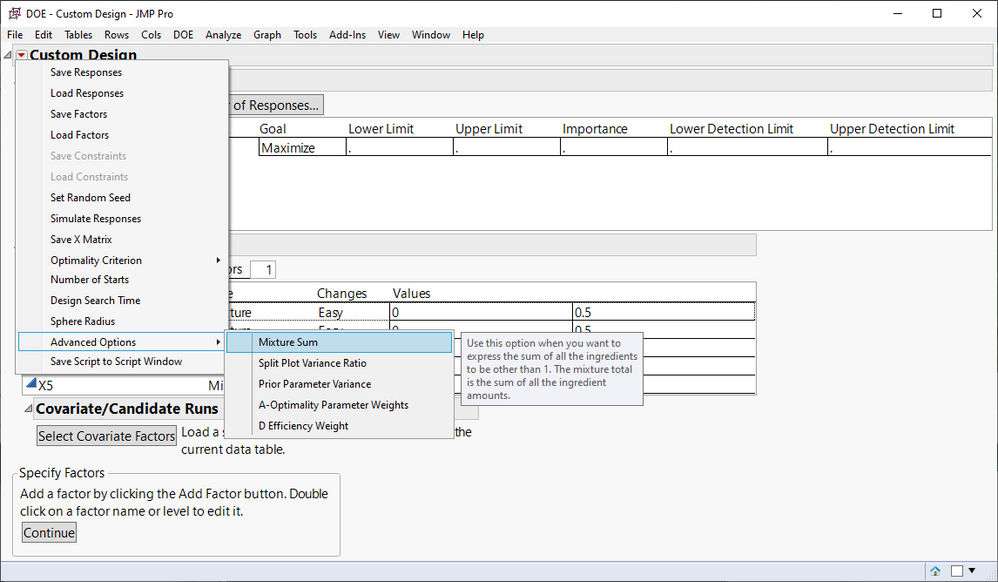
Another approach is to adjust the mixture sum and not enter X6 at all. From the Custom Design red popup menu, go to Advanced Options > Mixture Sum and specify the total to be 0.5. Then enter your 5 mixture factors that are changing.
- Mark as New
- Bookmark
- Subscribe
- Mute
- Subscribe to RSS Feed
- Get Direct Link
- Report Inappropriate Content
Re: Mixture Design with Linear Constraints
You cannot specify a lower limit and upper limit to the same value. That is not a factor, instead it is a constant. So you could change X6 to be a constant and then ignore the linear constraints. Remember that X6 does not need to be in the design or model because it is never changing.
Another approach is to adjust the mixture sum and not enter X6 at all. From the Custom Design red popup menu, go to Advanced Options > Mixture Sum and specify the total to be 0.5. Then enter your 5 mixture factors that are changing.
- Mark as New
- Bookmark
- Subscribe
- Mute
- Subscribe to RSS Feed
- Get Direct Link
- Report Inappropriate Content
Re: Mixture Design with Linear Constraints
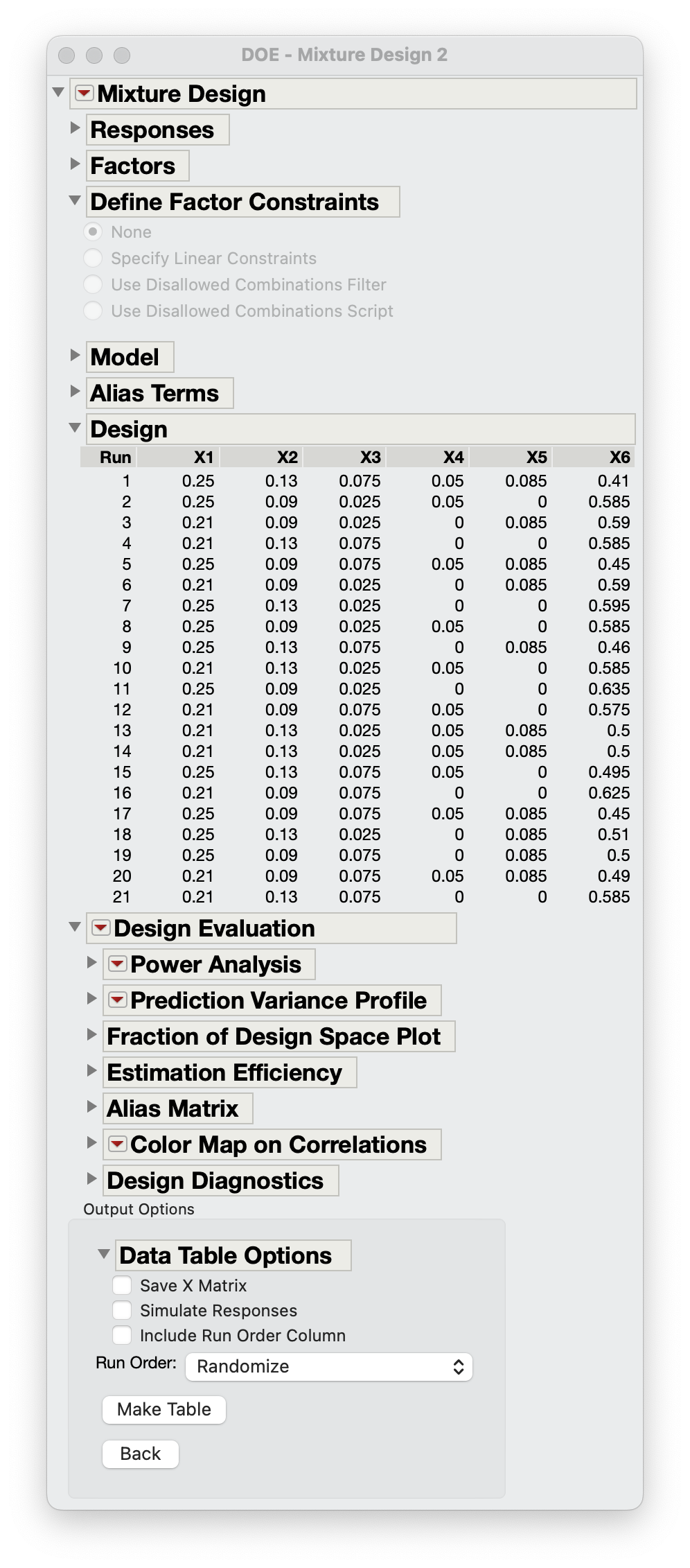
I think this is the approach I needed, thanks!


- Mark as New
- Bookmark
- Subscribe
- Mute
- Subscribe to RSS Feed
- Get Direct Link
- Report Inappropriate Content
Re: Mixture Design with Linear Constraints
If X6 is a dummy factor and a constant value, is there a particular reason you keep it in your analysis ?
It may be easier to simply consider X1 to X5 to add to 100% (even if it is in fact 50% of your total formulation), and drop the X6 factor. Since Mixture design is all about ratios between your mixture factors, having a total at 1 or 0,5 won't change the ratios (and solution(s) found), only the absolute values/quantities of your factors.
Or else, you can try to include X6 as a constant factor (not a mixture one) with a value of 0,5 and apply the constraint X1+X2+X3+X4+X5+X6 = 100% (or 1).
The first or second option should bring a solution to your case.
I hope it will help you,
"It is not unusual for a well-designed experiment to analyze itself" (Box, Hunter and Hunter)
Recommended Articles
- © 2025 JMP Statistical Discovery LLC. All Rights Reserved.
- Terms of Use
- Privacy Statement
- Contact Us