- Don’t miss your chance to experience Discovery Summit Europe at our best available rate! Early bird registration through 31 Oct.
- Graph Builder Toolbar streamlines interactive graphing. Creates shortcuts on Report and GraphBuilder Helpers toolbars. Download and install the extension.
- Subscribe to RSS Feed
- Mark Topic as New
- Mark Topic as Read
- Float this Topic for Current User
- Bookmark
- Subscribe
- Mute
- Printer Friendly Page
Discussions
Solve problems, and share tips and tricks with other JMP users.- User Community
- :
- Discussions
- :
- Matched pairs reference frame

- Mark as New
- Bookmark
- Subscribe
- Mute
- Subscribe to RSS Feed
- Get Direct Link
- Report Inappropriate Content
Matched pairs reference frame
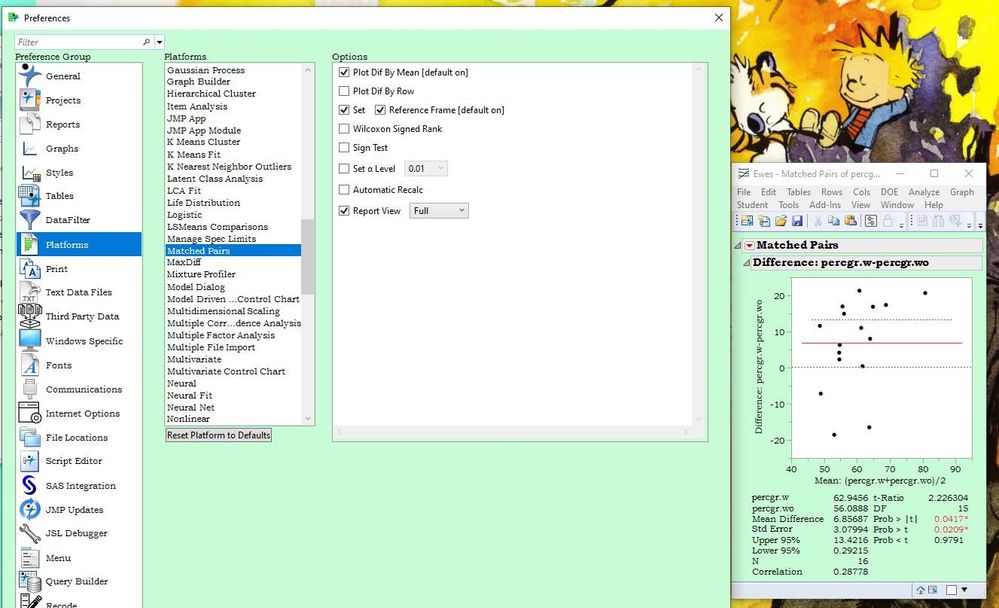
I don't seem to be able to get the reference frame to show up on the resulting graph by selecting a preference (see screenshot)? Is this a feature, a bug, or my ignorance of what option to select? (I can turn it on using the Little Red Triangle [because that's my friend!].)


- Mark as New
- Bookmark
- Subscribe
- Mute
- Subscribe to RSS Feed
- Get Direct Link
- Report Inappropriate Content
Re: Matched pairs reference frame
First, please verify that the reference lines command in the platform menu is checked. Second, try rescaling the plot. It might be drawn 'outside' of the current frame.
- Mark as New
- Bookmark
- Subscribe
- Mute
- Subscribe to RSS Feed
- Get Direct Link
- Report Inappropriate Content
Re: Matched pairs reference frame
Mark,
The reference lines command is indeed checked in the matched pairs platform; see the figure above. Rescaling the plot does not reveal any reference frame, and the zero line should be visible anyway. Any other ideas?
Steve
- Mark as New
- Bookmark
- Subscribe
- Mute
- Subscribe to RSS Feed
- Get Direct Link
- Report Inappropriate Content
Re: Matched pairs reference frame
Yes, I have another idea. You broke it!
I would contact JMP Technical Support ([email protected]) to investigate this anomaly.
Recommended Articles
- © 2026 JMP Statistical Discovery LLC. All Rights Reserved.
- Terms of Use
- Privacy Statement
- Contact Us