- JMP Statement Regarding Critical PHP Remote Code Execution Vulnerabilities (CVE-2026-109618, CVE-2026-109619)
- Don’t miss your chance to experience Discovery Summit Europe at our best available rate! Early bird registration through 31 Oct.
- Graph Builder Toolbar streamlines interactive graphing. Creates shortcuts on Report and GraphBuilder Helpers toolbars. Download and install the extension.
- Subscribe to RSS Feed
- Mark Topic as New
- Mark Topic as Read
- Float this Topic for Current User
- Bookmark
- Subscribe
- Mute
- Printer Friendly Page
Discussions
Solve problems, and share tips and tricks with other JMP users.- User Community
- :
- Discussions
- :
- Re: Manipulating Timestamp

- Mark as New
- Bookmark
- Subscribe
- Mute
- Subscribe to RSS Feed
- Get Direct Link
- Report Inappropriate Content
Manipulating Timestamp
Hi I am struggling to convert a Timestamp into numeric format. I basically want to use the timestamp to create an Elapsed Time column. I am having difficultly achieving this with JMP16. Below is an example of the format. The change from 12:59 to 01:00 also seems to cause issues for me.
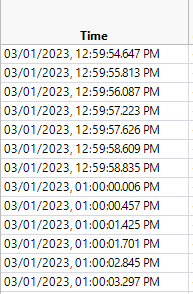
I was able to work with excel and manipulate the data to give me an Elapsed time in minutes (from row 1 as starting point). But I would prefer to use JMP and to create a script for it.
Thanks
- Mark as New
- Bookmark
- Subscribe
- Mute
- Subscribe to RSS Feed
- Get Direct Link
- Report Inappropriate Content
Re: Manipulating Timestamp
thank you very much for your help. your script is working well for me even when in UK date/time settings.


- Mark as New
- Bookmark
- Subscribe
- Mute
- Subscribe to RSS Feed
- Get Direct Link
- Report Inappropriate Content
Re: Manipulating Timestamp
I am not seeing the error. See the display below. I have also attached my data table. The Time 2 column is the same values as the time column, but with the display format set to display the actual numeric data values behind the date/time. It is the number of seconds since January 1, 1904. Time 2 has the formula :time but the format is changed to Fixed Dec, 20, 3.
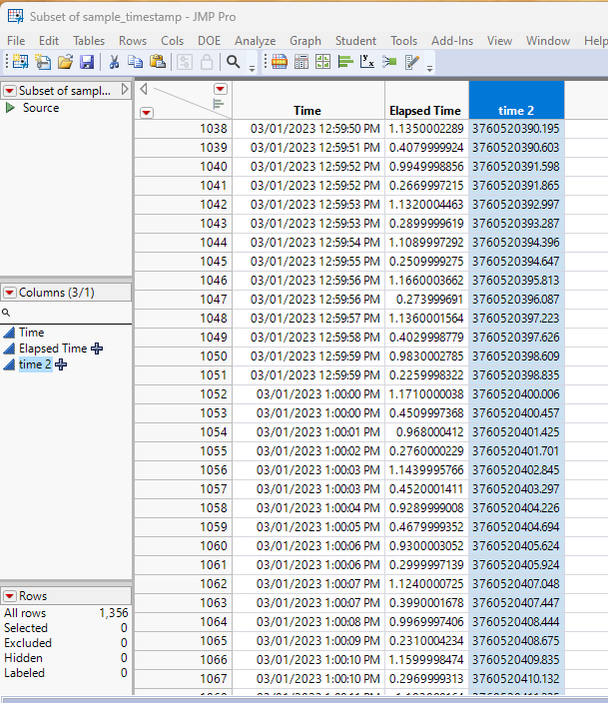
I ran the code under both JMP 16 and 17, with the same results.
- « Previous
-
- 1
- 2
- Next »
Recommended Articles
- © 2026 JMP Statistical Discovery LLC. All Rights Reserved.
- Terms of Use
- Privacy Statement
- Contact Us