Turn on suggestions
Auto-suggest helps you quickly narrow down your search results by suggesting possible matches as you type.
- Don’t miss your chance to experience Discovery Summit Europe at our best available rate! Early bird registration through 31 Oct.
- Graph Builder Toolbar streamlines interactive graphing. Creates shortcuts on Report and GraphBuilder Helpers toolbars. Download and install the extension.
Options
- Subscribe to RSS Feed
- Mark Topic as New
- Mark Topic as Read
- Float this Topic for Current User
- Bookmark
- Subscribe
- Mute
- Printer Friendly Page
Discussions
Solve problems, and share tips and tricks with other JMP users.- User Community
- :
- Discussions
- :
- Re: Local Data filter & Animation - how to specify the range?

Level XIII
- Mark as New
- Bookmark
- Subscribe
- Mute
- Subscribe to RSS Feed
- Get Direct Link
- Report Inappropriate Content
Local Data filter & Animation - how to specify the range?
Created:
Apr 19, 2023 03:33 PM
| Last Modified: Jun 11, 2023 4:31 AM
(8824 views)
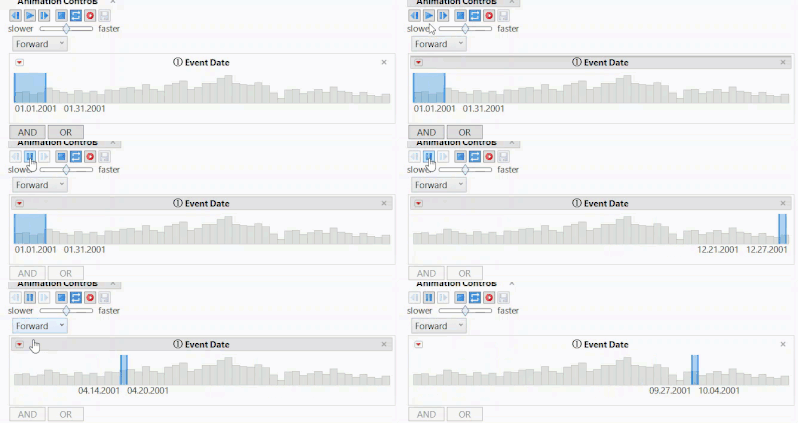
The Animation Menu of the local Data Filter is a very convenient way to produce a gif image for a time series.
Unfortunately, when I click on play, the selected range changes before the animation starts :(
Is there an option to specify the width of the selected values?
12 REPLIES 12


Staff
- Mark as New
- Bookmark
- Subscribe
- Mute
- Subscribe to RSS Feed
- Get Direct Link
- Report Inappropriate Content
Re: Local Data filter & Animation - how to specify the range?
@hogi - currently there is no option to animate only the max (or min) of the continuous filter item.
Level XIII
- Mark as New
- Bookmark
- Subscribe
- Mute
- Subscribe to RSS Feed
- Get Direct Link
- Report Inappropriate Content
Re: Local Data filter & Animation - how to specify the range?
Hi @danschikore , thank you for the info.
I think "animate the max" can be quite useful.
I posted a wish: Animate: animate the max
[an option for fading persistency would be amazing]
Level XIII
- Mark as New
- Bookmark
- Subscribe
- Mute
- Subscribe to RSS Feed
- Get Direct Link
- Report Inappropriate Content
Re: Local Data filter & Animation - how to specify the range?
Created:
Sep 11, 2024 04:52 PM
| Last Modified: Sep 11, 2024 1:53 PM
(1367 views)
| Posted in reply to message from hogi 07-23-2024
- « Previous
-
- 1
- 2
- Next »
Recommended Articles
- © 2026 JMP Statistical Discovery LLC. All Rights Reserved.
- Terms of Use
- Privacy Statement
- Contact Us