- Don’t miss your chance to experience Discovery Summit Europe at our best available rate! Early bird registration through 31 Oct.
- Image to Table JMP extension imports single or batch images as data tables. Useful to extract curves from pictures or convert image data to curve data to use in analyses like Functional Data Explorer. Download and install the extension.
- Subscribe to RSS Feed
- Mark Topic as New
- Mark Topic as Read
- Float this Topic for Current User
- Bookmark
- Subscribe
- Mute
- Printer Friendly Page
Discussions
Solve problems, and share tips and tricks with other JMP users.- User Community
- :
- Discussions
- :
- Re: Linear and quadratic contrasts with unequally spaced treatments

- Mark as New
- Bookmark
- Subscribe
- Mute
- Subscribe to RSS Feed
- Get Direct Link
- Report Inappropriate Content
Linear and quadratic contrasts with unequally spaced treatments
I am using the contrasts specification window with + and - buttons. However, when treatments are unequally spaced, the simple + and - isn't working. Here's my specific example:
Treatment doses: 0, 1, 2, 4
These doses are NOT equally spaced so we can not use the typical 4 level linear and quadratic contrasts. I calculated appropriate coefficients as shows in this link.
From my calculations, the linear coefficients should be -7, -3, 1, 9. In JMP, -0.7, -0.3, 0.1, and 0.9 satisfy the JMP requirements of adding up to 0 and absolute value less than 2.
My issue is with quadratic coefficients. From my calculations, the quadratic coefficients should be 224, -128, -256, 160. How do I get these quadratic coefficients into JMP 16 Pro?
Thank you for any and all advice!!


- Mark as New
- Bookmark
- Subscribe
- Mute
- Subscribe to RSS Feed
- Get Direct Link
- Report Inappropriate Content
Re: Linear and quadratic contrasts with unequally spaced treatments
You may be interested in the Custom Test tool in Fit Model (top red triangle > Estimates > Custom Test), which uses manual entry of contrast coefficients.
It looks like a similar question was asked and answered a few years ago: https://community.jmp.com/t5/Discussions/How-to-specify-contrast-coefficients-with-quot-Contrast/td-... You may want to review that thread.
JMP Academic Ambassador
- Mark as New
- Bookmark
- Subscribe
- Mute
- Subscribe to RSS Feed
- Get Direct Link
- Report Inappropriate Content
Re: Linear and quadratic contrasts with unequally spaced treatments
Thank you for sharing this thread. It looks like at the end of it, the same question is asked that I am asking here (how to conduct a contrast with unequal spacing between treatments).
When using the Custom Test tool, do the same rules apply in regards to adding up to 0 and absolute value less than 2?


- Mark as New
- Bookmark
- Subscribe
- Mute
- Subscribe to RSS Feed
- Get Direct Link
- Report Inappropriate Content
Re: Linear and quadratic contrasts with unequally spaced treatments
No such rules apply here; for each column in the Custom Test, you can test/estimate any contrast of interest...

- Mark as New
- Bookmark
- Subscribe
- Mute
- Subscribe to RSS Feed
- Get Direct Link
- Report Inappropriate Content
Re: Linear and quadratic contrasts with unequally spaced treatments
You can see in the example that appears in the other cited discussion that JMP automatically normalizes the coefficients used to compute the contrasts.
- Mark as New
- Bookmark
- Subscribe
- Mute
- Subscribe to RSS Feed
- Get Direct Link
- Report Inappropriate Content
Re: Linear and quadratic contrasts with unequally spaced treatments
Mark,
Can you explain what you mean by normalizes the coefficients?
Are you saying that I can more or less ignore the calculation of coefficients for unequally spaced treatments and act like they are evenly spaced?
Thanks for your help!
- Mark as New
- Bookmark
- Subscribe
- Mute
- Subscribe to RSS Feed
- Get Direct Link
- Report Inappropriate Content
Re: Linear and quadratic contrasts with unequally spaced treatments
Use the link in the first reply from Ross to see the previous discussion. Look at the first picture, Table A.2. My example is for the case where V = 4. I entered the contrast coefficients -3, -1, +1, and +3 from Table A.2 using the + and - buttons in the JMP interface. The results Contrast > Test Detail in the screenshot below Table A.2 showed that JMP used the linear contrast coefficients of 0.75, 0.25, -0.25, and -0.75. Note in the original discussion, I entered the coefficients in reverse order by mistake. The Test Details would have shown as -0.75, -0.25, 0.25, and 0.75 if I entered them correctly.
I do not know what you mean by 'even spaced.' That is not a requirement for the Analysis of Variance. The levels are modeled as nominal values, and the tests are for group means or combinations of group means.
- Mark as New
- Bookmark
- Subscribe
- Mute
- Subscribe to RSS Feed
- Get Direct Link
- Report Inappropriate Content
Re: Linear and quadratic contrasts with unequally spaced treatments
I agree that the contrast coefficients you assigned of -0.75, -0.25, 0.25, and 0.75 would be correct if the treatments were 0, 50, 100, 150 (evenly spaced). Because the last treatment is actually 200, that's what I mean by unequally spaced.
I am interested to see if responses have a linear, quadratic, or cubic trend, not just comparing the means of one treatment group to another treatment group. Here is the link to calculate trend analysis for unequal intervals for one-way ANOVA: https://real-statistics.com/one-way-analysis-of-variance-anova/trend-analysis-polynomial-contrast-co...
- Mark as New
- Bookmark
- Subscribe
- Mute
- Subscribe to RSS Feed
- Get Direct Link
- Report Inappropriate Content
Re: Linear and quadratic contrasts with unequally spaced treatments
@thayermo07 , here is how ya do it via Custom Test (I have batch where you will have dose).
First, do a custom test to find the coefficients you need in the Custom Test dialog. You say you need this contrast: 224, -128, -256, 160.
Ok, so put those in four columns in the custom test like this. Batch D is that way because of the way the model (via Fit Model platform) is parameterized.
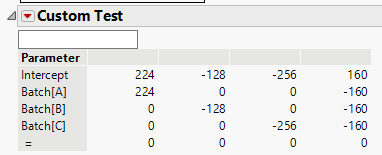
Then add across columns to get the following.
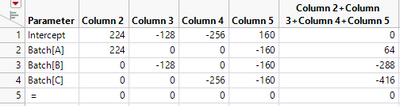
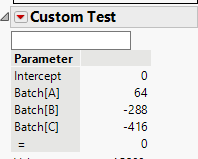
Then, finally, do another custom test to get your final contrast of interest. i.e., the contrast shown below is your desired quadratic contrast. It is important to understand how the model (via the Fit Model platform) is parameterized to use the Custom Test dialog correctly.
- Mark as New
- Bookmark
- Subscribe
- Mute
- Subscribe to RSS Feed
- Get Direct Link
- Report Inappropriate Content
Re: Linear and quadratic contrasts with unequally spaced treatments
This is a bit confusing to me. Would you mind sharing a link to material explaining this? Just at first glance, why is column 5 160 and then negative 160 for the cells below it?
Thanks for your help!
Recommended Articles
- © 2026 JMP Statistical Discovery LLC. All Rights Reserved.
- Terms of Use
- Privacy Statement
- Contact Us