cancel
Showing results for 
Show  only  | Search instead for 
Did you mean: 
  • JMP will suspend normal business operations for our Winter Holiday beginning on Wednesday, Dec. 24, 2025, at 5:00 p.m. ET (2:00 p.m. ET for JMP Accounts Receivable).
    Regular business hours will resume at 9:00 a.m. EST on Friday, Jan. 2, 2026.
  • We’re retiring the File Exchange at the end of this year. The JMP Marketplace is now your destination for add-ins and extensions.

Discussions

Solve problems, and share tips and tricks with other JMP users.
%3CLINGO-SUB%20id%3D%22lingo-sub-328877%22%20slang%3D%22en-US%22%20mode%3D%22NONE%22%3E%C3%89tiquetage%20des%20points%20de%20donn%C3%A9es%20dans%20PCA%20Biplot%20par%20une%20caract%C3%A9ristique%3C%2FLINGO-SUB%3E%3CLINGO-BODY%20id%3D%22lingo-body-328877%22%20slang%3D%22en-US%22%20mode%3D%22NONE%22%3E%3CP%3EChers%20tous%2C%3C%2FP%3E%3CP%3E%26nbsp%3B%3C%2FP%3E%3CP%3Eest-il%20possible%20d'%C3%A9tiqueter%20les%20points%20de%20donn%C3%A9es%20dans%20un%20biplot%20affich%C3%A9%20en%20B%20par%20certaines%20caract%C3%A9ristiques%20d%C3%A9finies%20dans%20JMP%20%3F%3C%2FP%3E%3CP%3EJe%20veux%20dire%2C%20existe-t-il%20une%20option%20pour%20les%20%C3%A9tiqueter%20par%20des%20noms%20d'%C3%A9chantillons%20provenant%20d'une%20colonne%20diff%C3%A9rente%20ou%20quelque%20chose%20du%20genre%2C%20comme%20je%20l'ai%20fait%20moi-m%C3%AAme%20dans%20A%20plot%20(dans%20le%20fichier%20joint%2C%20dans%20R)%26nbsp%3B%3F%20Au%20moins%20par%20une%20ligne%20-%20au%20lieu%20de%20voir%20juste%20un%20point%20noir.%3C%2FP%3E%3CP%3E%26nbsp%3B%3C%2FP%3E%3CP%3EParce%20que%20maintenant%2C%20je%20dois%20appuyer%20sur%20chaque%20point%20pour%20voir%20quel%20point%20correspond%20%C3%A0%20quelle%20ligne%2C%20et%20ce%20n'est%20pas%20du%20tout%20pratique.%3C%2FP%3E%3CP%3E%3CBR%20%2F%3EMerci%3C%2FP%3E%3C%2FLINGO-BODY%3E%3CLINGO-LABS%20id%3D%22lingo-labs-328877%22%20slang%3D%22en-US%22%20mode%3D%22NONE%22%3E%3CLINGO-LABEL%3E%C3%89tudes%20de%20consommation%20et%20de%20march%C3%A9%3C%2FLINGO-LABEL%3E%3C%2FLINGO-LABS%3E%3CLINGO-SUB%20id%3D%22lingo-sub-328946%22%20slang%3D%22en-US%22%20mode%3D%22NONE%22%3ERe%20%3A%20%C3%89tiquetage%20des%20points%20de%20donn%C3%A9es%20dans%20PCA%20Biplot%20par%20une%20caract%C3%A9ristique%3C%2FLINGO-SUB%3E%3CLINGO-BODY%20id%3D%22lingo-body-328946%22%20slang%3D%22en-US%22%20mode%3D%22NONE%22%3E%3CP%3EOk%2C%20peut-%C3%AAtre%20que%20la%20question%20n'%C3%A9tait%20pas%20claire.%20C'est%20ce%20que%20j'aimerais%20voir%20(ci-joint).%3C%2FP%3E%3CP%3EMes%20%C3%A9chantillons%20sont%20nomm%C3%A9s%20S1%2C%20S2%2C%20S3%2C%20S4%20et%20ainsi%20de%20suite.%3C%2FP%3E%3CP%3EPour%20chaque%20point%2C%20au%20lieu%20d'un%20point%2C%20je%20voudrais%20voir%20S1%2C%20S2%20ou%20S3%20%C3%A9crit%20%C3%A0%20la%20place%20d'un%20point.%3C%2FP%3E%3CP%3EJ'ai%20supprim%C3%A9%20quelques%20points%20noirs%20sur%20votre%20intrigue%20pour%20montrer%20ce%20que%20je%20veux%20r%C3%A9ellement%20dire.%3C%2FP%3E%3CP%3E%26nbsp%3B%3C%2FP%3E%3CP%3EJe%20pense%20que%20cela%20permet%20de%20rep%C3%A9rer%20beaucoup%20plus%20facilement%20les%20groupes%20d'%C3%A9chantillons%20et%20d'avoir%20une%20id%C3%A9e%20de%20la%20fa%C3%A7on%20dont%20ils%20sont%20dispers%C3%A9s.%3C%2FP%3E%3CP%3EC'est%20un%20peu%20un%20regroupement%20pr%C3%A9liminaire.%20Maintenant%2C%20en%20regardant%20imm%C3%A9diatement%2C%20je%20peux%20voir%20que%20S1%20se%20regroupe.%20Ok%2C%20%C3%A9tudions%20cela%20plus%20en%20d%C3%A9tail.%20Au%20lieu%20d'appuyer%20manuellement%20sur%20100%20points%20pour%20voir%20%C3%A0%20quelle%20cat%C3%A9gorie%20ils%20appartiennent.%3C%2FP%3E%3C%2FLINGO-BODY%3E%3CLINGO-SUB%20id%3D%22lingo-sub-328923%22%20slang%3D%22en-US%22%20mode%3D%22NONE%22%3ERe%20%3A%20%C3%89tiquetage%20des%20points%20de%20donn%C3%A9es%20dans%20PCA%20Biplot%20par%20une%20caract%C3%A9ristique%3C%2FLINGO-SUB%3E%3CLINGO-BODY%20id%3D%22lingo-body-328923%22%20slang%3D%22en-US%22%20mode%3D%22NONE%22%3EVoir%20mon%20ajout%20%C3%A0%20ma%20r%C3%A9ponse%20initiale.%3C%2FLINGO-BODY%3E%3CLINGO-SUB%20id%3D%22lingo-sub-328901%22%20slang%3D%22en-US%22%20mode%3D%22NONE%22%3ERe%20%3A%20%C3%89tiquetage%20des%20points%20de%20donn%C3%A9es%20dans%20PCA%20Biplot%20par%20une%20caract%C3%A9ristique%3C%2FLINGO-SUB%3E%3CLINGO-BODY%20id%3D%22lingo-body-328901%22%20slang%3D%22en-US%22%20mode%3D%22NONE%22%3E%3CP%3EPuis-je%20avoir%20ces%20informations%20dessin%C3%A9es%20dans%20le%20graphique%20-%20au%20lieu%20des%20points%20noirs%26nbsp%3B%3F%3C%2FP%3E%3CP%3EIl%20me%20serait%20bien%20plus%20utile%20de%20les%20voir%20tous%20%C3%A0%20la%20fois%20que%20de%20m'errer%20sur%20chaque%20point%20individuel.%3C%2FP%3E%3C%2FLINGO-BODY%3E%3CLINGO-SUB%20id%3D%22lingo-sub-328900%22%20slang%3D%22en-US%22%20mode%3D%22NONE%22%3ERe%20%3A%20%C3%89tiquetage%20des%20points%20de%20donn%C3%A9es%20dans%20PCA%20Biplot%20par%20une%20caract%C3%A9ristique%3C%2FLINGO-SUB%3E%3CLINGO-BODY%20id%3D%22lingo-body-328900%22%20slang%3D%22en-US%22%20mode%3D%22NONE%22%3E%3CP%3EUn%20moyen%20simple%20de%20proc%C3%A9der%20consiste%20%C3%A0%20acc%C3%A9der%20%C3%A0%20la%20colonne%20du%20tableau%20de%20donn%C3%A9es%20que%20vous%20souhaitez%20afficher%2C%20%C3%A0%20cliquer%20avec%20le%20bouton%20droit%20sur%20la%20colonne%20et%20%C3%A0%20s%C3%A9lectionner%20%22Label%2FUnLabel%22.%3C%2FP%3E%0A%3CP%3E%3CSPAN%20class%3D%22lia-inline-image-display-wrapper%20lia-image-align-inline%22%20image-alt%3D%22pca1.PNG%22%20style%3D%22width%3A%20283px%3B%22%3E%3CSPAN%20class%3D%22lia-inline-image-display-wrapper%22%20image-alt%3D%22pca1.PNG%22%20style%3D%22width%3A%20283px%3B%22%3E%3Cspan%20class%3D%22lia-inline-image-display-wrapper%22%20image-alt%3D%22pca1.PNG%22%20style%3D%22width%3A%20283px%3B%22%3E%3Cimg%20src%3D%22https%3A%2F%2Fcommunity.jmp.com%2Ft5%2Fimage%2Fserverpage%2Fimage-id%2F27981iF5BAAA7C009A7E55%2Fimage-size%2Flarge%3Fv%3Dv2%26amp%3Bpx%3D999%22%20role%3D%22button%22%20title%3D%22pca1.PNG%22%20alt%3D%22pca1.PNG%22%20%2F%3E%3C%2Fspan%3E%3C%2FSPAN%3E%3C%2FSPAN%3E%3C%2FP%3E%0A%3CP%3EEnsuite%2C%20lorsque%20vous%20survolez%20ou%20cliquez%20sur%20un%20point%20de%20donn%C3%A9es%2C%20vous%20verrez%20l'%C3%A9tiquette.%3C%2FP%3E%0A%3CP%3E%3CSPAN%20class%3D%22lia-inline-image-display-wrapper%20lia-image-align-inline%22%20image-alt%3D%22pca2.PNG%22%20style%3D%22width%3A%20473px%3B%22%3E%3CSPAN%20class%3D%22lia-inline-image-display-wrapper%22%20image-alt%3D%22pca2.PNG%22%20style%3D%22width%3A%20473px%3B%22%3E%3Cspan%20class%3D%22lia-inline-image-display-wrapper%22%20image-alt%3D%22pca2.PNG%22%20style%3D%22width%3A%20473px%3B%22%3E%3Cimg%20src%3D%22https%3A%2F%2Fcommunity.jmp.com%2Ft5%2Fimage%2Fserverpage%2Fimage-id%2F27982i0412DE11B9A8B9CA%2Fimage-size%2Flarge%3Fv%3Dv2%26amp%3Bpx%3D999%22%20role%3D%22button%22%20title%3D%22pca2.PNG%22%20alt%3D%22pca2.PNG%22%20%2F%3E%3C%2Fspan%3E%3C%2FSPAN%3E%3C%2FSPAN%3E%3C%2FP%3E%0A%3CP%3ESi%20vous%20souhaitez%20que%20les%20%C3%A9tiquettes%20deviennent%20persistantes%2C%20il%20vous%20suffit%20de%20s%C3%A9lectionner%20l'option%20%C2%AB%26nbsp%3BLabel%2FUnLabel%26nbsp%3B%C2%BB%20pour%20les%20lignes%20du%20tableau%20de%20donn%C3%A9es%20dont%20vous%20souhaitez%20que%20les%20%C3%A9tiquettes%20soient%20affich%C3%A9es%20en%20continu.%3C%2FP%3E%0A%3CP%3E%3CSPAN%20class%3D%22lia-inline-image-display-wrapper%20lia-image-align-inline%22%20image-alt%3D%22pca3.PNG%22%20style%3D%22width%3A%20304px%3B%22%3E%3CSPAN%20class%3D%22lia-inline-image-display-wrapper%22%20image-alt%3D%22pca3.PNG%22%20style%3D%22width%3A%20304px%3B%22%3E%3Cspan%20class%3D%22lia-inline-image-display-wrapper%22%20image-alt%3D%22pca3.PNG%22%20style%3D%22width%3A%20304px%3B%22%3E%3Cimg%20src%3D%22https%3A%2F%2Fcommunity.jmp.com%2Ft5%2Fimage%2Fserverpage%2Fimage-id%2F27983i3340D6138C893D4B%2Fimage-size%2Flarge%3Fv%3Dv2%26amp%3Bpx%3D999%22%20role%3D%22button%22%20title%3D%22pca3.PNG%22%20alt%3D%22pca3.PNG%22%20%2F%3E%3C%2Fspan%3E%3C%2FSPAN%3E%3C%2FSPAN%3E%26nbsp%3B%3C%2FP%3E%0A%3CP%3E%3CSPAN%20class%3D%22lia-inline-image-display-wrapper%20lia-image-align-inline%22%20image-alt%3D%22pca4.PNG%22%20style%3D%22width%3A%20436px%3B%22%3E%3CSPAN%20class%3D%22lia-inline-image-display-wrapper%22%20image-alt%3D%22pca4.PNG%22%20style%3D%22width%3A%20436px%3B%22%3E%3Cspan%20class%3D%22lia-inline-image-display-wrapper%22%20image-alt%3D%22pca4.PNG%22%20style%3D%22width%3A%20436px%3B%22%3E%3Cimg%20src%3D%22https%3A%2F%2Fcommunity.jmp.com%2Ft5%2Fimage%2Fserverpage%2Fimage-id%2F27984i5207EF476FE72F62%2Fimage-size%2Flarge%3Fv%3Dv2%26amp%3Bpx%3D999%22%20role%3D%22button%22%20title%3D%22pca4.PNG%22%20alt%3D%22pca4.PNG%22%20%2F%3E%3C%2Fspan%3E%3C%2FSPAN%3E%3C%2FSPAN%3E%3C%2FP%3E%3C%2FLINGO-BODY%3E
Choose Language Hide Translation Bar
dainius
Level II

Labelling data points in PCA Biplot by a characteristic

Dear all,


is it possible to label the data points in a biplot shown in B by some definite characteristics in JMP? 

I mean, is there an option to label them by sample names from a different column or something, like I did it in A plot myself (in the attached file, in R)? At least by a row line - instead of seeing just a black dot.


Because now I need to press on every point to see which point is which line, and this is not at all convenient.


Thank you

4 REPLIES 4
txnelson
Super User

Re: Labelling data points in PCA Biplot by a characteristic

A simple way to do this, is to go to the column in the data table you want to be displayed, and to right click on the column and select "Label/UnLabel". 
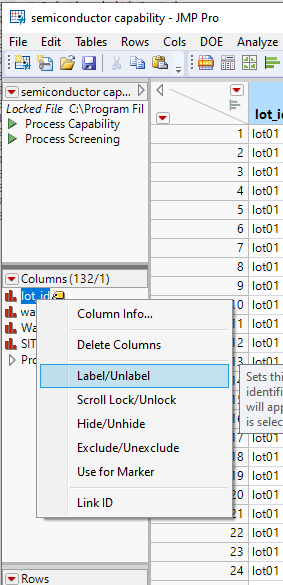
pca1.PNG

Then when you hover over, or click on a data point, you will see the label.
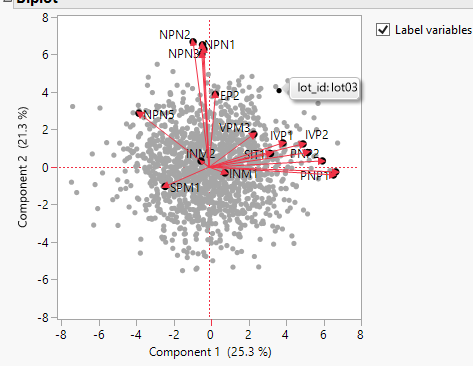
pca2.PNG

If you want the labels to become persistent, all you need to do is to select the "Label/UnLabel" option for the rows in the data table you want the labels to be continuously displayed.
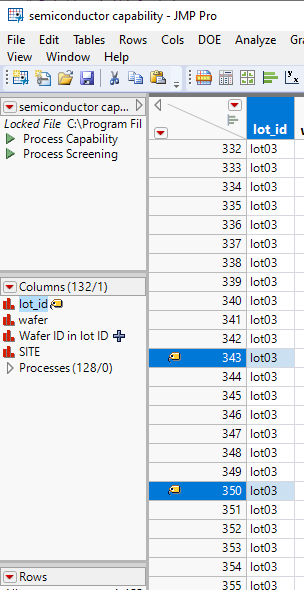
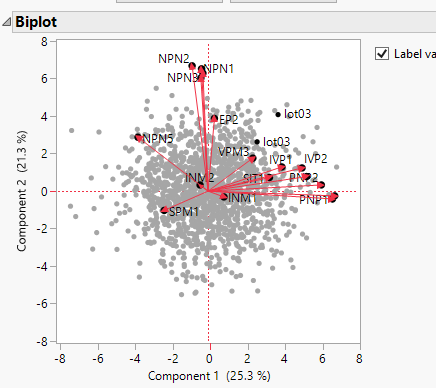
pca3.PNG 

pca4.PNG

Jim
dainius
Level II

Re: Labelling data points in PCA Biplot by a characteristic

Can I have this info drawn in the graph though - instead of the black points? 

I would be much more useful to me to see them all at once than to wander on each individual point.

txnelson
Super User

Re: Labelling data points in PCA Biplot by a characteristic

See my addition to my initial response.
Jim
dainius
Level II

Re: Labelling data points in PCA Biplot by a characteristic

Ok, maybe the question was unclear. This is what I would love to see (attached).

My samples are named S1, S2, S3, S4 and so on.

For every point, instead of a point, I would want to see S1, S2 or S3 written instead of a point. 

I have deleted some black points on your plot to show what I actually mean.


I think it makes it much easier to spot the groups of the samples and to get an idea of how are they scattered.

It's kinda a preliminary grouping. Now by an immediate looking I can see that S1 clusters together. Ok, let's investigate this further. Instead of manually pressing on 100 points to see which category they belong to.

Recommended Articles