- Don’t miss your chance to experience Discovery Summit Europe at our best available rate! Early bird registration through 31 Oct.
- Image to Table JMP extension imports single or batch images as data tables. Useful to extract curves from pictures or convert image data to curve data to use in analyses like Functional Data Explorer. Download and install the extension.
- Subscribe to RSS Feed
- Mark Topic as New
- Mark Topic as Read
- Float this Topic for Current User
- Bookmark
- Subscribe
- Mute
- Printer Friendly Page
Discussions
Solve problems, and share tips and tricks with other JMP users.- User Community
- :
- Discussions
- :
- Re: Label the first event for each patient in a large dataset

- Mark as New
- Bookmark
- Subscribe
- Mute
- Subscribe to RSS Feed
- Get Direct Link
- Report Inappropriate Content
Label the first event for each patient in a large dataset
I have a medical dataset where each row represents an event for a patient. Some patients have only one event, some have multiple events (which are represented by several rows, each with the same "Tx ID" (see picture below), however, I just want to create a column which labels the first event for each patient.
Accepted Solutions


- Mark as New
- Bookmark
- Subscribe
- Mute
- Subscribe to RSS Feed
- Get Direct Link
- Report Inappropriate Content
Re: Label the first event for each patient in a large dataset
Hi @cjw99 -
There are a number of ways to do this. One way that just uses a column formula is to use Col Rank()
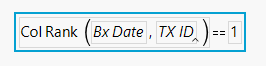
This ranks the date (earliest is lowest rank) by the ID and checks if it is 1 ( returning 1 or 0 ).
In a similar data table, you will get this output:
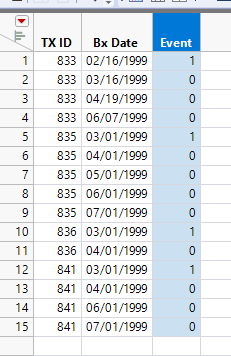
The nice thing about Col Rank is that you don't have to have your data table sorted, it will work if you jumble the rows.


- Mark as New
- Bookmark
- Subscribe
- Mute
- Subscribe to RSS Feed
- Get Direct Link
- Report Inappropriate Content
Re: Label the first event for each patient in a large dataset
You can accomplish this by
- Select the TX ID column
- Go to pull down menu Rows=>Row Selection=>Select Duplicate Rows
- Go to the RowState column and right click on one of the selected rows and select "Invert Selection"
- In the RowState column, go to one of the rows that was selected after the Inversion, and right click and select Label/UnLabel.
You will now have selected all first lrows for each different TX ID values.
- Mark as New
- Bookmark
- Subscribe
- Mute
- Subscribe to RSS Feed
- Get Direct Link
- Report Inappropriate Content
Re: Label the first event for each patient in a large dataset
Here is one way to create your second table with two column formulas (or one slightly more complicated formula), however, it requires you to sort the data table. If the data table is in the order you display, this will work. If not, first sort the data table by Bx Date - Ascending, then TX ID - Ascending
The Number of Rejections column tracks the number of rejections by TX ID

The Final Formula column uses Number of Rejections to piece together an output similar to your target.

You can combine the two columns into one, however, my preference is to keep them separate in case you need to make modifications later. You can always hide the intermediate column if you don't want to see it.
Combined Column

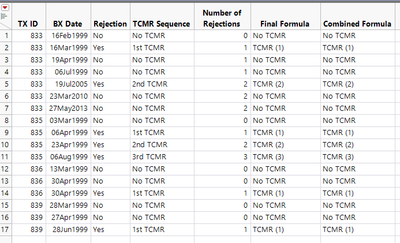
If you want the text to match your TCMR Sequence column exactly, you can use a Value Label in the final column.
I'm sure there are other ways to get to your target column, but this was the first that came to mind using only column formulas.
- Mark as New
- Bookmark
- Subscribe
- Mute
- Subscribe to RSS Feed
- Get Direct Link
- Report Inappropriate Content
Re: Label the first event for each patient in a large dataset
Hi @cjw99 -
There are a number of ways to do this. One way that just uses a column formula is to use Col Rank()
This ranks the date (earliest is lowest rank) by the ID and checks if it is 1 ( returning 1 or 0 ).
In a similar data table, you will get this output:
The nice thing about Col Rank is that you don't have to have your data table sorted, it will work if you jumble the rows.
- Mark as New
- Bookmark
- Subscribe
- Mute
- Subscribe to RSS Feed
- Get Direct Link
- Report Inappropriate Content
Re: Label the first event for each patient in a large dataset
Thank You! I knew there must be a simple way to do this
- Mark as New
- Bookmark
- Subscribe
- Mute
- Subscribe to RSS Feed
- Get Direct Link
- Report Inappropriate Content
Re: Label the first event for each patient in a large dataset
I don't want to abuse this service, but is there a way to use this function AND specify the rows ranked that meet a second condition from another column?
For example....in my dataset, the dates are biopsy dates. Some of these dates are associated with an outcome of interest (kidney transplant rejection) while others are not.
What I would like to be able to do is rank all the rows in order if they meet the rejection condition while skipping the other rows.
In the end, I would have a column that has labelled the 1st rejection, 2nd rejection, etc.
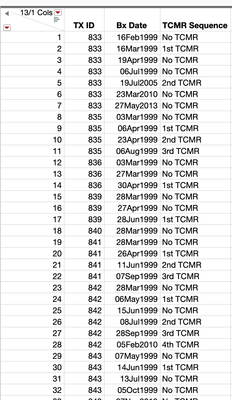
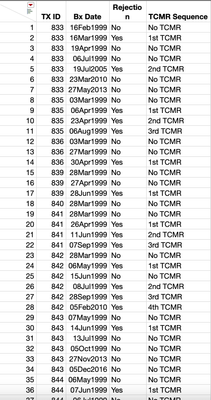
For example...like below. In this data "Bx Date" = biopsy date, and "TCMR Sequence" refers to T cell-mediated rejection.
Here I have already put them all in sequence in the TCMR sequence column but ideally, I would like to generate a formula that does this automatically for all 3,700 rows in the database.
I am familiar with creating simple If/Then formulas but I always struggle once the formula has to evaluate multiple rows for a given patient.
- Mark as New
- Bookmark
- Subscribe
- Mute
- Subscribe to RSS Feed
- Get Direct Link
- Report Inappropriate Content
Re: Label the first event for each patient in a large dataset
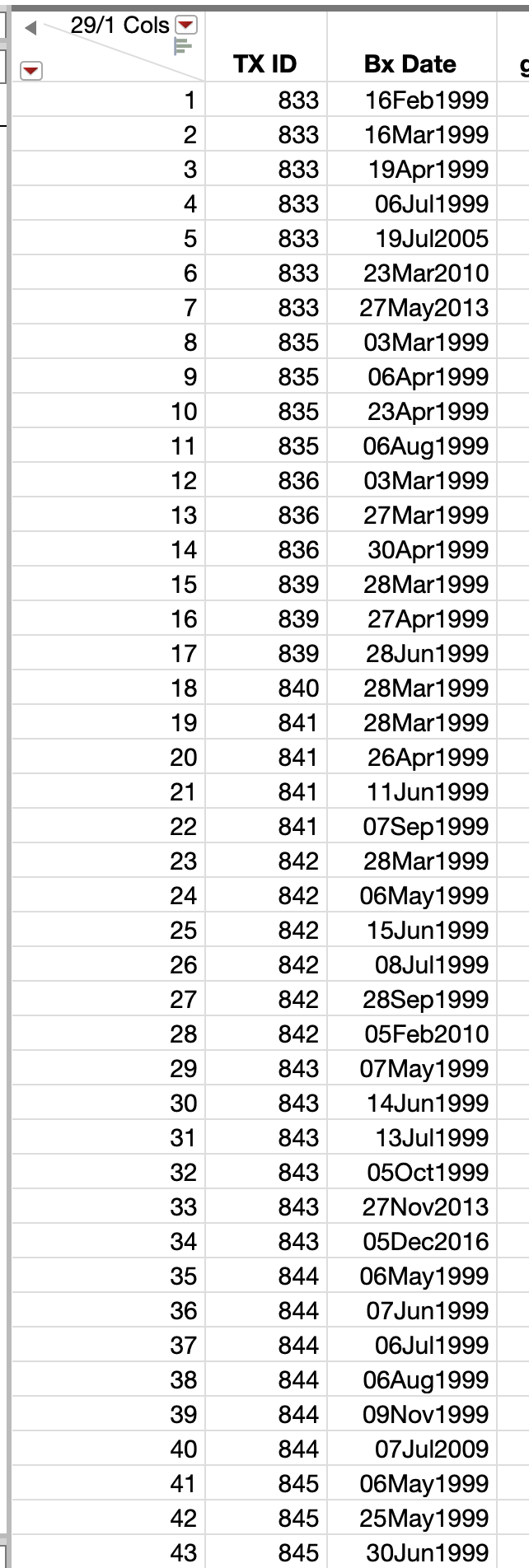
In addition to what I wrote a moment ago....perhaps this data table makes more sense where a rejection yes/no column is present
- Mark as New
- Bookmark
- Subscribe
- Mute
- Subscribe to RSS Feed
- Get Direct Link
- Report Inappropriate Content
Re: Label the first event for each patient in a large dataset
Here is one way to create your second table with two column formulas (or one slightly more complicated formula), however, it requires you to sort the data table. If the data table is in the order you display, this will work. If not, first sort the data table by Bx Date - Ascending, then TX ID - Ascending
The Number of Rejections column tracks the number of rejections by TX ID
The Final Formula column uses Number of Rejections to piece together an output similar to your target.
You can combine the two columns into one, however, my preference is to keep them separate in case you need to make modifications later. You can always hide the intermediate column if you don't want to see it.
Combined Column
If you want the text to match your TCMR Sequence column exactly, you can use a Value Label in the final column.
I'm sure there are other ways to get to your target column, but this was the first that came to mind using only column formulas.
- Mark as New
- Bookmark
- Subscribe
- Mute
- Subscribe to RSS Feed
- Get Direct Link
- Report Inappropriate Content
Re: Label the first event for each patient in a large dataset
You can accomplish this by
- Select the TX ID column
- Go to pull down menu Rows=>Row Selection=>Select Duplicate Rows
- Go to the RowState column and right click on one of the selected rows and select "Invert Selection"
- In the RowState column, go to one of the rows that was selected after the Inversion, and right click and select Label/UnLabel.
You will now have selected all first lrows for each different TX ID values.
- Mark as New
- Bookmark
- Subscribe
- Mute
- Subscribe to RSS Feed
- Get Direct Link
- Report Inappropriate Content
Re: Label the first event for each patient in a large dataset
Thank you.... I never noticed the select duplicate rows option before!
Recommended Articles
- © 2026 JMP Statistical Discovery LLC. All Rights Reserved.
- Terms of Use
- Privacy Statement
- Contact Us