- Don’t miss your chance to experience Discovery Summit Europe at our best available rate! Early bird registration through 31 Oct.
- Graph Builder Toolbar streamlines interactive graphing. Creates shortcuts on Report and GraphBuilder Helpers toolbars. Download and install the extension.
- Subscribe to RSS Feed
- Mark Topic as New
- Mark Topic as Read
- Float this Topic for Current User
- Bookmark
- Subscribe
- Mute
- Printer Friendly Page
Discussions
Solve problems, and share tips and tricks with other JMP users.- User Community
- :
- Discussions
- :
- Re: JSL script - After update table, run the embedded formula

- Mark as New
- Bookmark
- Subscribe
- Mute
- Subscribe to RSS Feed
- Get Direct Link
- Report Inappropriate Content
JSL script - After update table, run the embedded formula
Hi,
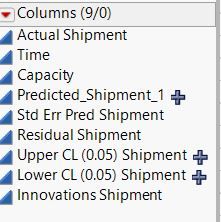
I am trying to update my existing table on column name "Capacity". As you can see in the picture below, once the Capacity column is updated, "Predicted_Shipment_1" column need to change the value according to the fomula embedded inside. However, once I run the script below, the value in "Predicted_Shipment_1" column does not change according to the updated Capacity column. Is there anything wrong with my script below?
dt2 << Update(
With( dt3 ),
Match Columns( :Time = :Time ),
Add Columns from Update table( "Capacity" )
);
column(dt2,"Predicted_Shipment_1") << delete formula;
dt3 << Update(
With( dt2 ),
Match Columns( :Time = :Time ),
Add Columns from Update table( "Predicted_Shipment_1" )
);
At the end the value in column "Predicted_Shipment_1" updated in dt3 is the old value which is not according to the formula embedded inside. Anything wrong with the formula above?
Accepted Solutions
- Mark as New
- Bookmark
- Subscribe
- Mute
- Subscribe to RSS Feed
- Get Direct Link
- Report Inappropriate Content
Re: JSL script - After update table, run the embedded formula
Thank you for your replied. I have found solution for this. Just add in the syntax below and it will help to run the formula.
column(dt4,4) << Eval Formula(1);

- Mark as New
- Bookmark
- Subscribe
- Mute
- Subscribe to RSS Feed
- Get Direct Link
- Report Inappropriate Content
Re: JSL script - After update table, run the embedded formula
@ReginaHong,
When you delete the formula and re-create the column, there is no formula in the column to run that will update the values of the Predicted column. The values that are generated due to your update/join operation will be held in the column.
Uday
- Mark as New
- Bookmark
- Subscribe
- Mute
- Subscribe to RSS Feed
- Get Direct Link
- Report Inappropriate Content
Re: JSL script - After update table, run the embedded formula
Thank you for your replied. I have found solution for this. Just add in the syntax below and it will help to run the formula.
column(dt4,4) << Eval Formula(1);
Recommended Articles
- © 2026 JMP Statistical Discovery LLC. All Rights Reserved.
- Terms of Use
- Privacy Statement
- Contact Us