- JMP Statement Regarding Critical PHP Remote Code Execution Vulnerabilities (CVE-2026-109618, CVE-2026-109619)
- Don’t miss your chance to experience Discovery Summit Europe at our best available rate! Early bird registration through 31 Oct.
- Graph Builder Toolbar streamlines interactive graphing. Creates shortcuts on Report and GraphBuilder Helpers toolbars. Download and install the extension.
- Subscribe to RSS Feed
- Mark Topic as New
- Mark Topic as Read
- Float this Topic for Current User
- Bookmark
- Subscribe
- Mute
- Printer Friendly Page
Discussions
Solve problems, and share tips and tricks with other JMP users.- User Community
- :
- Discussions
- :
- Re: JSL plugin for notepad++


- Mark as New
- Bookmark
- Subscribe
- Mute
- Subscribe to RSS Feed
- Get Direct Link
- Report Inappropriate Content
JSL plugin for notepad++
Just wondering if anyone has made a plugin for notepad ++ that will allow using notepad++ as the editor.
I like JMPs builtin but there are a slew of features in n++ that would be useful to be able to use. Plus the ability to use multiple languages is nice.
- Mark as New
- Bookmark
- Subscribe
- Mute
- Subscribe to RSS Feed
- Get Direct Link
- Report Inappropriate Content
Re: JSL plugin for notepad++
So I actually built a JSL plugin for notepad++. I'll say how to install it below, but might I recommend the JSL for VSCode extension that we moved to instead. It's under (semi-)active development and has much more extensibility. You can find it by downloading VSCode and searching extensions for "JMP" or in the VSCode marketplace.
But if you just really like notepad++. Here's how to install it.
- Find your install directory, by default it’s C:\Program Files (x86)\Notepad++
- Go to .\plugins\APIs
- Drop jsl.xml in there
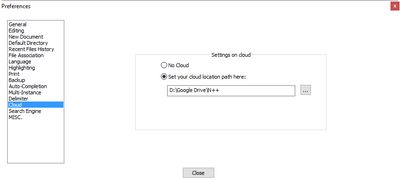
- If you have cloud settings setup in in N++, go there if not go back to the install directory
- Open your functionList.xml
- Open funcitonList(JSL).xml from the zip
- paste its contents in as another parser below </associationMap>
- Save and close
- Open your userDefineLang.xml
- Open userDefineLang.xml from the zip and paste that in as another lang wherever looks appropriate
- Save and close.
- Reopen N++ and you should be good
- ??
- Profit

- Mark as New
- Bookmark
- Subscribe
- Mute
- Subscribe to RSS Feed
- Get Direct Link
- Report Inappropriate Content
Re: JSL plugin for notepad++
Thank you @vince_faller ,
Could you please provide updated instructions how to install this in N++ 64bit - latest version.
Ron
- Mark as New
- Bookmark
- Subscribe
- Mute
- Subscribe to RSS Feed
- Get Direct Link
- Report Inappropriate Content
Re: JSL plugin for notepad++
Recommended Articles
- © 2026 JMP Statistical Discovery LLC. All Rights Reserved.
- Terms of Use
- Privacy Statement
- Contact Us