- JMP Statement Regarding Critical PHP Remote Code Execution Vulnerabilities (CVE-2026-109618, CVE-2026-109619)
- Don’t miss your chance to experience Discovery Summit Europe at our best available rate! Early bird registration through 31 Oct.
- Graph Builder Toolbar streamlines interactive graphing. Creates shortcuts on Report and GraphBuilder Helpers toolbars. Download and install the extension.
- Subscribe to RSS Feed
- Mark Topic as New
- Mark Topic as Read
- Float this Topic for Current User
- Bookmark
- Subscribe
- Mute
- Printer Friendly Page
Discussions
Solve problems, and share tips and tricks with other JMP users.- User Community
- :
- Discussions
- :
- Issue with disallowed combinations filters in DOE

- Mark as New
- Bookmark
- Subscribe
- Mute
- Subscribe to RSS Feed
- Get Direct Link
- Report Inappropriate Content
Issue with disallowed combinations filters in DOE
Dear Community,
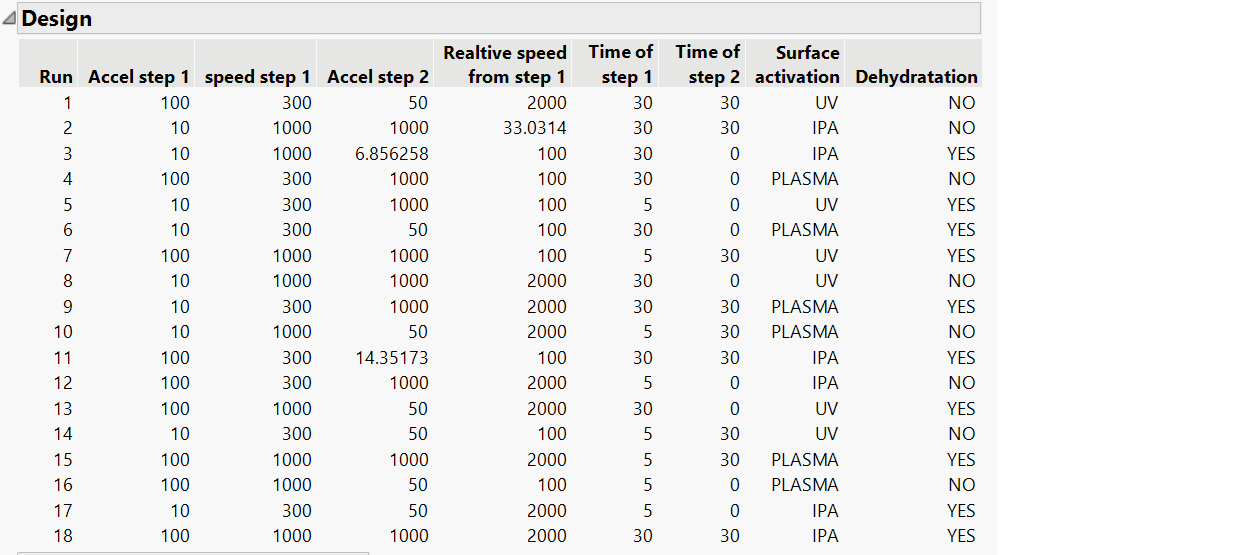
I have two factors for which I want disallowed combination i a Custom DOE.
If the "Accel step 2 = 0 , there can't be any "speed from step 1"
if the Accel step 2 > 0, there cannot be any "speed from step 1" at 0.
I tried to translate like this :
Accel step 2 == 0 & Relative speed from step 1 > 0
| Accel step 2 > 0 &Relative speed from step 1 == 0
The DOE generated is indeed removing these two conditions but also removing other conditions that I need in the DOE, like :
Accel step 2 = 0 and speed from step 1 >0
what is the reason of it and what could I do to solve it ?
Thank you so much for your support.
Accepted Solutions


- Mark as New
- Bookmark
- Subscribe
- Mute
- Subscribe to RSS Feed
- Get Direct Link
- Report Inappropriate Content
Re: Issue with disallowed combinations filters in DOE
Hi Alex,
Originally, your design was built with factors accel step 1 and speed step 1 having levels different from 0:

So your constraint "If the "Accel step 2 = 0 , there can't be any speed from step 1" couldn't be enforced since speed from step 1 could only take values different from 0, because of the specified range (but I may have confused the factor relative speed from step 1 with the factor speed step 1).
To show you the candidate set approach on your use case, here is what I did :
- Build a full factorial design for the factors having all values different from 0 (96 possible combinations when factors time are removed),
- Add combinations respecting your constraint with values equal to 0 for factors Accel step 2 and relative speed from step 1 and values different from 0 for factors Accel step 1 and speed step 1 (hope I didn't do any mistakes), with 24 new runs.
- Launch the Custom design using this candidate set with "Select Covariate Factors", specify the model (I choose main effects + all 2-factor interactions like you had), and a run size (I choose 54 like in your example). You have specific options to also allow covariate runs to be repeated, I checked it as it can help estimate terms more precisely despite the constraint that may otherwise create some imbalance in the final design.
- You end up with a design that respect your constraint, as it is based on the candidate set enforcing your constraint (here the 25 first runs of your design) :

I hope I did understand correctly your constraint and that this response may help you (or even better solve your question).
Please find attached the candidate set created for your use case (with Factor table in script if you want to change the low or high levels of some factors) and the resulting Custom Design.
Best,
"It is not unusual for a well-designed experiment to analyze itself" (Box, Hunter and Hunter)
- Mark as New
- Bookmark
- Subscribe
- Mute
- Subscribe to RSS Feed
- Get Direct Link
- Report Inappropriate Content
Re: Issue with disallowed combinations filters in DOE
Hello @Alex83,
Welcome in the Community !
Without more details about the factors type, ranges, any constraints you may have between other factors, assumed model, etc..., it's hard to help you. Can you provide your design table so that we can use the same factors settings and see what doesn't work ?
Best,
"It is not unusual for a well-designed experiment to analyze itself" (Box, Hunter and Hunter)
- Mark as New
- Bookmark
- Subscribe
- Mute
- Subscribe to RSS Feed
- Get Direct Link
- Report Inappropriate Content
Re: Issue with disallowed combinations filters in DOE
Dear Victor,
Thank you for your feedback and your support !
Here is my config :
factors are continuous and start from zero.
These factor are not independent: if acceleration is zero, the speed cannot be bigger than zero.
same if the speed is bigger than 0, acceleration cannot be bigger than 0.
However, acceleration and speed can be both 0.

I have put the DOE enclosed.
Best Regards,
Alex
- Mark as New
- Bookmark
- Subscribe
- Mute
- Subscribe to RSS Feed
- Get Direct Link
- Report Inappropriate Content
Re: Issue with disallowed combinations filters in DOE
Hi @Alex83,
I don't know your topic or system you want to study with this DoE, but looking at the factor I have some questions.
Do you really need all these factors and can they really be changed independantly ? I ask this question because I see in your DOE that you have acceleration, speed (or relative speed) and time at step 1 and 2 in your factors. I would think "naively" that acceleration is linked to the speed and time at each of these steps, so can you really change each of these factors independantly (apart from the constraint you want to include) ?
In your design, your factors do not start all at 0. Since the low level of speed step 1 is different from 0, you can't create the disallowed combination "If the "Accel step 2 = 0 , there can't be any speed from step 1". Changing the low levels of your speed and acceleration factors to 0 may help define the constraint.
I think the easiest way would be to use the Candidate set approach and use it in the Custom design : Candidate Set Designs: Tailoring DOE Constraints to the Problem (2021-EU-30MP-784)
Start by creating the full table of possible combinations between your factors, and then use the option "Select Covariate Factors" in Custom Design platform to select the factors from your candidate set table. The design generated will only include runs available from your candidate set table: if you have enforced your constraints in this table by only allowing/including runs respecting this constraint, then the resulting design will also respect your constraints.
You may also read similar topics related to disallowed combinations :
Using disallowed combinations to remove a factor from the DoE
Adding a complex constrain to a Custom Design with 4 factors
Hope this answer will help you,
"It is not unusual for a well-designed experiment to analyze itself" (Box, Hunter and Hunter)
- Mark as New
- Bookmark
- Subscribe
- Mute
- Subscribe to RSS Feed
- Get Direct Link
- Report Inappropriate Content
Re: Issue with disallowed combinations filters in DOE
Dear Victor,
Thank you for your precious inputs. True, we were about to remove the time, as accel and speed are enough to define what we want.
What do you mean by "In your design, your factors do not start all at 0 ? I set the factors starts at 0, as you can see in the picture enclosed.

I will try the candidate set approach by creating the table first, and see if it solve the issues.
Best Regards,
Alex
- Mark as New
- Bookmark
- Subscribe
- Mute
- Subscribe to RSS Feed
- Get Direct Link
- Report Inappropriate Content
Re: Issue with disallowed combinations filters in DOE
Hi Alex,
Originally, your design was built with factors accel step 1 and speed step 1 having levels different from 0:
So your constraint "If the "Accel step 2 = 0 , there can't be any speed from step 1" couldn't be enforced since speed from step 1 could only take values different from 0, because of the specified range (but I may have confused the factor relative speed from step 1 with the factor speed step 1).
To show you the candidate set approach on your use case, here is what I did :
- Build a full factorial design for the factors having all values different from 0 (96 possible combinations when factors time are removed),
- Add combinations respecting your constraint with values equal to 0 for factors Accel step 2 and relative speed from step 1 and values different from 0 for factors Accel step 1 and speed step 1 (hope I didn't do any mistakes), with 24 new runs.
- Launch the Custom design using this candidate set with "Select Covariate Factors", specify the model (I choose main effects + all 2-factor interactions like you had), and a run size (I choose 54 like in your example). You have specific options to also allow covariate runs to be repeated, I checked it as it can help estimate terms more precisely despite the constraint that may otherwise create some imbalance in the final design.
- You end up with a design that respect your constraint, as it is based on the candidate set enforcing your constraint (here the 25 first runs of your design) :
I hope I did understand correctly your constraint and that this response may help you (or even better solve your question).
Please find attached the candidate set created for your use case (with Factor table in script if you want to change the low or high levels of some factors) and the resulting Custom Design.
Best,
"It is not unusual for a well-designed experiment to analyze itself" (Box, Hunter and Hunter)
- Mark as New
- Bookmark
- Subscribe
- Mute
- Subscribe to RSS Feed
- Get Direct Link
- Report Inappropriate Content
Re: Issue with disallowed combinations filters in DOE
Hello Victor,
Thank you so much for your help. Indeed the "speed step 1" and "relative speed from step 1" are different.
I think that the candidate set you are referring to solves my issue. I'll try to reproduce it based on your example.
Best Regards,
Alex
- Mark as New
- Bookmark
- Subscribe
- Mute
- Subscribe to RSS Feed
- Get Direct Link
- Report Inappropriate Content
Re: Issue with disallowed combinations filters in DOE
Hello Victor,
I am stuck at step 3. How can I use the modified full factorial table to create the custom design DOE ? Is there any import menu that I missed ?
Best Regards
Alex
- Mark as New
- Bookmark
- Subscribe
- Mute
- Subscribe to RSS Feed
- Get Direct Link
- Report Inappropriate Content
Re: Issue with disallowed combinations filters in DOE
It's ok I found it. Please do not consider my question. All good.
Best Regards,
Alex
- Mark as New
- Bookmark
- Subscribe
- Mute
- Subscribe to RSS Feed
- Get Direct Link
- Report Inappropriate Content
Re: Issue with disallowed combinations filters in DOE
Hi Alex,
Once you have prepared your candidate set (here the full factorial + additional combination runs), let your candidate set table open and go into menu DOE>Custom Design.
From there,
- Click on Select Covariate Factors:
- Choose the factors you want to include from your candidate set table and click OK:
- Continue, and then specify the model you want to assume/fit and the number of runs. You also have options at this stage to force the design generation to include all covariate runs and/or allow repetitions of runs from the candidate set. The first option doesn't seem helpful here, but the first one may help estimate terms more precisely despite the imbalance in the candidate set:
- You can then click on Make Design and get your Custom design ! :)


Hope the process is clearer now ?
"It is not unusual for a well-designed experiment to analyze itself" (Box, Hunter and Hunter)
Recommended Articles
- © 2026 JMP Statistical Discovery LLC. All Rights Reserved.
- Terms of Use
- Privacy Statement
- Contact Us