- JMP will suspend normal business operations for our Winter Holiday beginning on Wednesday, Dec. 24, 2025, at 5:00 p.m. ET (2:00 p.m. ET for JMP Accounts Receivable).
Regular business hours will resume at 9:00 a.m. EST on Friday, Jan. 2, 2026. - We’re retiring the File Exchange at the end of this year. The JMP Marketplace is now your destination for add-ins and extensions.
- Subscribe to RSS Feed
- Mark Topic as New
- Mark Topic as Read
- Float this Topic for Current User
- Bookmark
- Subscribe
- Mute
- Printer Friendly Page
Discussions
Solve problems, and share tips and tricks with other JMP users.- JMP User Community
- :
- Discussions
- :
- Is this possible to write a script that opens always the last sheet of an xlsx f...

- Mark as New
- Bookmark
- Subscribe
- Mute
- Subscribe to RSS Feed
- Get Direct Link
- Report Inappropriate Content
Is this possible to write a script that opens always the last sheet of an xlsx file?
I need a JSL script that opens always the last sheet of a chosen xlsx file. Is there a function to do this in JSL?
Alternatively, is it possible to accomplish this by compiling all the sheets of the Excel file into a list and open the last item of the list? Or open the excel file in a way that the user can input the sheet to open?
Accepted Solutions


- Mark as New
- Bookmark
- Subscribe
- Mute
- Subscribe to RSS Feed
- Get Direct Link
- Report Inappropriate Content
Re: Is this possible to write a script that opens always the last sheet of an xlsx file?
Hi,
I've added a reference to the chosen file, which can then be plugged into Open(). Let us know if this works (the Open settings may need to be adjusted for your file):
sheetList = Get Excel Worksheets(file=Pick File("Select xlsx file","$DOCUMENTS",{"Excel File|xlsx", "All Files|*"},1,0,""));
Show( sheetList );
lastSheet = sheetList[N Items( sheetList )];
Open(
	file,
	Worksheets( lastSheet ),
	Use for all sheets( 1 ),
	Concatenate Worksheets( 0 ),
	Create Concatenation Column( 0 ),
	Worksheet Settings(
		1,
		Has Column Headers( 1 ),
		Number of Rows in Headers( 1 ),
		Headers Start on Row( 1 ),
		Data Starts on Row( 2 ),
		Data Starts on Column( 1 ),
		Data Ends on Row( 0 ),
		Data Ends on Column( 0 ),
		Replicated Spanned Rows( 1 ),
		Replicated Spanned Headers( 0 ),
		Suppress Hidden Rows( 1 ),
		Suppress Hidden Columns( 1 ),
		Suppress Empty Columns( 1 ),
		Treat as Hierarchy( 0 ),
		Multiple Series Stack( 0 ),
		Import Cell Colors( 0 ),
		Limit Column Detect( 0 ),
		Column Separator String( "-" )
	)
);

- Mark as New
- Bookmark
- Subscribe
- Mute
- Subscribe to RSS Feed
- Get Direct Link
- Report Inappropriate Content
Re: Is this possible to write a script that opens always the last sheet of an xlsx file?
Here is the example from the Scripting Index that illustrates how to get a list of the spreadsheets that are in a given wookbook. From there one can select the last spreadsheet.
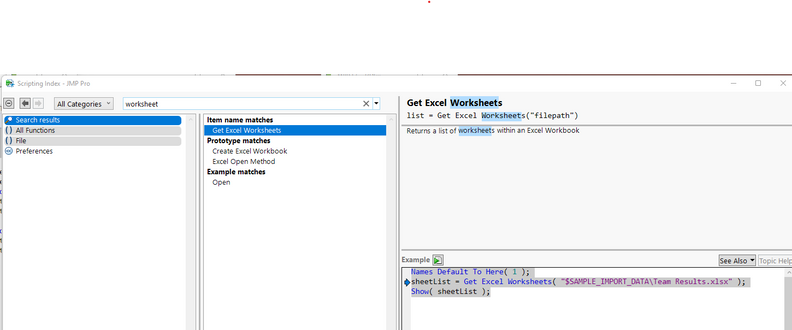
Names Default To Here( 1 );
sheetList = Get Excel Worksheets( "$SAMPLE_IMPORT_DATA\Team Results.xlsx" );
Show( sheetList );
From there it is a simple matter to get the last entry in the list
lastSheet = sheetList[N Items( sheetList )];
- Mark as New
- Bookmark
- Subscribe
- Mute
- Subscribe to RSS Feed
- Get Direct Link
- Report Inappropriate Content
Re: Is this possible to write a script that opens always the last sheet of an xlsx file?
This do not seem to be able to work. Here I wrote a code to pick up the xlsx file of interest, of which I would like to get the last worsksheet and open it into a data table. Could you advise on how to move forward from the code below?
sheetList = Get Excel Worksheets(Pick File(	"Select xlsx file","$DOCUMENTS",{"Excel File|xlsx", "All Files|*"},1,0,""));
Show( sheetList );
lastSheet = sheetList[N Items( sheetList )];
- Mark as New
- Bookmark
- Subscribe
- Mute
- Subscribe to RSS Feed
- Get Direct Link
- Report Inappropriate Content
Re: Is this possible to write a script that opens always the last sheet of an xlsx file?
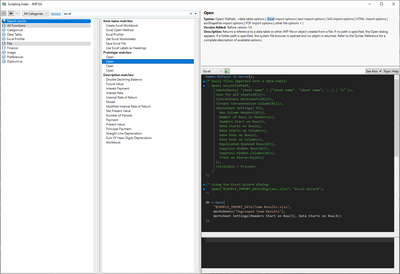
After you have the name of last sheet and path to the file, then you can use Open() to open the file with only the last worksheet.
From Scripting Index:
- Mark as New
- Bookmark
- Subscribe
- Mute
- Subscribe to RSS Feed
- Get Direct Link
- Report Inappropriate Content
Re: Is this possible to write a script that opens always the last sheet of an xlsx file?
Your code seems to work for me. What issue are you having with it? What JMP version and what operating system?
- Mark as New
- Bookmark
- Subscribe
- Mute
- Subscribe to RSS Feed
- Get Direct Link
- Report Inappropriate Content
Re: Is this possible to write a script that opens always the last sheet of an xlsx file?
Hi,
I've added a reference to the chosen file, which can then be plugged into Open(). Let us know if this works (the Open settings may need to be adjusted for your file):
sheetList = Get Excel Worksheets(file=Pick File("Select xlsx file","$DOCUMENTS",{"Excel File|xlsx", "All Files|*"},1,0,""));
Show( sheetList );
lastSheet = sheetList[N Items( sheetList )];
Open(
	file,
	Worksheets( lastSheet ),
	Use for all sheets( 1 ),
	Concatenate Worksheets( 0 ),
	Create Concatenation Column( 0 ),
	Worksheet Settings(
		1,
		Has Column Headers( 1 ),
		Number of Rows in Headers( 1 ),
		Headers Start on Row( 1 ),
		Data Starts on Row( 2 ),
		Data Starts on Column( 1 ),
		Data Ends on Row( 0 ),
		Data Ends on Column( 0 ),
		Replicated Spanned Rows( 1 ),
		Replicated Spanned Headers( 0 ),
		Suppress Hidden Rows( 1 ),
		Suppress Hidden Columns( 1 ),
		Suppress Empty Columns( 1 ),
		Treat as Hierarchy( 0 ),
		Multiple Series Stack( 0 ),
		Import Cell Colors( 0 ),
		Limit Column Detect( 0 ),
		Column Separator String( "-" )
	)
);Recommended Articles
- © 2026 JMP Statistical Discovery LLC. All Rights Reserved.
- Terms of Use
- Privacy Statement
- Contact Us