Turn on suggestions
Auto-suggest helps you quickly narrow down your search results by suggesting possible matches as you type.
- Don’t miss your chance to experience Discovery Summit Europe at our best available rate! Early bird registration through 31 Oct.
- Graph Builder Toolbar streamlines interactive graphing. Creates shortcuts on Report and GraphBuilder Helpers toolbars. Download and install the extension.
Options
- Subscribe to RSS Feed
- Mark Topic as New
- Mark Topic as Read
- Float this Topic for Current User
- Bookmark
- Subscribe
- Mute
- Printer Friendly Page
Discussions
Solve problems, and share tips and tricks with other JMP users.- User Community
- :
- Discussions
- :
- Re: Is it possible to use a custom equation to fit the data in graph builder?

Level III
- Mark as New
- Bookmark
- Subscribe
- Mute
- Subscribe to RSS Feed
- Get Direct Link
- Report Inappropriate Content
Is it possible to use a custom equation to fit the data in graph builder?
May 6, 2020 10:58 AM
(25289 views)
Hi!
I've used graph builder to plot the data with grouped X (as shown in the attached image). I wanted to fit all three curves using an exponential growth function. I only found Line of Fit and Smoother functions, but these are not what I would like to do. I was wondering if it is possible to customize the fitting equation and also display the confidence interval of the fit as well as the statistics of the fit (e.g. R^2, F-test, equation) in the graph?
Thanks!
11 REPLIES 11


Super User
- Mark as New
- Bookmark
- Subscribe
- Mute
- Subscribe to RSS Feed
- Get Direct Link
- Report Inappropriate Content
Re: Is it possible to use a custom equation to fit the data in graph builder?
If you are creating the graph using JSL, it is a simple modification to delete the Axis Box() associated with the right hand axis.
Can you share the script that creates the graph?
Can you share the script that creates the graph?
Jim

Level II
- Mark as New
- Bookmark
- Subscribe
- Mute
- Subscribe to RSS Feed
- Get Direct Link
- Report Inappropriate Content
Re: Is it possible to use a custom equation to fit the data in graph builder?
Created:
Dec 15, 2020 08:56 PM
| Last Modified: Dec 16, 2020 9:57 AM
(3098 views)
| Posted in reply to message from txnelson 12-15-2020
Thanks. After some fiddling, I realized that de selecting the labels box in the axis setting did the trick as well. Here is my graph and script
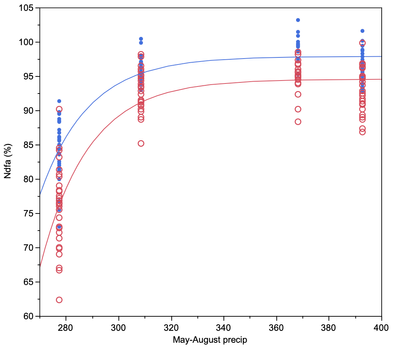

Graph Builder(
    Show Legend( 0 ),
    Show Title( 0 ),
    Variables(
        X( :Name( "May-August precip" ) ),
        Y( :Name( "Ndfa (%)" ) ),
        Y( :Exponential 3P, Position( 1 ), Side( "Right" ) ),
        Overlay( :Site )
    ),
    Elements( Points( X, Y( 1 ), Legend( 13 ) ), Formula( X, Y( 2 ), Legend( 12 ) ) ),
    SendToReport(
        Dispatch(
            {},
            "Exponential 3P",
            ScaleBox,
            {Min( 60 ), Max( 105 ), Inc( 10 ), Minor Ticks( 0 ), Label Row(
                {Automatic Font Size( 0 ), Automatic Tick Marks( 0 ), Show Major Labels( 0 ), Show Major Ticks( 0 ), Show Minor Ticks( 0 )}
            )}
        ),
        Dispatch( {}, "", GraphBuilderComponentBox( 7 ), {Select} ),
        Dispatch( {}, "", AxisBox, {Select} ),
        Dispatch( {}, "", AxisBox( 2 ), {Select} ),
        Dispatch( {}, "Y r title", TextEditBox, {Set Text( "" )} ),
        Dispatch( {}, "Graph Builder", FrameBox, {Select} )
    )
);
- « Previous
-
- 1
- 2
- Next »
Recommended Articles
- © 2026 JMP Statistical Discovery LLC. All Rights Reserved.
- Terms of Use
- Privacy Statement
- Contact Us