- Discovery Summit 2026: Early User Edition - September 23-24.Register. It's free.
- Graph Builder Toolbar streamlines interactive graphing. Creates shortcuts on Report and GraphBuilder Helpers toolbars. Download and install the extension.
- Subscribe to RSS Feed
- Mark Topic as New
- Mark Topic as Read
- Float this Topic for Current User
- Bookmark
- Subscribe
- Mute
- Printer Friendly Page
Discussions
Solve problems, and share tips and tricks with other JMP users.- User Community
- :
- Discussions
- :
- Re: Initial Condition for "Life Distribution" Function in "Reliability & Surviva...

- Mark as New
- Bookmark
- Subscribe
- Mute
- Subscribe to RSS Feed
- Get Direct Link
- Report Inappropriate Content
Initial Condition for "Life Distribution" Function in "Reliability & Survival" Analyze Tool
When using the "life distribution" function in the "reliability and survival" portion of the analyze tool, why don't they need initial conditions to find the Weibull parameters? Thanks!
Accepted Solutions


- Mark as New
- Bookmark
- Subscribe
- Mute
- Subscribe to RSS Feed
- Get Direct Link
- Report Inappropriate Content
Re: Initial Condition for "Life Distribution" Function in "Reliability & Survival" Analyze Tool
I try to capture all steps: (usually you would use a censor but it#s not required to show the options)
1. Just the time to event data
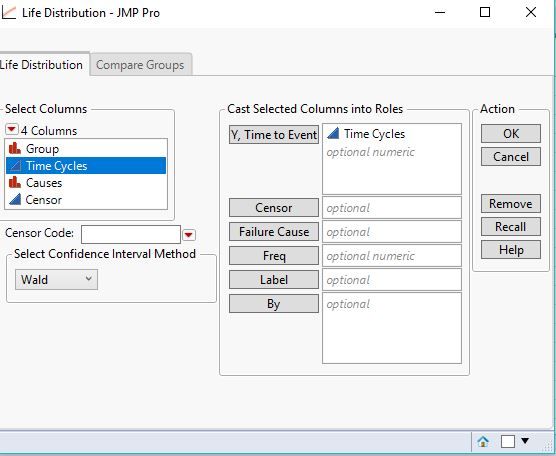
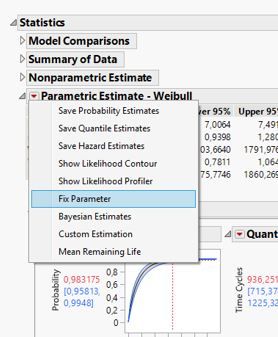
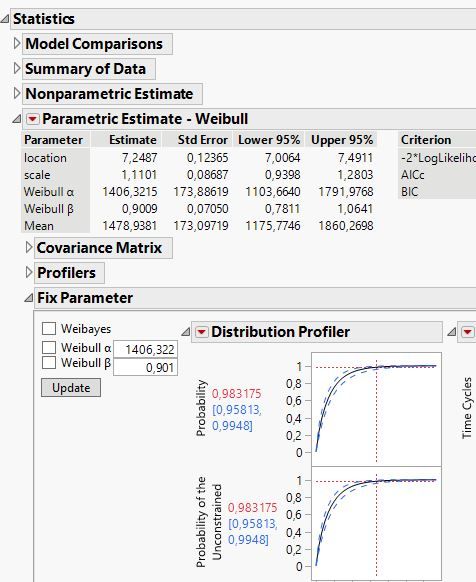
You have to select weibull from the compare distributions panel, then in the statistics section under Weibull the hotspot and select Fix Parameter (2nd picture). The 3rd picture shows the appearing report where you can set weibull alpha and beta.
2. With Failure information to see distributions for each failure cause.
This is as you described it.
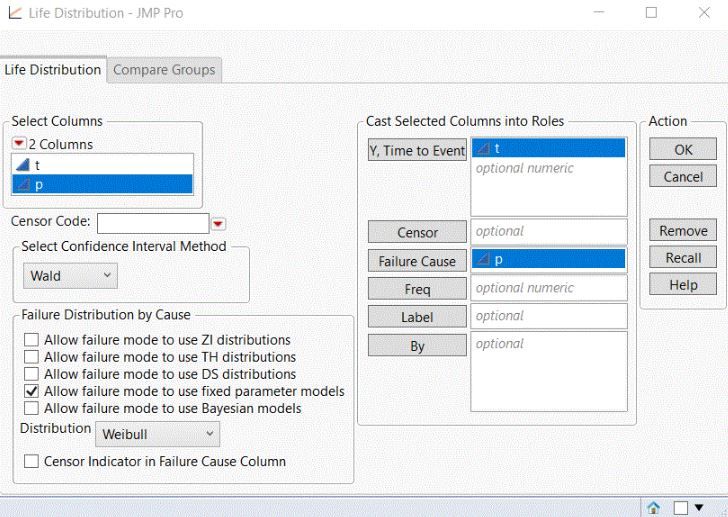
If you want to be able to fix the parameters in the individual failure cause distributions you have to set this optin already in the launch window (above picture). then you select weibull in the compare distribution panel, go to individual distributions of one of the failure causes and select there the Fix Parameter similar to the first option:
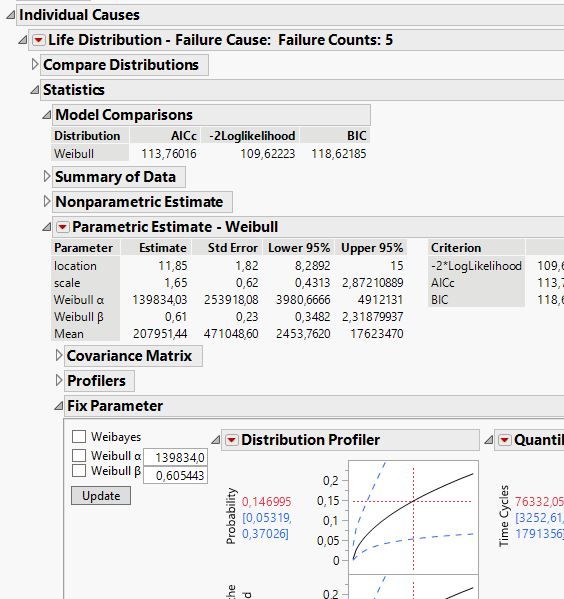
3. Competing Risk Mixture Option:
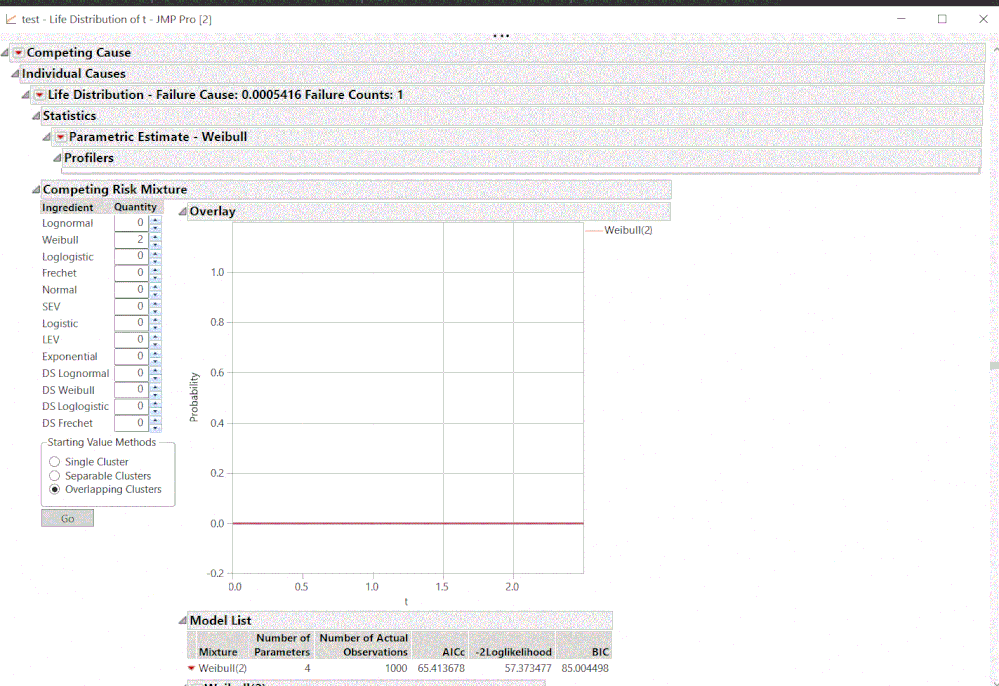
Heree you will not ahave the option to specify Fix Parameter for the weibull as it tries to find the weibull parameters depending on the mixture of the distributions you set in advance.
Hope this explains the different options.
- Mark as New
- Bookmark
- Subscribe
- Mute
- Subscribe to RSS Feed
- Get Direct Link
- Report Inappropriate Content
Re: Initial Condition for "Life Distribution" Function in "Reliability & Survival" Analyze Tool
May these two threads answer your question already?
Life-Distribution-Fixing-p-and-fixing-Weibull-beta-in-DS-Weibull
Weibull-distribution-solving-for-a-quot-pooled-quot-Weibull-beta
- Mark as New
- Bookmark
- Subscribe
- Mute
- Subscribe to RSS Feed
- Get Direct Link
- Report Inappropriate Content
Re: Initial Condition for "Life Distribution" Function in "Reliability & Survival" Analyze Tool
Thanks so much for the links! If you're doing a competing risk analysis, there isn't a red triangle that pops up to vary the parameters. In this case, how would the initial conditions be specified?
- Mark as New
- Bookmark
- Subscribe
- Mute
- Subscribe to RSS Feed
- Get Direct Link
- Report Inappropriate Content
Re: Initial Condition for "Life Distribution" Function in "Reliability & Survival" Analyze Tool
When you use the competing causes in the life distribution platform you need to specify the setting upfront in the launch window:
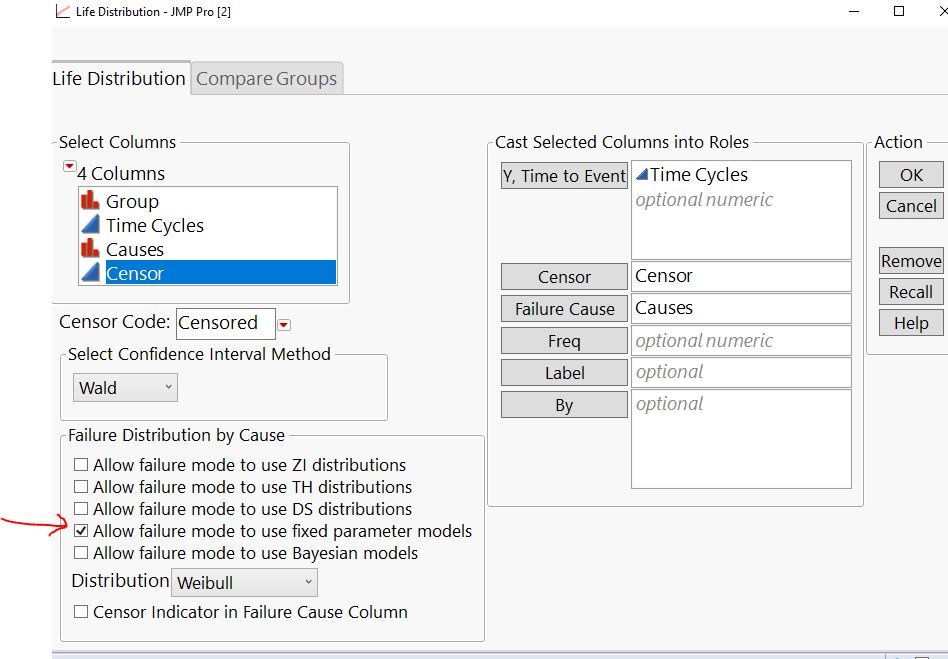
Then you can in the individual weibull fits fix the parameter settings as well. The fix parameter option will not appear if you have not checked that box in the launch window or set it in the preferences of this platform.
- Mark as New
- Bookmark
- Subscribe
- Mute
- Subscribe to RSS Feed
- Get Direct Link
- Report Inappropriate Content
Re: Initial Condition for "Life Distribution" Function in "Reliability & Survival" Analyze Tool
Ok, I tried those steps using JMP Pro 15, but it seems that I'm still not able to change the parameters in the below image? Thank you so much for your help for your previous posts! I really appreciate it.
- Mark as New
- Bookmark
- Subscribe
- Mute
- Subscribe to RSS Feed
- Get Direct Link
- Report Inappropriate Content
Re: Initial Condition for "Life Distribution" Function in "Reliability & Survival" Analyze Tool
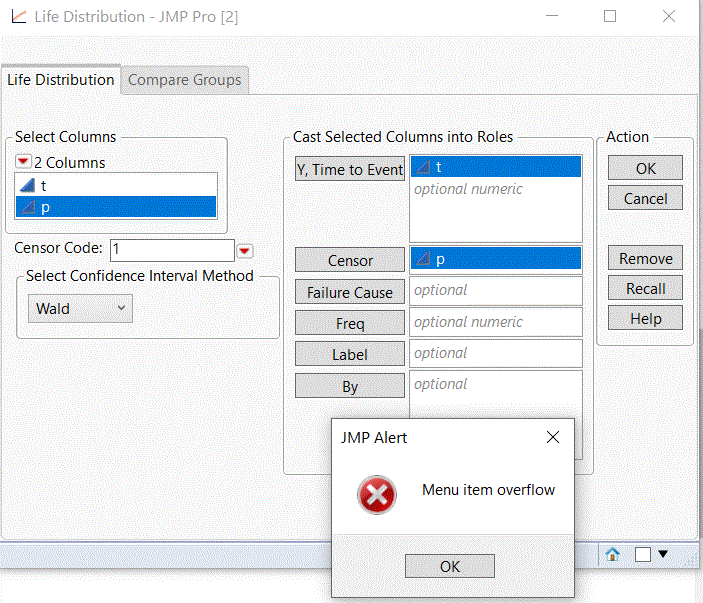
I see that your censor is contineous, please set it to categorical (e.g. nominal). In addition you have just two columns so no failure cause. Hope this will resolve the issues you have with that error. (If not you may check with [email protected] for this error if it can be reproduced.)
Your message I received per email:
Re: Initial Condition for "Life Distribution" Function in "Reliability & Survival" Analyze Tool
I tried to do that in the below picture using JMP Pro15, but the "failure distribution by cause menu" doesn't show up. I tried doing it without using the censored function, and the same thing occurs. I tried doing it with the censor function, and clicking the red triangle in the censor code place, but another window pops up saying "menu item overflow". (I would think it shouldn't matter whether the data is censored or not?) Am I missing something? Thanks!
- Mark as New
- Bookmark
- Subscribe
- Mute
- Subscribe to RSS Feed
- Get Direct Link
- Report Inappropriate Content
Re: Initial Condition for "Life Distribution" Function in "Reliability & Survival" Analyze Tool
If I disregard the censor selection and just treat it as uncensored data, is it possible to adjust the initial condition parameters without selecting the failure cause, in the case that I don't know the failure cause? Thank you!
- Mark as New
- Bookmark
- Subscribe
- Mute
- Subscribe to RSS Feed
- Get Direct Link
- Report Inappropriate Content
Re: Initial Condition for "Life Distribution" Function in "Reliability & Survival" Analyze Tool
Maybe my previous post was confusing and not exactly to what you were asking for. The failure cause is not necessary (just added it as you mentioned different competing risk scenarios and thought you meant to understand the risk involved with different failure causes - my fault not reading accurately ;) ).
You can launch the life distribution platform without censor or without failure cause or without both. In each case you have the option to fix parameters after you have done the weibull fit using the red hotspot of the then created outline box for the Weibull analysis.
However when using the competing risk mixture fit platform you cannot set the Weibull parameters in advance, only default can be used. Part of the reason is that you do not have any idea of what underlying distribution really works here, but you believe it is a mixture of distributions and not just one single one, as the single one does not fit in a good way. It then estimates the probability that a given observation fails due to the cause represented by each of the component mixture distributions. You can check if a mixture of distributions will better fit. If you e.g. take 2 Weibull distributions it tries to find two weibull distributions with different alpha and beta values. As said, if oyu have a good reason to provide a guess for alpha/beta for a mixture of distributions please share it with our development through the wish list. Thanks!
If you want that option use the JMP Wish List to express this wish and describe why you want to have this option there as well. The JMP Development team scan these wishes on a regular base and may consider it for a future version of JMP (without guarantee of course, there are many aspects involved in the decision to put something in the software). In the wish list other users can kudo it so it gets more interest of course :)
- Mark as New
- Bookmark
- Subscribe
- Mute
- Subscribe to RSS Feed
- Get Direct Link
- Report Inappropriate Content
Re: Initial Condition for "Life Distribution" Function in "Reliability & Survival" Analyze Tool
Thank you so much for taking the time to explain things clearly! I really appreciate it! :)
From what I'm understanding so far and with playing around with the JMP Pro 15, if I want to set intial conditions for the competing Weibull function, I need to do it beforehand in the "Life Distribution" Window. If I put something in the "failure cause" section, the "allow failure mode to use fixed parameter models" shows up, as in the below picture.
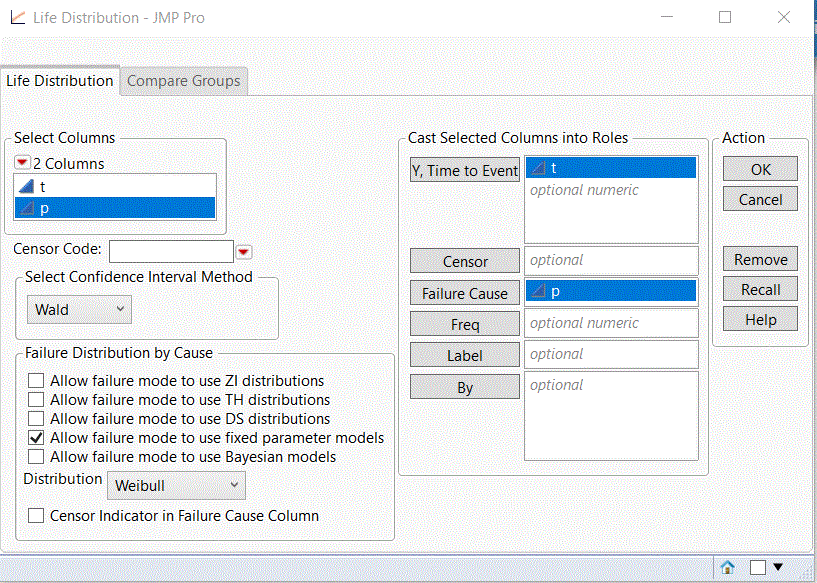
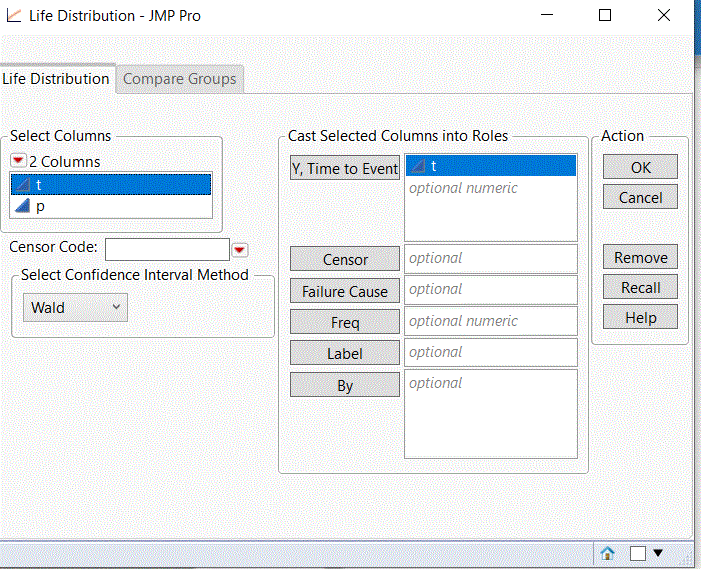
If I don't put something in the "failure cause" column, then the "allow failure mode to use fixed parameter models" doesn't show up, as in the below picture. If I don't know the failure cause, then does that mean that it's not possible to change the initial conditions?
- Mark as New
- Bookmark
- Subscribe
- Mute
- Subscribe to RSS Feed
- Get Direct Link
- Report Inappropriate Content
Re: Initial Condition for "Life Distribution" Function in "Reliability & Survival" Analyze Tool
I try to capture all steps: (usually you would use a censor but it#s not required to show the options)
1. Just the time to event data
You have to select weibull from the compare distributions panel, then in the statistics section under Weibull the hotspot and select Fix Parameter (2nd picture). The 3rd picture shows the appearing report where you can set weibull alpha and beta.
2. With Failure information to see distributions for each failure cause.
This is as you described it.
If you want to be able to fix the parameters in the individual failure cause distributions you have to set this optin already in the launch window (above picture). then you select weibull in the compare distribution panel, go to individual distributions of one of the failure causes and select there the Fix Parameter similar to the first option:
3. Competing Risk Mixture Option:
Heree you will not ahave the option to specify Fix Parameter for the weibull as it tries to find the weibull parameters depending on the mixture of the distributions you set in advance.
Hope this explains the different options.
Recommended Articles
- © 2026 JMP Statistical Discovery LLC. All Rights Reserved.
- Terms of Use
- Privacy Statement
- Contact Us