cancel
Showing results for 
Show  only  | Search instead for 
Did you mean: 
  • JMP Security Notice: CVE-2026-109618 and CVE-2026-109619

    JMP promptly initiated a review of its products, services, and relevant infrastructure for exposure to CVE-2026-109618 and CVE-2026-109619.

    Our assessment of JMP products has not identified exposure to these vulnerabilities. Where remediation was required within supporting environments, appropriate security updates and controls have been applied and validated.

    We have identified no evidence of successful exploitation or unauthorized access to JMP systems or customer information associated with these vulnerabilities.

    JMP continues to monitor the issue and relevant vendor guidance. No action is required by JMP customers at this time.

  • Don’t miss your chance to experience Discovery Summit Europe at our best available rate! Early bird registration through 31 Oct.
  • Graph Builder Toolbar streamlines interactive graphing. Creates shortcuts on Report and GraphBuilder Helpers toolbars. Download and install the extension.

Discussions

Solve problems, and share tips and tricks with other JMP users.
Choose Language Hide Translation Bar
Johnanderson
Level II

Including covariates in Jmp pro

Dear collegues–

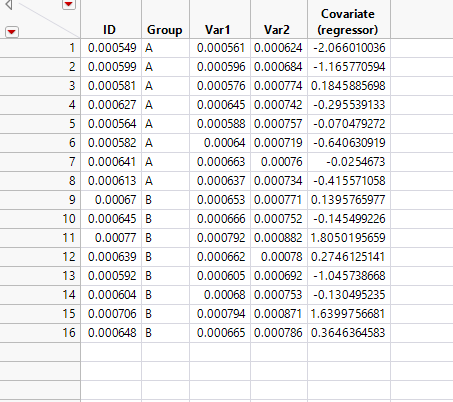
I would like to know the correct way to include covariates in a correlation analysis using JMP pro 14. Please see bellow is a spreadsheet contain two variables (var1 and var2) and one covariate. I aim to:

1. Run correlation analysis between var1 and var2 within each group by including the regressor. I know how to fit x/y to run the correlation, nut I want to know how the correlation will look like after including the regressor.

2. Study the differnce in Var1 (t.test) between A and B after including the covariate. Also I know how to run t test but I want to include th ecovariate int his test?

Thank you for any advice,

John


Capture.PNG

John anderson
1 REPLY 1
Byron_JMP
Staff

Re: Including covariates in Jmp pro

Hopefully I'm not over simplifying what your're trying to do...

Maybe try the Fit Model Platform?


Include Group, Var1, Var2, Covariate, as effects. (not sure what the Response (Y)) is in this example.

Use the Effect Leverage option for Emphasis (makes the next step easier)

In the report, click on the red triangle menu in the leverage plot for Group (top row of graphs in the report)

you can display the least squares means plot and also the least squares means differences students's t.


JMP Systems Engineer, Health and Life Sciences (Pharma)

Recommended Articles