Turn on suggestions
Auto-suggest helps you quickly narrow down your search results by suggesting possible matches as you type.
- Don’t miss your chance to experience Discovery Summit Europe at our best available rate! Early bird registration through 31 Oct.
- Graph Builder Toolbar streamlines interactive graphing. Creates shortcuts on Report and GraphBuilder Helpers toolbars. Download and install the extension.
Options
- Subscribe to RSS Feed
- Mark Topic as New
- Mark Topic as Read
- Float this Topic for Current User
- Bookmark
- Subscribe
- Mute
- Printer Friendly Page
Discussions
Solve problems, and share tips and tricks with other JMP users.- User Community
- :
- Discussions
- :
- Re: Import csv file using specified row as column names

Level III
- Mark as New
- Bookmark
- Subscribe
- Mute
- Subscribe to RSS Feed
- Get Direct Link
- Report Inappropriate Content
Import csv file using specified row as column names
Jan 29, 2020 12:24 PM
(7925 views)
Hi all,
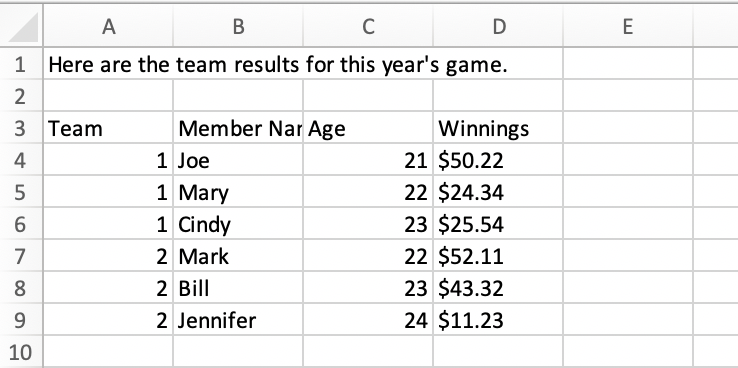
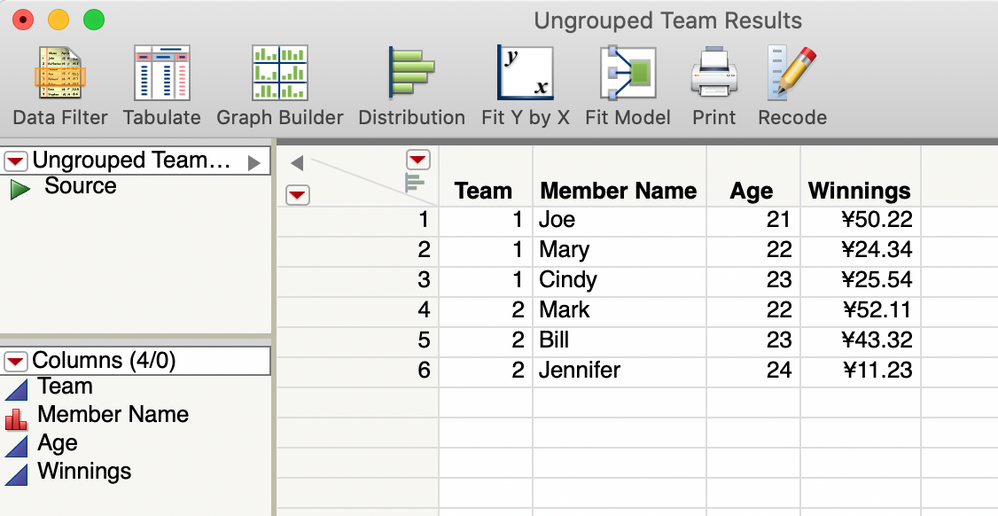
I wonder to import csv file using specified row as column names (row 3 in this case).
Here is the csv file format:
Here is the target jmp table format I want:
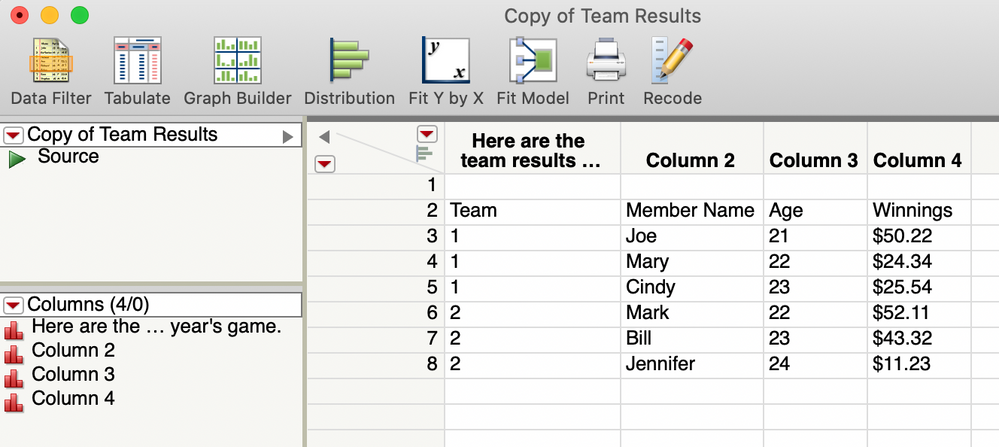
I wrote the below scripts, but failed:
Names Default To Here( 1 );
Files = Pick File(
	"Select CSV File",
	"$Downloads",
	{"JMP Files|jmp;jsl;jrn", "All Files|*"},
	1,
	0,
	"",
	"multiple"
);
For( i = 1, i <= N Items( Files ), i++,
	Try( Open(
		Files[i],
			Worksheet Settings(
			1,
				Has Column Headers(1),
				Number of Rows in headers(2),
				Headers Start on Row(2),
				Data Starts on Row(8)
			)
		)
	 )
);
Any advice? Thanks
1 ACCEPTED SOLUTION
Accepted Solutions


Super User
Solution
- Mark as New
- Bookmark
- Subscribe
- Mute
- Subscribe to RSS Feed
- Get Direct Link
- Report Inappropriate Content
Re: Import csv file using specified row as column names
Here is the source used by JMP to open a .csv file. As can be seen, there are options for Column Names Start() and Data Starts().
You should be able to modify this code to meet your needs
Open(
	"C:\Users\Jim\Documents\Big Class.csv",
	columns(
		New Column( "name", Character, "Nominal" ),
		New Column( "age", Numeric, "Continuous", Format( "Best", 12 ) ),
		New Column( "sex", Character, "Nominal" ),
		New Column( "height", Numeric, "Continuous", Format( "Best", 12 ) ),
		New Column( "weight", Numeric, "Continuous", Format( "Best", 12 ) )
	),
	Import Settings(
		End Of Line( CRLF, CR, LF ),
		End Of Field( Comma, CSV( 0 ) ),
		Strip Quotes( 1 ),
		Use Apostrophe as Quotation Mark( 0 ),
		Use Regional Settings( 0 ),
		Scan Whole File( 1 ),
		Treat empty columns as numeric( 0 ),
		CompressNumericColumns( 0 ),
		CompressCharacterColumns( 0 ),
		CompressAllowListCheck( 0 ),
		Labels( 1 ),
		Column Names Start( 1 ),
		Data Starts( 2 ),
		Lines To Read( "All" ),
		Year Rule( "20xx" )
	)
)
Jim
3 REPLIES 3
Level III
- Mark as New
- Bookmark
- Subscribe
- Mute
- Subscribe to RSS Feed
- Get Direct Link
- Report Inappropriate Content
Re: Import csv file using specified row as column names
Created:
Jan 29, 2020 12:28 PM
| Last Modified: Jan 29, 2020 10:08 AM
(7924 views)
| Posted in reply to message from Adam_Xu 01-29-2020
Sorry, this scripts:
Names Default To Here( 1 );
Files = Pick File(
	"Select CSV File",
	"$Downloads",
	{"JMP Files|jmp;jsl;jrn", "All Files|*"},
	1,
	0,
	"",
	"multiple"
);
For( i = 1, i <= N Items( Files ), i++,
	Try(
		Open(
			Files[i],
			Worksheet Settings(
				1,
				Has Column Headers( 1 ),
				Number of Rows in headers( 2 ),
				Headers Start on Row( 3 ),
				Data Starts on Row( 4 )
			)
		)
	)
);
Super User
Solution
- Mark as New
- Bookmark
- Subscribe
- Mute
- Subscribe to RSS Feed
- Get Direct Link
- Report Inappropriate Content
Re: Import csv file using specified row as column names
Here is the source used by JMP to open a .csv file. As can be seen, there are options for Column Names Start() and Data Starts().
You should be able to modify this code to meet your needs
Open(
	"C:\Users\Jim\Documents\Big Class.csv",
	columns(
		New Column( "name", Character, "Nominal" ),
		New Column( "age", Numeric, "Continuous", Format( "Best", 12 ) ),
		New Column( "sex", Character, "Nominal" ),
		New Column( "height", Numeric, "Continuous", Format( "Best", 12 ) ),
		New Column( "weight", Numeric, "Continuous", Format( "Best", 12 ) )
	),
	Import Settings(
		End Of Line( CRLF, CR, LF ),
		End Of Field( Comma, CSV( 0 ) ),
		Strip Quotes( 1 ),
		Use Apostrophe as Quotation Mark( 0 ),
		Use Regional Settings( 0 ),
		Scan Whole File( 1 ),
		Treat empty columns as numeric( 0 ),
		CompressNumericColumns( 0 ),
		CompressCharacterColumns( 0 ),
		CompressAllowListCheck( 0 ),
		Labels( 1 ),
		Column Names Start( 1 ),
		Data Starts( 2 ),
		Lines To Read( "All" ),
		Year Rule( "20xx" )
	)
)
Jim
Level III
- Mark as New
- Bookmark
- Subscribe
- Mute
- Subscribe to RSS Feed
- Get Direct Link
- Report Inappropriate Content
Re: Import csv file using specified row as column names
Thank you, Sir! It works
Recommended Articles
- © 2026 JMP Statistical Discovery LLC. All Rights Reserved.
- Terms of Use
- Privacy Statement
- Contact Us