- JMP Statement Regarding Critical PHP Remote Code Execution Vulnerabilities (CVE-2026-109618, CVE-2026-109619)
- Don’t miss your chance to experience Discovery Summit Europe at our best available rate! Early bird registration through 31 Oct.
- Graph Builder Toolbar streamlines interactive graphing. Creates shortcuts on Report and GraphBuilder Helpers toolbars. Download and install the extension.
- Subscribe to RSS Feed
- Mark Topic as New
- Mark Topic as Read
- Float this Topic for Current User
- Bookmark
- Subscribe
- Mute
- Printer Friendly Page
Discussions
Solve problems, and share tips and tricks with other JMP users.- User Community
- :
- Discussions
- :
- Re: IF statements basic question

- Mark as New
- Bookmark
- Subscribe
- Mute
- Subscribe to RSS Feed
- Get Direct Link
- Report Inappropriate Content
IF statements basic question
Hi,
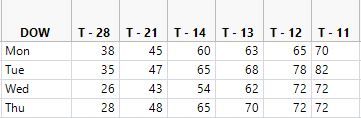
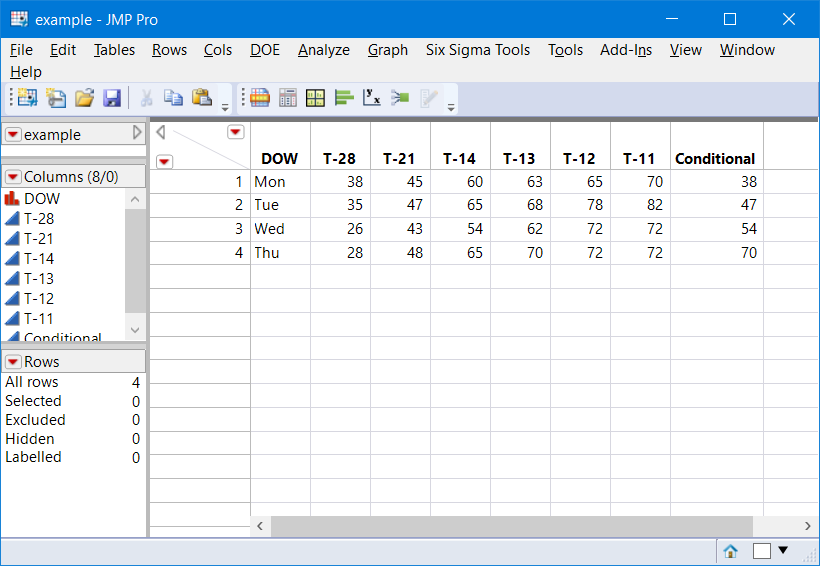
I am working with data that looks like this. I want to create an IF statement in a new column, saying that if the DOW (Day of week) is Mon, it should input the value in Column "T-28", if Tue, then input the value in "T-12" etc etc. How do i do this?
IF(DOW=="Mon",???)
Accepted Solutions


- Mark as New
- Bookmark
- Subscribe
- Mute
- Subscribe to RSS Feed
- Get Direct Link
- Report Inappropriate Content
Re: IF statements basic question
To make the column formula, you can use the if statement or the match statement; the match syntax is a little easier to read:
New Table( "example",
	New Column( "DOW", character, Set Values( {"Mon", "Tue", "Wed", "Thu"} ) ),
	New Column( "T-28", Set Values( [38, 35, 26, 28] ) ),
	New Column( "T-21", Set Values( [45, 47, 43, 48] ) ),
	New Column( "T-14", Set Values( [60, 65, 54, 65] ) ),
	New Column( "T-13", Set Values( [63, 68, 62, 70] ) ),
	New Column( "T-12", Set Values( [65, 78, 72, 72] ) ),
	New Column( "T-11", Set Values( [70, 82, 72, 72] ) ),
	New Column( "Conditional",
		Formula(
			Match( :DOW,
				"Mon", :Name( "T-28" ),
				"Tue", :Name( "T-21" ),
				"Wed", :Name( "T-14" ),
				"Thu", :Name( "T-13" ),
				-9999 // else...use . for missing value
			)
		)
	)
)
Because the column names contain hyphens (subtract) they need the name() wrapper.
With an if statement:
New Table( "example",
	New Column( "DOW", character, Set Values( {"Mon", "Tue", "Wed", "Thu"} ) ),
	New Column( "T-28", Set Values( [38, 35, 26, 28] ) ),
	New Column( "T-21", Set Values( [45, 47, 43, 48] ) ),
	New Column( "T-14", Set Values( [60, 65, 54, 65] ) ),
	New Column( "T-13", Set Values( [63, 68, 62, 70] ) ),
	New Column( "T-12", Set Values( [65, 78, 72, 72] ) ),
	New Column( "T-11", Set Values( [70, 82, 72, 72] ) ),
	New Column( "Conditional",
		Formula(
			if(
				:DOW=="Mon", :Name( "T-28" ),
				:DOW=="Tue", :Name( "T-21" ),
				:DOW=="Wed", :Name( "T-14" ),
				:DOW=="Thu", :Name( "T-13" ),
				-9999 // else...use . for missing value
			)
		)
	)
)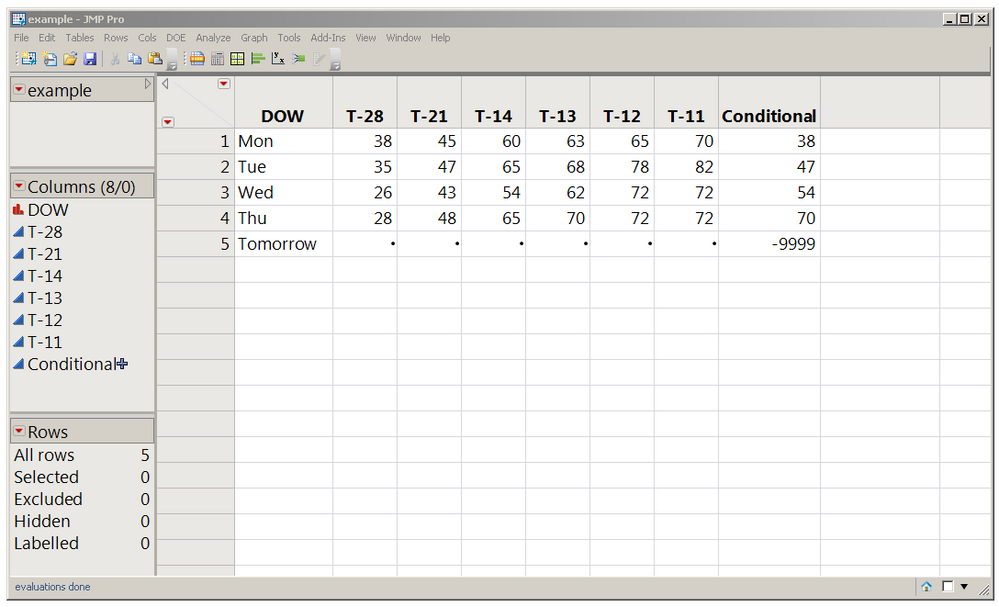
JMP would really rather use . for a missing value instead of -9999; I used that for this demo so the effect would be clear.
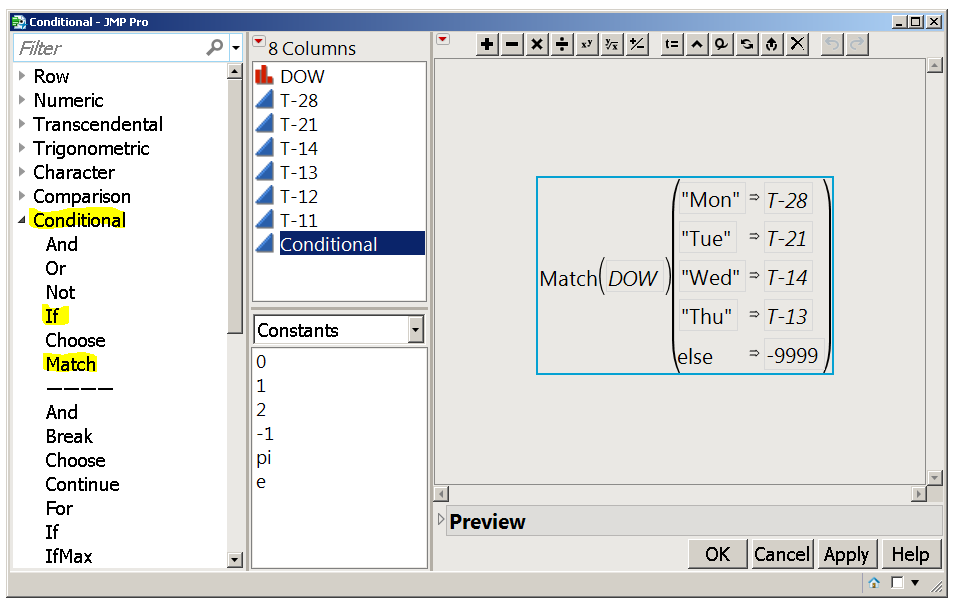
You can also use the Formula Editor instead of JSL; click on the + beside the Conditional column in the data table's left hand panel (above) to see the formula editor (below):
If Secrets blog post

- Mark as New
- Bookmark
- Subscribe
- Mute
- Subscribe to RSS Feed
- Get Direct Link
- Report Inappropriate Content
Re: IF statements basic question
@anjana,
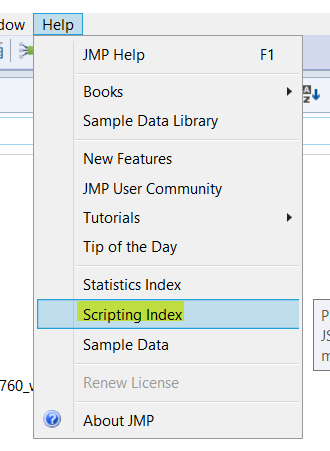
I would advice that you look here. This is a very helpful resource to understand how to use different functions in JMP
Here is an example, which says if x is the value that you are trying to assign to one of the columns, then if the value in column DOW = "Mon", assign the value of x to the column "T-28" , else assign it to column "T-12"
If(:DOW == "Mon", // then:Name("T-28") = x ;
,
// else
:Name(T-12) = x;
);
Uday


- Mark as New
- Bookmark
- Subscribe
- Mute
- Subscribe to RSS Feed
- Get Direct Link
- Report Inappropriate Content
Re: IF statements basic question
It is valuable to understand multiple functions. I like to use the power of lists, and prefer not to use functions in my tables, unless I attach a script to set a column's values.
Names Default To Here( 1 );
dt = New Table("example",
	New Column("DOW", character, values({"Mon", "Tue", "Wed", "Thu" }) ),
	NewColumn("T-28", numeric, values({38,35,26,28})),
	NewColumn("T-21", numeric, values({45, 47, 43, 48})),
	NewColumn("T-14", numeric, values({60, 65, 54, 65})),
	NewColumn("T-13", numeric, values({63, 68, 62, 70})),
	NewColumn("T-12", numeric, values({65, 78,72,72})),
	NewColumn("T-11", numeric, values({70,82,72,72}))
);

dt << newColumn("Conditional", numeric);


dowlist = {"Mon", "Tue", "Wed", "Thu", "Fri", "Sat"};
clist = {"T-28", "T-21", "T-14", "T-13", "T-12", "T-11"};
dt:Conditional << set each value( Column(dt,clist[Contains(dowlist, :DOW)])[] ) ;
- Mark as New
- Bookmark
- Subscribe
- Mute
- Subscribe to RSS Feed
- Get Direct Link
- Report Inappropriate Content
Re: IF statements basic question
To make the column formula, you can use the if statement or the match statement; the match syntax is a little easier to read:
New Table( "example",
	New Column( "DOW", character, Set Values( {"Mon", "Tue", "Wed", "Thu"} ) ),
	New Column( "T-28", Set Values( [38, 35, 26, 28] ) ),
	New Column( "T-21", Set Values( [45, 47, 43, 48] ) ),
	New Column( "T-14", Set Values( [60, 65, 54, 65] ) ),
	New Column( "T-13", Set Values( [63, 68, 62, 70] ) ),
	New Column( "T-12", Set Values( [65, 78, 72, 72] ) ),
	New Column( "T-11", Set Values( [70, 82, 72, 72] ) ),
	New Column( "Conditional",
		Formula(
			Match( :DOW,
				"Mon", :Name( "T-28" ),
				"Tue", :Name( "T-21" ),
				"Wed", :Name( "T-14" ),
				"Thu", :Name( "T-13" ),
				-9999 // else...use . for missing value
			)
		)
	)
)
Because the column names contain hyphens (subtract) they need the name() wrapper.
With an if statement:
New Table( "example",
	New Column( "DOW", character, Set Values( {"Mon", "Tue", "Wed", "Thu"} ) ),
	New Column( "T-28", Set Values( [38, 35, 26, 28] ) ),
	New Column( "T-21", Set Values( [45, 47, 43, 48] ) ),
	New Column( "T-14", Set Values( [60, 65, 54, 65] ) ),
	New Column( "T-13", Set Values( [63, 68, 62, 70] ) ),
	New Column( "T-12", Set Values( [65, 78, 72, 72] ) ),
	New Column( "T-11", Set Values( [70, 82, 72, 72] ) ),
	New Column( "Conditional",
		Formula(
			if(
				:DOW=="Mon", :Name( "T-28" ),
				:DOW=="Tue", :Name( "T-21" ),
				:DOW=="Wed", :Name( "T-14" ),
				:DOW=="Thu", :Name( "T-13" ),
				-9999 // else...use . for missing value
			)
		)
	)
)
JMP would really rather use . for a missing value instead of -9999; I used that for this demo so the effect would be clear.
You can also use the Formula Editor instead of JSL; click on the + beside the Conditional column in the data table's left hand panel (above) to see the formula editor (below):
If Secrets blog post
Recommended Articles
- © 2026 JMP Statistical Discovery LLC. All Rights Reserved.
- Terms of Use
- Privacy Statement
- Contact Us